model name1[MZ-R70] model name2[MZ------]
[3-232-169-11(2)]
masterpage:Right
filename[K:\595_sony\59501001\Cmd_j6\01GB03MAN.fm]
11
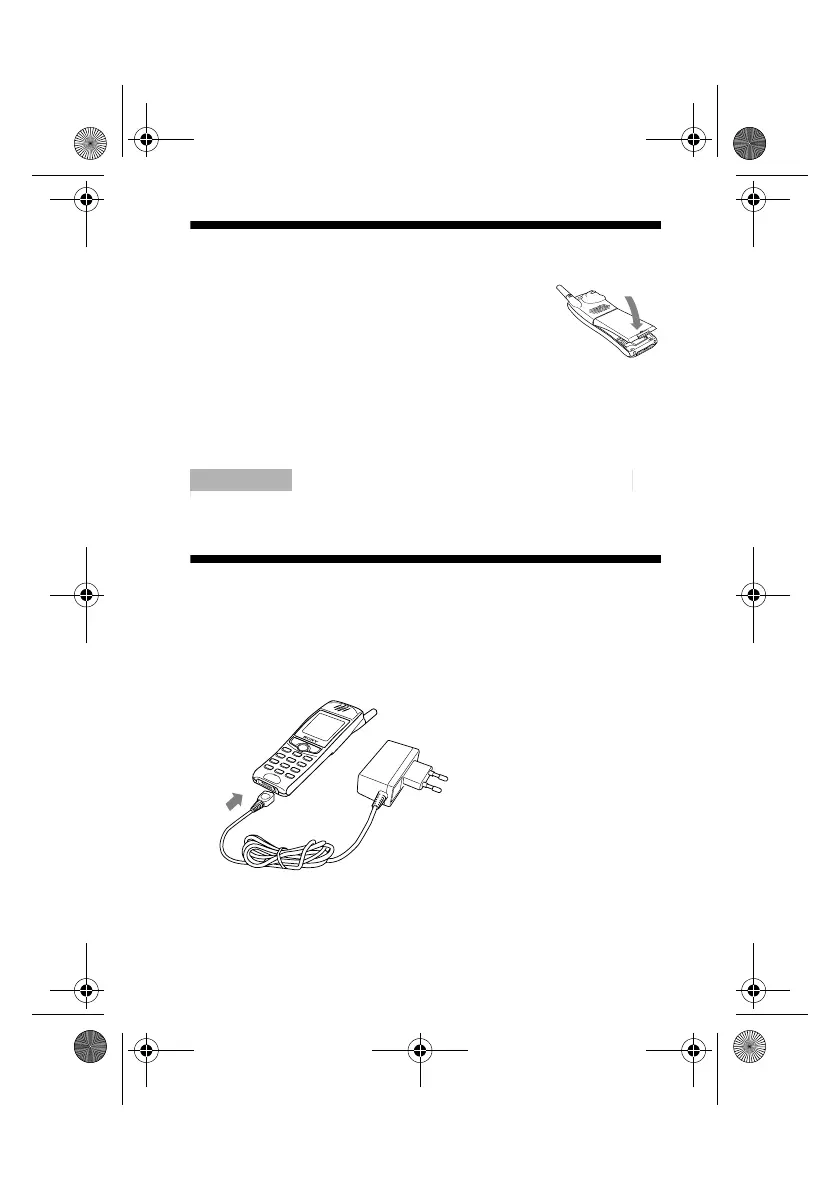
Inserting the Battery Pack
1 Unwrap the battery pack.
2 Press the battery pack firmly into place and
check that it snaps closed.
To remove the battery pack
First power off and wait until the display goes blank. Press the
battery release hook up and remove the battery.
ImportantImportantImportantImportantImportant
If you insert a new battery, please reset the clock.
Charging the Battery Pack
As supplied, your battery pack will not be fully charged.
1 Plug the charger into a mains socket
2 Plug the charger into the bottom (jack) of the phone.
01GB.book Page 11 Friday, April 27, 2001 1:08 PM



 To Next Page