9
GB
Getting started
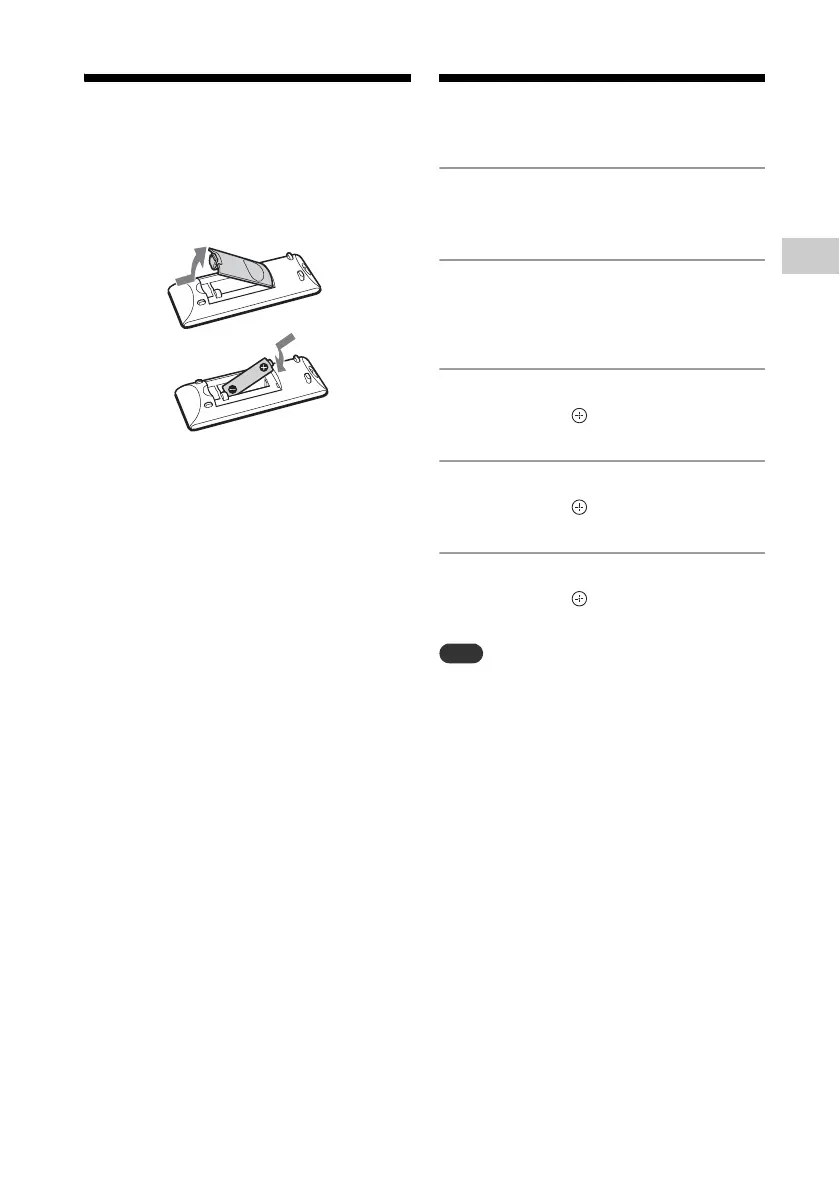
Preparing the
Remote
Insert an R6 (size AA) battery (not supplied),
matching the polarities as shown below.
Notes on using the remote
With normal use, the battery should last for
about six months.
If you do not use the remote for a long period of
time, remove the battery to avoid damage from
battery leakage and corrosion.
Setting the clock
1
Press / to turn on the
system.
2
Press TIMER MENU .
If setting the clock for the first time,
proceed to step 4.
3
Press / to select “CLOCK,”
then press .
4
Press / to set the hour,
then press .
5
Press / to set the minutes,
then press .
Complete the clock setting.
The clock settings are reset when you
disconnect the power cord or if a power failure
occurs.
To display the clock when the
system is off
Press DISPLAY to display the clock. The
clock is displayed for about 8 seconds.



 To Next Page