15
Getting started
GB
Step 2: Turning the power on, and setting the
date and time
1
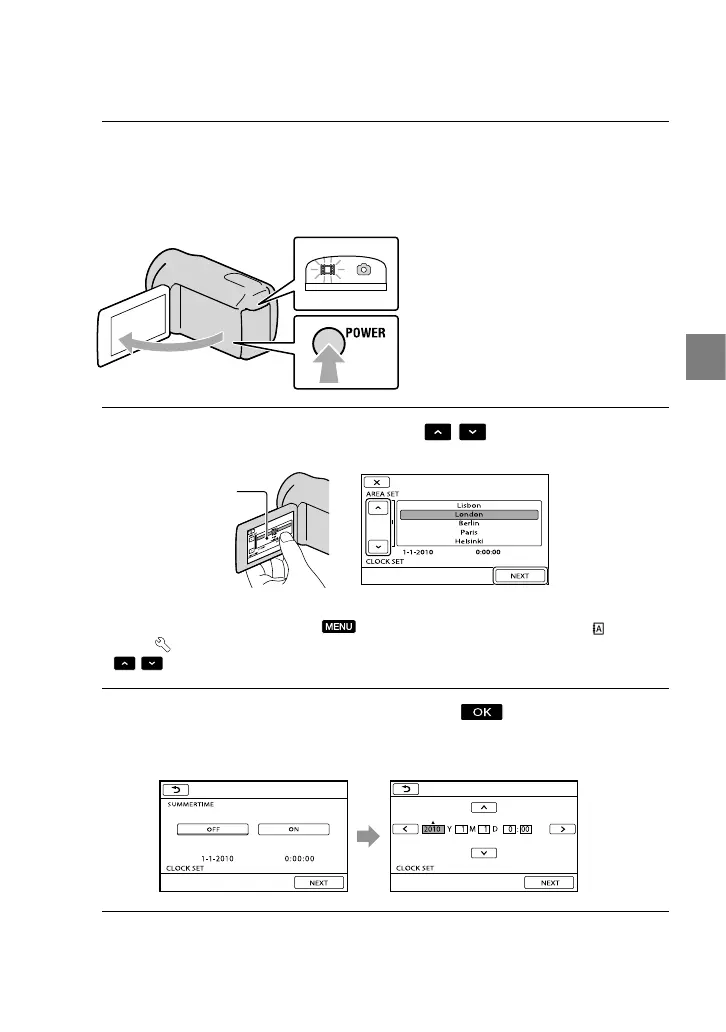
Open the LCD screen of your camcorder.
Your camcorder is turned on.
To turn on your camcorder when the LCD screen is open, press POWER.
2
Select the desired geographical area with
/ , then touch [NEXT].
To set the date and time again, touch (MENU) [Show others] [CLOCK/ LANG]
(under
[GENERAL SET] category) [CLOCK SET]. When an item is not on the screen, touch
/ until the item appears.
3
Set [SUMMERTIME], date and time, then touch
.
The clock starts.
If you set [SUMMERTIME] to [ON], the clock advances 1 hour.
MODE lamp
POWER button
Touch the button on the
LCD screen









 To Next Page