Recording/Playback
21
GB
Recording/Playback
Recording
In the default setting, movies are recorded with high definition image quality (HD) on the
following media.
HDR-CX110E/CX115E: Memory card
HDR-CX116E/CX150E/CX155E: Internal memory
HDR-XR150E/XR155E: Internal hard disk
Tips
To change the recording media, see page 17 (HDR-CX116E/CX150E/CX155E/XR150E/XR155E).
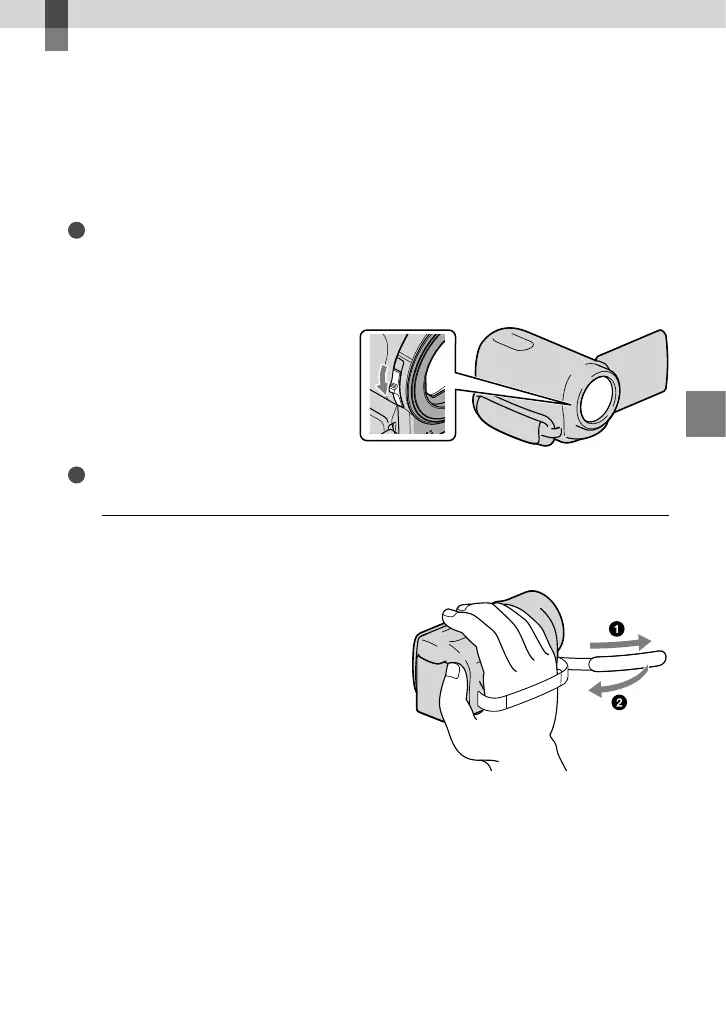
To open the lens cover
Slide the LENS COVER switch to open.
Tips
When you finish recording or when you play back images, close the lens cover.
1
Fasten the grip belt.
HDR-CX110E/CX115E/CX116E/CX150E/CX155E






 To Next Page