83
Customizing your camcorder
GB
OFF
Data code is not displayed.
DATE/TIME
Displays the date and time.
CAMERA DATA
Displays camera setting data.
COORDINATES*
Displays coordinates.
* HDR-CX550VE/XR550VE
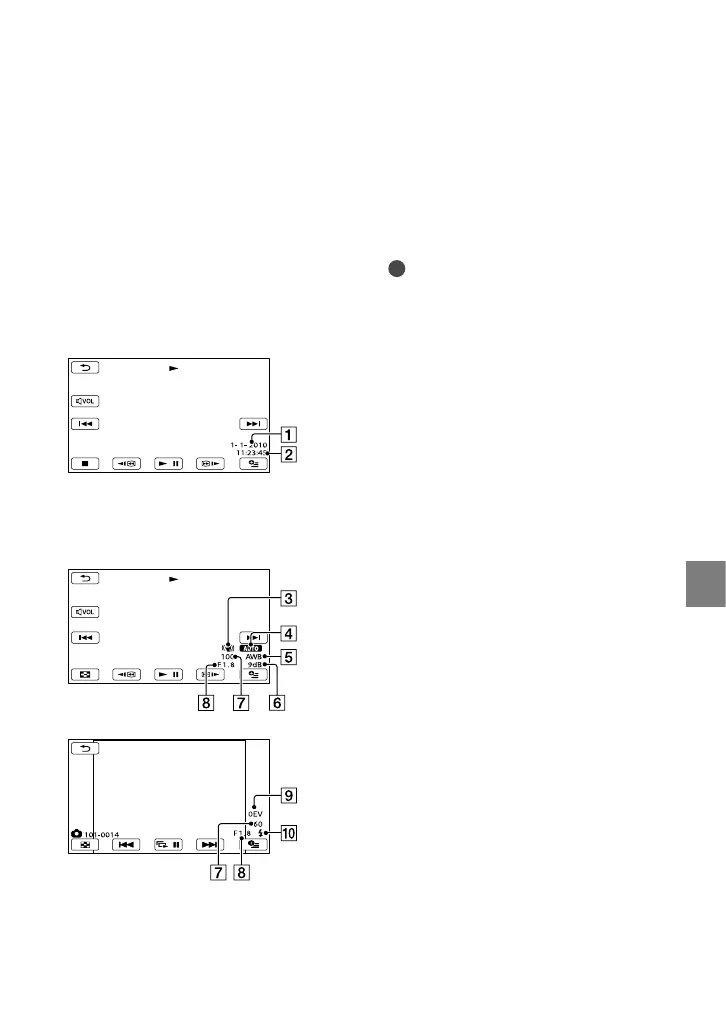
DATE/TIME
Date
Time
CAMERA DATA
SteadyShot off
Brightness
White balance
Gain
Shutter speed
Aperture value
Exposure
Flash
COORDINATES (HDR-CX550VE/
XR550VE)
See page 55.
Tips
The data code is displayed on the TV screen if
you connect your camcorder to a TV.
The indicator toggles through the following
sequences as you press DATA CODE
on the Wireless Remote Commander:
[DATE/TIME] [CAMERA DATA]
[COORDINATES](HDR-CX550VE/XR550VE)
[OFF] (no indication).
Depending on the recording media condition,
bars [--:--:--] appear.
Movie
Photo



 To Next Page