EasyManua.ls Logo

Sony D-32 - Maintenance; Cleaning the Lens; Notes on Compact Discs

Sony D-32
9 pages
Print Icon
To Next Page IconTo Next Page
To Previous Page IconTo Previous Page
Loading...
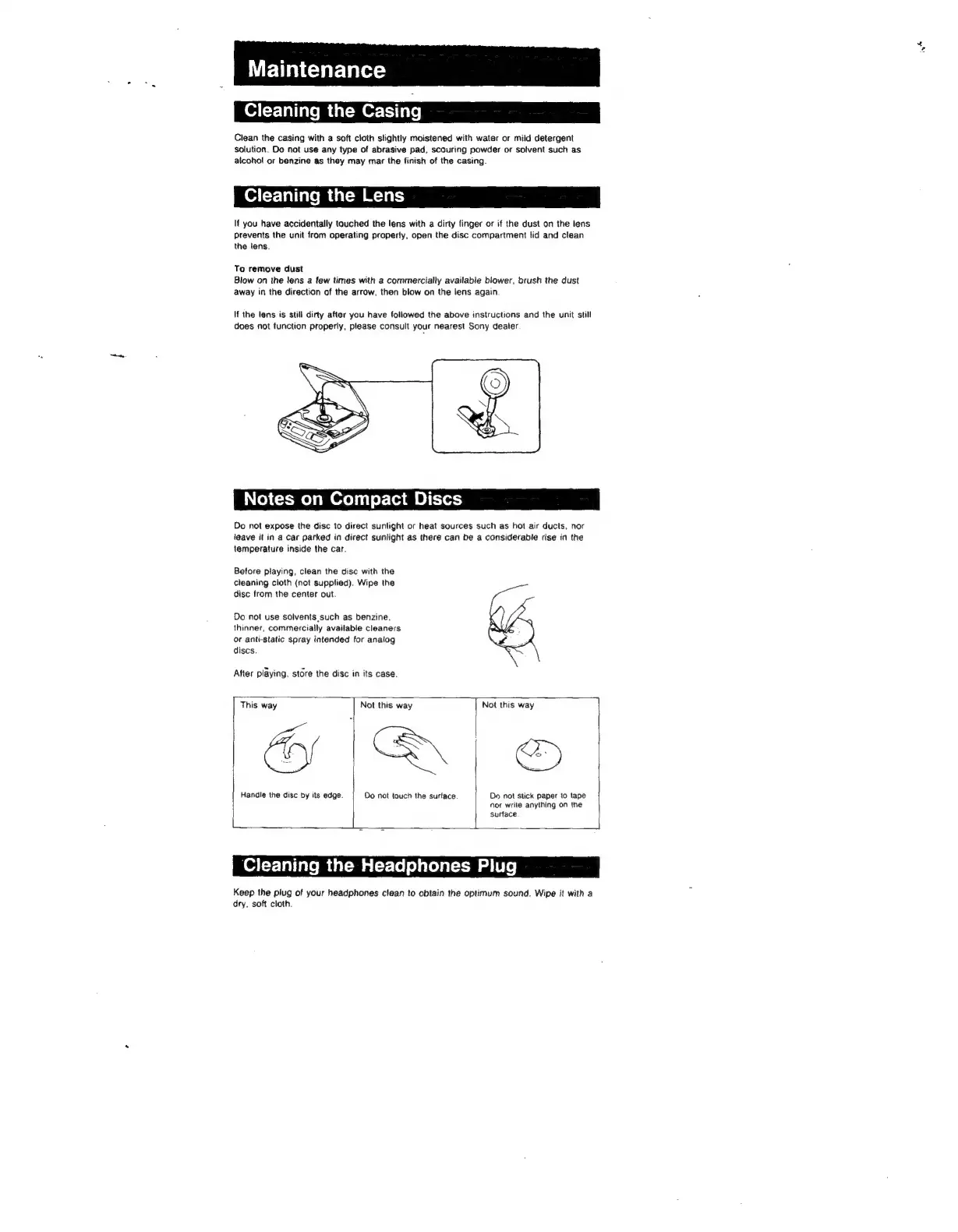
Maintenance
Cleaning
the
Casing
Clean
the
casing
with a
soft
cloth
slightly
moistened
with
water
or
mild
detergent
solution.
Do
not
use
any
type
of
abrasive pad,
scouring
powder
or
solvent
such
as
alcohol
or
benzine
as
they
may
mar
the
finish
of
the
casing.
Cleaning
the
Lens
If
you
have
accidentally
touched
the
lens
with
a
dirty
finger
or
if
the
dust
on
the
lens
Prevents
the
unit
from
operating
properly,
open
the
disc
compartment
lid
and
clean
the
lens.
To
remove
dust
Blow
on
the
lens
a
few
times
with
a
commercially
available
blower,
brush
the
dust
away
in
the
direction
of
the
arrow,
then
blow
on
the
lens
again
If
the
lens
is
still
dirty
after
you
have
followed
the
above
instructions
and
the
unit
still
does
not
function
properly,
please
consult
your
nearest
Sony
dealer
Notes
on
Compact
Discs
Do
not
expose
the
disc
to
direct
sunlight
or
heat
sources
such
as
hot
air
ducts,
nor
leave
it
in
a
car
parked
in
direct
sunlight
as
there
can
be
a
considerable
rise
in
the
temperature
inside
the
car.
Before
playing,
clean
the
disc
with
the
cleaning
cloth
(not
supplied).
Wipe
the
disc
from
the
center
out.
Do
not
use
solvents
such
as
benzine,
thinner,
commercially
available
cleaners
or
anti-static
spray
intended
for
analog
discs.
After
playing,
store
the
disc
in
its
case.
This
way
Not
this
way
Not
this
way
|
Handle
the
disc
by
its
edge.
Do
not
touch
the
surtace
Oo
not
stick
paper
to
tape
nor
write
anything
on
the
surface
Cleaning
the
Headphones
Plug
Keep
the
plug
of
your
headphones
clean
to
obtain
the
optimum
sound.
Wipe
it
with
a
dry,
soft
cloth.

Related product manuals