EasyManua.ls Logo

Sony D-32 - Page 9

Sony D-32
9 pages
Print Icon
To Previous Page IconTo Previous Page

Loading...
BR
colle)
(-tlaleleldiare
meieice(-1
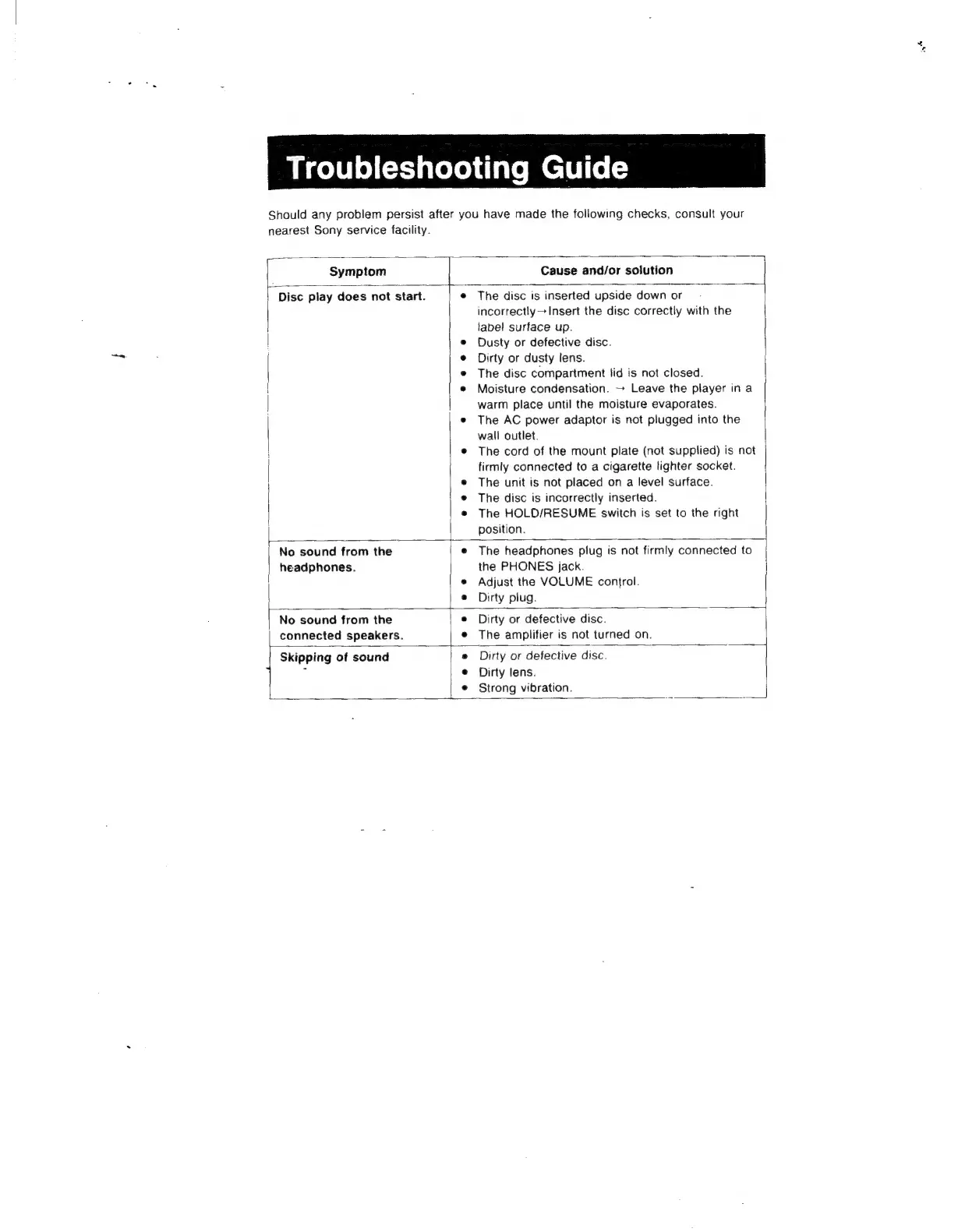
Should
any
problem
persist
after
you
have
made
the
following
checks,
consult
your
nearest
Sony
service
facility.
Symptom
Cause
and/or
solution
Disc
play
does
not
start.
The
disc
is
inserted
upside
down
or
incorrectly
>
Insert
the
disc
correctly
with
the
label
surface
up.
Dusty
or
defective
disc.
Dirty
or
dusty
lens.
The
disc
compartment
lid
is
not
closed.
Moisture
condensation.
~
Leave
the
player
in
a
warm
place
until
the
moisture
evaporates.
The
AC
power
adaptor
is
not
plugged
into
the
wall
outlet.
The
cord
of
the
mount
plate
(not
supplied)
is
not
firmly
connected
to
a
cigarette
lighter
socket.
The
unit
is
not
placed
on
a
level
surface.
The
disc
is
incorrectly
inserted.
The
HOLD/RESUME
switch
is
set
to
the
right
position.
No
sound
from
the
headphones.
The
headphones
plug
is
not
firmly
connected
to
the
PHONES
jack.
Adjust
the
VOLUME
confrol.
Dirty
plug.
No
sound
from
the
connected
speakers.
Dirty
or
defective
disc.
The
amplifier
is
not
turned
on.
Skipping
of
sound
Dirty
or
defective
disc.
Dirty
lens.
Strong
vibration.

Related product manuals