Advanced Settings and Adjustments
67
GB
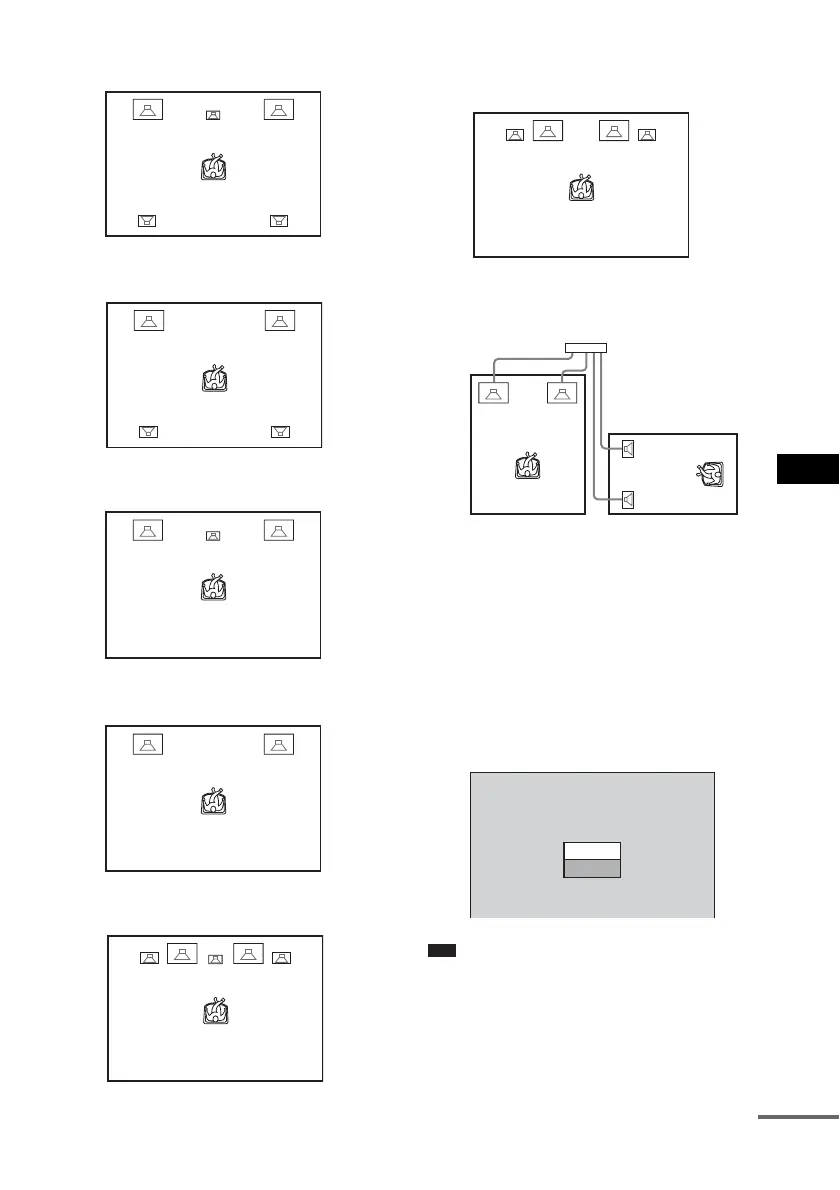
• [STANDARD]: when installing all the
speakers normally.
• [NO CENTER]: when installing the front
and surround speakers.
• [NO SURROUND]: when installing the
center and front speakers.
• [FRONT ONLY]: when installing the
front speakers.
• [ALL FRONT]: when installing all the
speakers in front of the listening position.
• [ALL FRONT - NO CENTER]: when
installing the front and surround speakers
in front of the listening position.
• [SECOND ROOM]: when installing the
front speakers in one room and surround
speakers in another.
6 Press ENTER.
The selected setting takes effect.
7 Press X/x to select [YES] or [NO], then
press ENTER.
• [YES]: continue with [AUTO
CALIBRATION], see Step 5 of
“Calibrating the Appropriate Settings
Automatically” (page 68).
• [NO]: exit [SPEAKER FORMATION].
Note
• In order to enjoy the surround sound after you change
the position of the speakers, it is recommended you
set [SPEAKER FORMATION], and then set [AUTO
CALIBRATION].
• To set [AUTO CALIBRATION], you need to
connect the supplied calibration mic.
Continue with AUTO CALIBRATION?
YES
SPEAKER FORMATION
NO
continued



 To Next Page