52
GB
x [TV TYPE]
You can select the aspect ratio of the connected
TV.
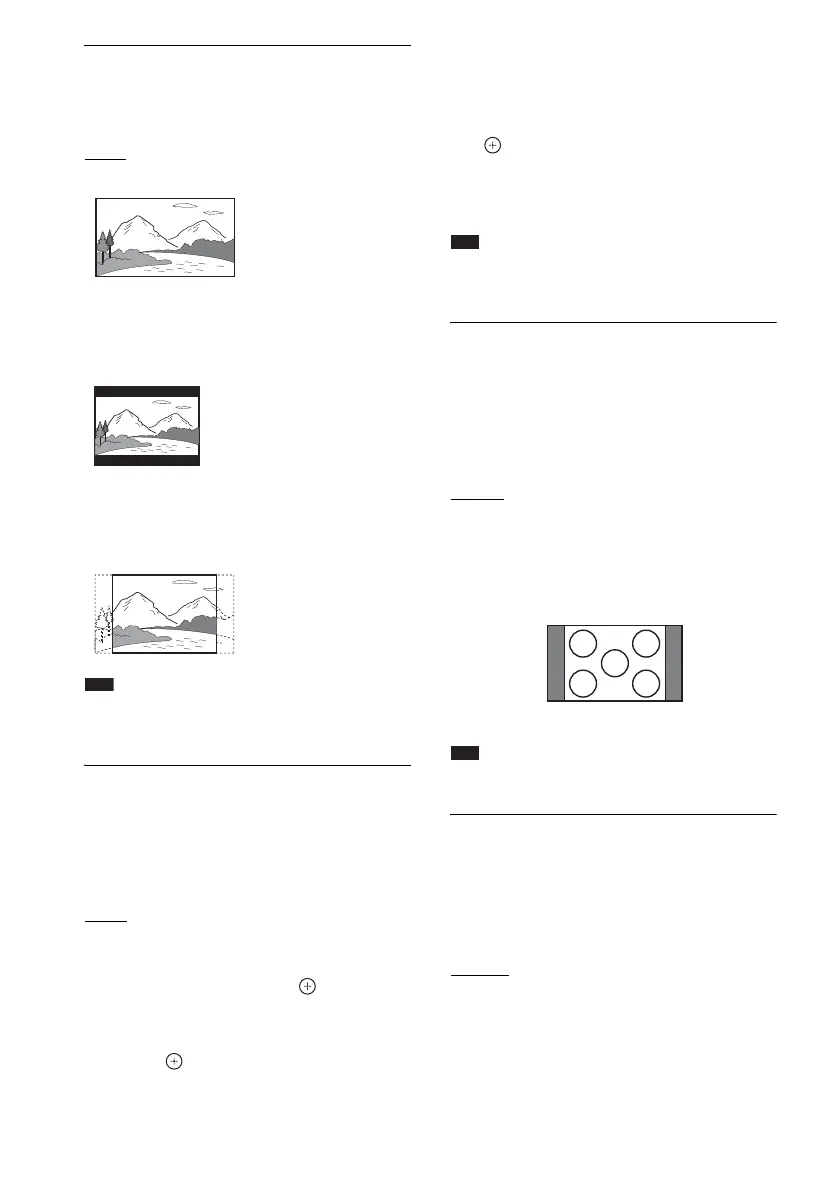
[16:9]
: Select this when you connect a wide-
screen TV or a TV with a wide mode function.
[4:3 LETTER BOX]: Select this when you
connect a 4:3 standard TV. The system displays
a wide picture with bands on the upper and
lower portions of the TV screen.
[4:3 PAN SCAN]: Select this when you connect
a 4:3 standard TV. The system automatically
displays a wide picture on the entire screen and
cuts off the portions that do not fit.
Note
• Depending on the DVD, [4:3 LETTER BOX] may be
selected automatically instead of [4:3 PAN SCAN] or
vice versa.
x [PROGRESSIVE (COMPONENT OUT)]
You can set the progressive signal that is output
from the COMPONENT VIDEO OUT jacks to
on/off. For details, see “Does your TV accept
progressive signals?” (page 27).
[OFF]
: The system outputs interlace signals.
[ON]: The system outputs progressive signals.
When you select [ON], follow the Steps below.
1 Select [ON], then press .
The confirmation display appears.
2 Press C/c to select [START], then
press .
The system outputs a progressive signal for
5 seconds. Check that the screen is
displayed correctly.
3 Press C/c to select [YES], then press
.
The system outputs a progressive signal. If
you select [NO], the system will not output
a progressive signal.
Note
• [PROGRESSIVE (COMPONENT OUT)] is
effective only when you connect the unit and TV with
a component video cable (page 18).
x [4:3 OUTPUT]
When you use a 16:9 aspect ratio TV, you can
adjust the aspect ratio to watch 4:3 aspect ratio
signals. If you can change the aspect ratio on
your TV, change the setting on your TV, not the
system.
[FULL]: Select this when you can change the
aspect ratio on your TV.
[NORMAL]: Select this when you cannot
change the aspect ratio on your TV. A 16:9
aspect ratio signal with black bands on left and
right sides of the image appears.
Note
• [4:3 OUTPUT] is effective only when you set [TV
TYPE] in [VIDEO SETUP] to [16:9].
x [COLOR SYSTEM (VIDEO CD)]
(Asian, Australian, Middle Eastern, and
South African models only)
You can select the color system when you play a
VIDEO CD.
[AUTO]
: The system outputs the disc’s video
signal, either PAL or NTSC. If your TV uses a
DUAL system, select [AUTO].
[PAL]: The system changes the video signal of
an NTSC disc and outputs it in the PAL system.
[NTSC]: The system changes the video signal of
a PAL disc and outputs it in the NTSC system.
16:9 aspect ratio TV



 To Next Page