21
GB
Getting Started
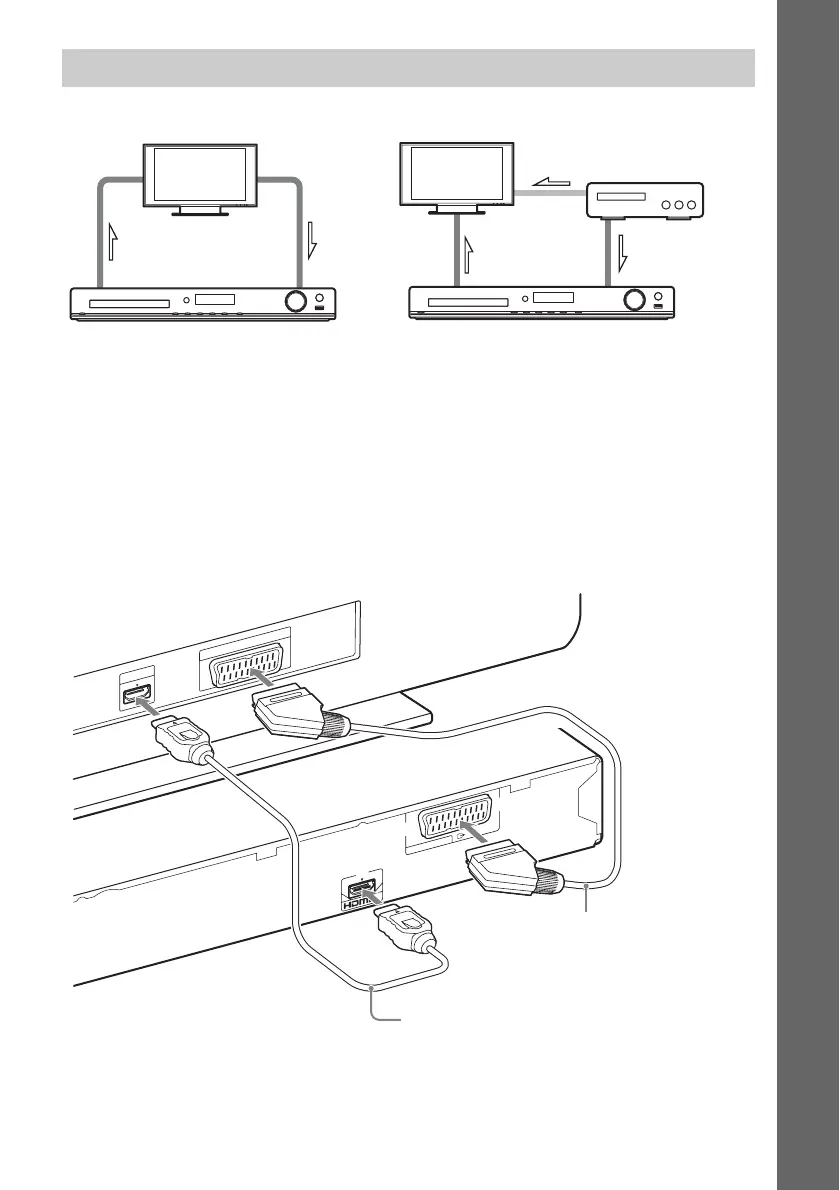
1 Connecting the video to your TV
Depending on the jacks on your TV, select one of the connection methods.
x Method 1: SCART (EURO AV) cable (not supplied) connection
This is the basic connection and sends both video and audio signals (analog stereo).
x Method 2: HDMI cable (not supplied) connection
Picture quality will be improved compared to Method 1.
If your TV is compatible with the Audio Return Channel function, this connection also sends a digital
audio signal from the TV. You do not need to make a separate audio connection for listening to TV
sound. For details of the Audio Return Channel function, see “Receiving the digital audio signal of your
TV” (page 43).
Connecting your TV/set-top box
When connecting to a TV only
1 Video
2 Audio
1 Video
2 Audio
When connecting to a TV and set-top box
Video
HD
M
I IN
EUR
O
AV
O
U
T
A
R
C
EURO AV
O
U
T
P
U
T
(T
O
T
V
)
Method 2
(not supplied)
Method 1
(not supplied)



 To Next Page