Playback
33
GB
2 Press C/X/x/c to select the item you
want to play or change, then press .
You can also select the number by pressing
the number buttons while holding down
SHIFT.
To display the DVD’s menu on the
Control Menu
1 Press DISPLAY.
2 Press X/x to select [DISC
MENU], then press .
3 Press X/x to select [MENU] or [TOP
MENU], then press .
This function is only available for DVD-VRs
with a playlist created.
1 Press DISPLAY while the system is
in stop mode.
2 Press X/x to select [ORIGINAL/
PLAY LIST], then press .
3 Press X/x to select a setting, then
press .
• [PLAY LIST]: You can play the titles in
the order of the existing playlist.
• [ORIGINAL]: You can play the titles as
they were originally recorded.
Selecting the Playback
Mode
You can play the contents of a disc in the order
you want by arranging the order of the tracks on
the disc to create your own program. You can
program up to 99 tracks.
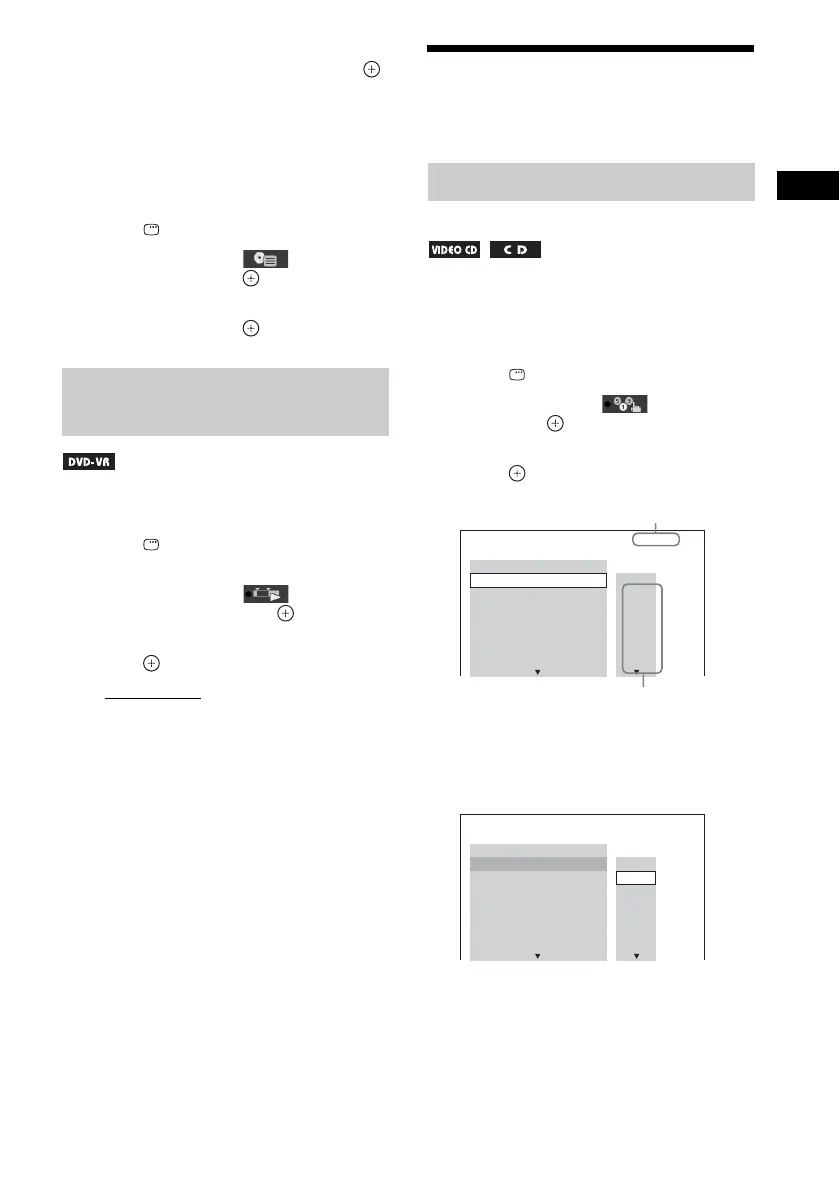
1 Press DISPLAY.
2 Press X/x to select [PROGRAM],
then press .
3 Press X/x to select [SET t], then
press .
4 Press c.
The cursor moves to the track row [T] (in
this case, [01]).
Selecting an original title or
edited title on a DVD-VR
Playing in programmed order
(Program Play)
PROGRAM 0: 00:00
T
1. TRACK
– – – –
01
02
03
04
05
06
– –
– –
– –
– –
– –
– –
ALL CLEAR
2. TRACK
3. TRACK
7. TRACK
6. TRACK
5. TRACK
4. TRACK
Tracks recorded on a disc
Total time of the programmed tracks
PROGRAM 0: 00:00
T
2. TRACK
1. TRACK
– – – –
01
02
03
04
05
06
– –
– –
– –
– –
– –
– –
ALL CLEAR
3. TRACK
7. TRACK
6. TRACK
5. TRACK
4. TRACK



 To Next Page