22
GB
Getting Started
Step 2: Connecting the System
For connecting the system, read the information on the following pages.
Do not connect the AC power cord (mains lead) of the unit to a wall outlet (mains) until all the other
connections are made.
Note
• When you connect another component with a volume control, turn down the volume of the other components to a
level where sound is not distorted.
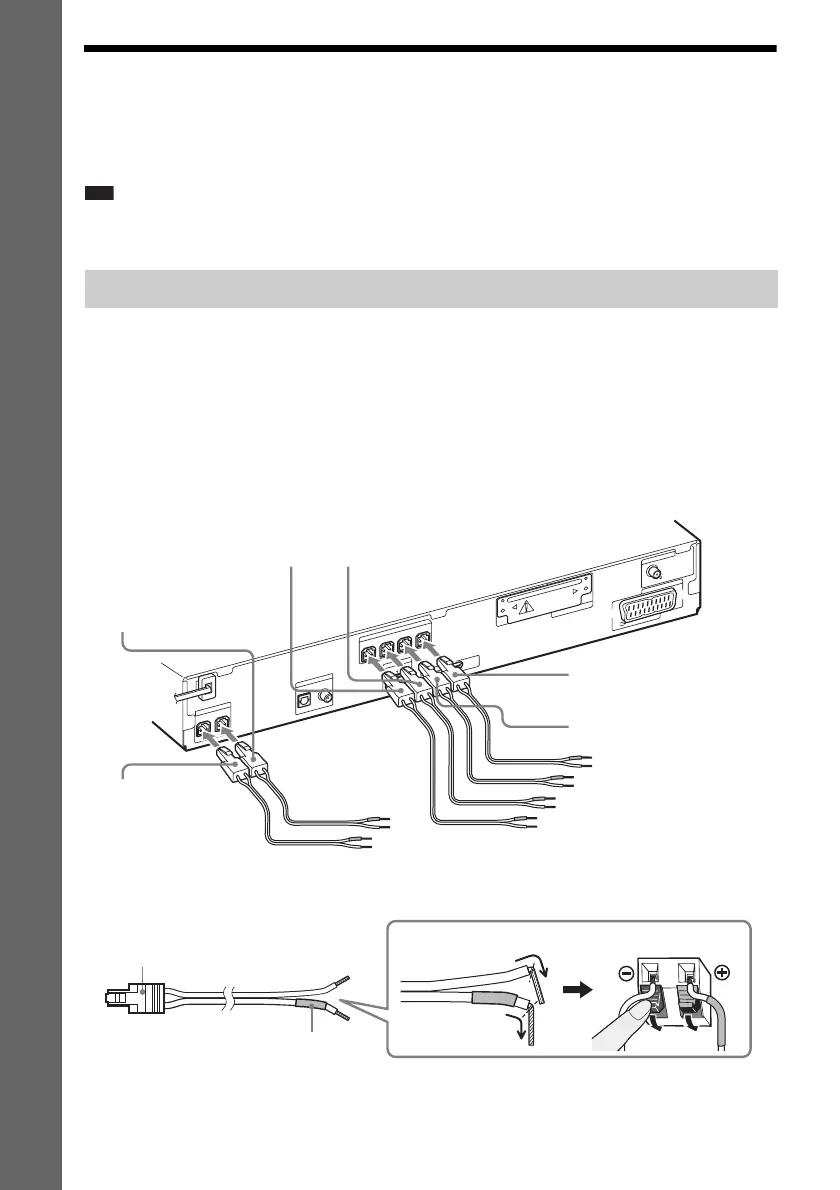
The connector of the speaker cords and the color tube are color-coded depending on the type of speaker.
Connect the speaker cords to match the color of the SPEAKER jacks of the unit.
Be sure to match the speaker cords to the appropriate terminals on the speakers: the speaker cord with
the color tube to 3, and the speaker cord without the color tube to #. Do not catch the speaker cord
insulation (rubber covering) in the speaker terminals.
To connect speaker cords to the unit
When connecting to the unit, insert the connector until it clicks.
To connect speaker cords to the speaker
Connecting the speakers
CENTER
S
U
B
W
O
O
F
E
R
H
D
M
I O
U
T
S
P
E
A
K
E
R
COAXIAL 75
FM
A
N
T
E
N
N
A
D
M
P
O
R
T
DC5V
0.7A MAX
DIGITAL IN
COAXIAL
OPTICAL
T
V
E
U
R
O
A
V
O
U
TPUT(TO
TV
)
FRONT R FRONT L SUR R SUR L
S
P
E
A
K
E
R
EZW-T100
Green
(Center speaker)
Purple
(Subwoofer)
White
(Front left speaker (L))
Red
(Front right speaker (R))
Gray
(Surround right speaker (R))
Blue
(Surround left speaker (L))
Color tube
(+)
(–)
Connector
Rear of the speaker



 To Next Page