24
GB
Getting Started
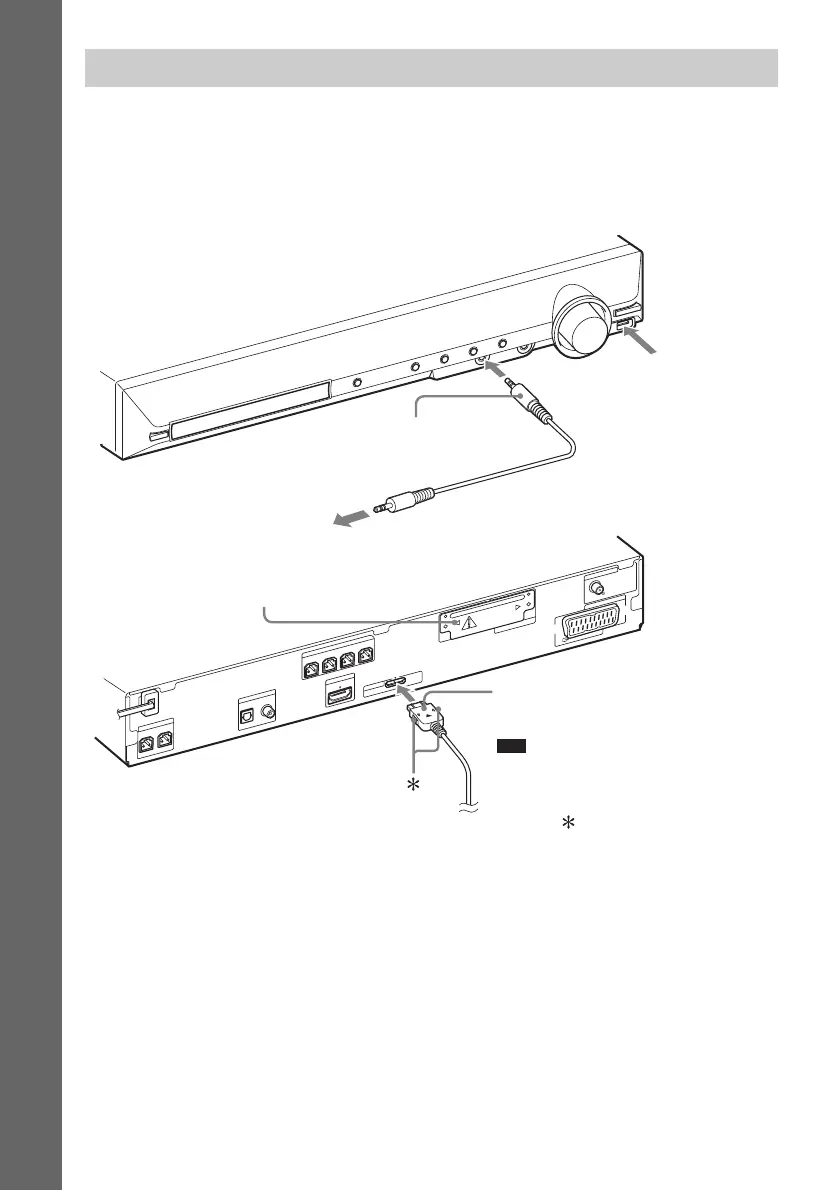
You can enjoy connected components via the system’s speakers.
Portable audio source (not supplied): E
USB device (not supplied): F
DIGITAL MEDIA PORT adapter: G (TDM-iP20 is supplied with United Kingdom models. You can
also use other DIGITAL MEDIA PORT adapters.)
Wireless system options
By using an S-AIR product (not supplied), you can enjoy wireless performance by transmission from
the system. For details, see “Using an S-AIR Product” (page 80) or refer to the operating instructions
of the S-AIR product.
Connecting the other components
CENTER
S
U
B
W
O
O
F
E
R
H
D
M
I O
U
T
S
P
E
A
K
E
R
COAXIAL 75
FM
A
N
T
E
N
N
A
D
M
P
O
R
T
DC5V
0.7A MAX
DIGITAL IN
COAXIAL
OPTICAL
T
V
E
U
R
O
A
V
O
U
TPUT(TO
T
V)
FRONT R FRONT L
SUR R SUR L
S
P
E
A
K
E
R
EZW-T100
G DIGITAL MEDIA PORT adapter
(page 79)
To a portable audio source
E Stereo mini-plug cord
(not supplied)
Note
• Connect the DIGITAL MEDIA PORT
adapter so that the V marks are aligned.
When disconnecting, pull out while
pressing .
EZW-T100 slot (See “Wireless
system options”.)
F Connect a USB
device (page 67).



 To Next Page