28
GB
Getting Started
Step 3: Performing the
Quick Setup
Follow the Steps below to make the basic
adjustments for using the system.
Displayed items vary depending on the area.
1 Turn on the TV.
2 Press [/1.
Note
• Make sure that the function is set to “DVD”
(page 31).
3 Switch the input selector on your TV so
that the signal from the system
appears on the TV screen.
[Press [ENTER] to run QUICK SETUP.]
appears at the bottom of the TV screen. If
this message does not appear, recall the
Quick Setup display (page 30).
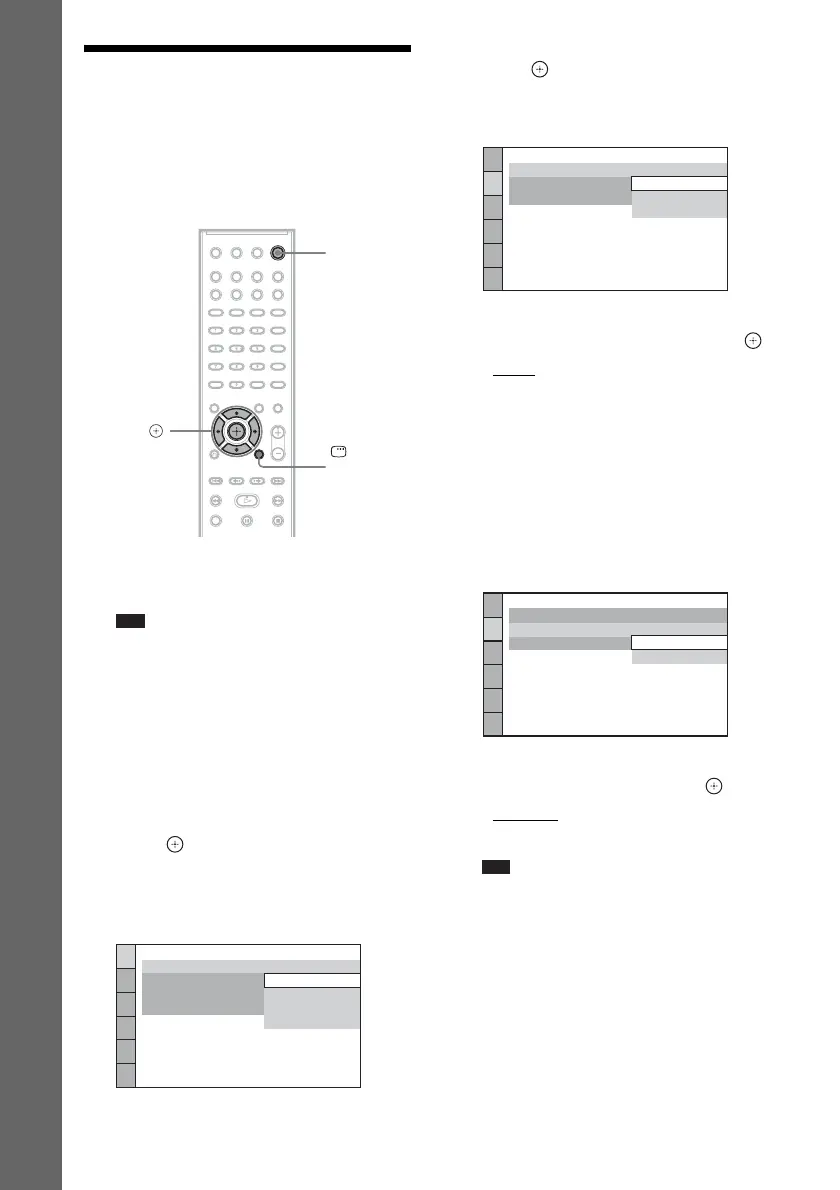
4 Press without inserting a disc.
The Setup Display for selecting the
language used in the on-screen display
appears.
5 Press X/x to select a language, then
press .
The Setup Display for selecting the aspect
ratio of the TV to be connected appears.
6 Press X/x to select the setting that
matches your TV type, then press .
• [16:9]: For a wide-screen TV or a 4:3
standard TV with a wide-screen mode
(page 55)
• [4:3 LETTER BOX] or [4:3 PAN SCAN]:
For a 4:3 standard TV (page 55)
The Setup Display for selecting the output
method for video signals from the EURO
AV T OUTPUT (TO TV) jack on the rear
panel of the unit appears.
7 Press X/x to select the output method
for video signals, then press .
• [VIDEO]: Outputs video signals.
• [RGB]: Outputs RGB signals.
Note
• If your TV does not accept RGB signals, no
picture appears on the TV screen even if you
select [RGB]. Refer to the operating instructions
supplied with your TV.
The Setup Display for the Control for
HDMI function appears.
"/1
DISPLAY
C/X/x/c,
LANGUAGE SETUP
MENU:
OSD:
AUDIO:
SUBTITLE:
ENGLISH
ENGLISH
FRENCH
SPANISH
PORTUGUESE
VIDEO SETUP
LINE:
TV TYPE:
PAUSE MODE:
16:9
16:9
4:3 LETTER BOX
4:3 PAN SCAN
VIDEO SETUP
LINE:
TV TYPE:
PAUSE MODE:
16:9
VIDEO
VIDEO
VIDEO
VIDEO
RGB



 To Next Page