23
GB
Getting Started
Depending on the jacks on your TV, select the connection method.
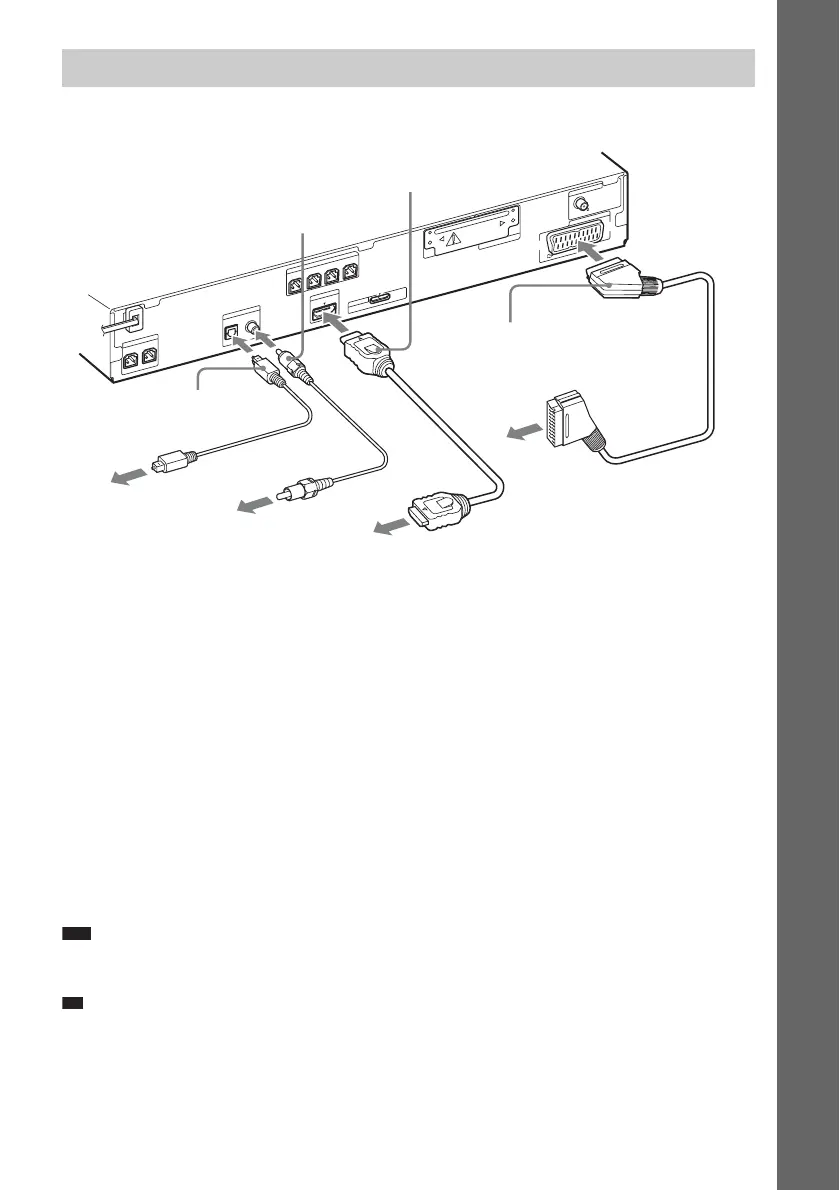
Method 1: SCART (EURO AV) cable (A) connection
This connection sends both video and audio signals.
Method 2: HDMI* cable (B) and SCART (EURO AV) cable (A) connection
If your TV has an HDMI jack, connect to the TV both with an HDMI cable and SCART (EURO AV)
cable. Picture quality will be improved compared to using only the SCART (EURO AV) connection.
When connecting with the HDMI cable, you need to select the type of output signal (page 30).
To view images from the DIGITAL MEDIA PORT adapter, you need to connect to the TV with the
SCART (EURO AV) cable. Video signals from the DIGITAL MEDIA PORT adapter are not output
via the HDMI OUT jack.
* HDMI (High-Definition Multimedia Interface)
Digital optical cord (C) or digital coaxial cord (D) connection
When the TV has a digital optical or coaxial output jack, you can improve sound quality by connecting
with a digital optical or coaxial cord in addition to the SCART (EURO AV) connection.
Note
• The system can accept both digital and analog signals. Digital signals have priority over analog signals. (COAXIAL
has priority over OPTICAL.) If the digital signal ceases, the analog signal will be processed after 2 seconds.
Ti
• When you connect the system and a TV with the “BRAVIA” Sync function via an HDMI cable, the “BRAVIA”
Sync function is enabled. In this case, set [CONTROL FOR HDMI] in [HDMI SETUP] to [ON] (page 55).
Connecting the TV
CENTER
S
U
B
W
O
O
F
E
R
H
D
M
I O
U
T
S
P
E
A
K
E
R
COAXIAL 75
FM
A
N
T
E
N
N
A
D
M
P
O
R
T
DC5V
0.7A MAX
DIGITAL IN
COAXIAL
OPTICAL
T
V
E
U
R
O
A
V
O
U
TPU
T
(TO
T
V
)
FRONT R FRONT L
SUR R
SUR L
S
P
E
A
K
E
R
EZW-T100
To the HDMI IN jack of the TV.
To the SCART (EURO AV)
jack of the TV.
A SCART (EURO AV) cable
(not supplied)
B HDMI cable (not
supplied)
C Digital optical cord (not
supplied)
To the digital optical
out jack of the TV.
To the digital coaxial
out jack of the TV.
D Digital coaxial cord (not
supplied)



 To Next Page