27
GB
Getting Started
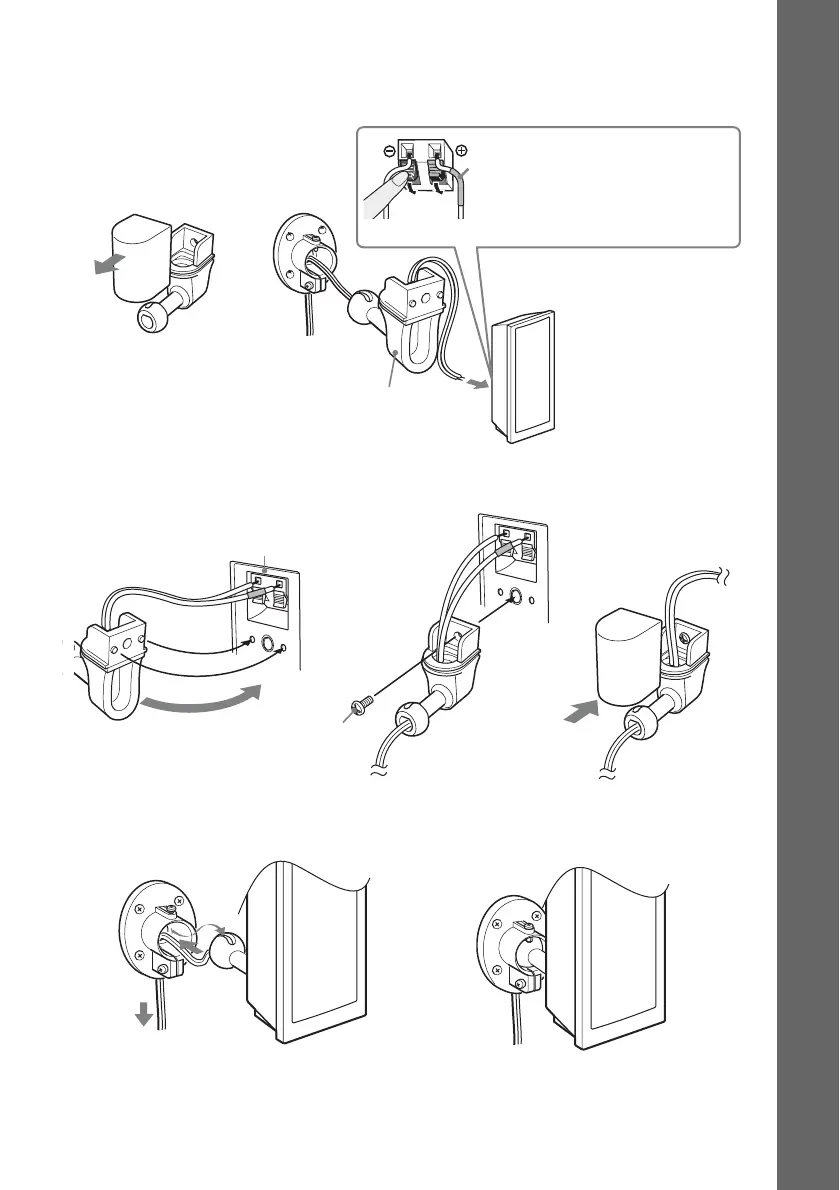
2 Remove the cover from the mounting bracket, pass the speaker cord through the hole
on the rear side of the mounting bracket and out from the front side of the bracket, then
connect the speaker cord to the speaker.
3 Tightly secure the speaker to the mounting bracket with the screw (supplied).
4 Adjust the length of the speaker cord as you bring the shaft knob together with the
mounting plate, then insert the knob firmly until it stops.
Mounting bracket
Color tube
Front left speaker (L): White
Front right speaker (R): Red
Surround left speaker (L): Blue
Surround right speaker (R): Gray
,
Rear of the speaker
,
,
Screw (supplied)
Speaker cord
,



 To Next Page