60
GB
(Language Follow)
When you change the language for the on-screen
display of your TV, the system’s on-screen
display language is also changed.
Note
• When the system’s on-screen display is displayed,
this function does not work.
Using an S-AIR Product
(DAV-DZ810 only)
When you purchase the S-AIR product, you
need to perform the following settings to
activate wireless transmission.
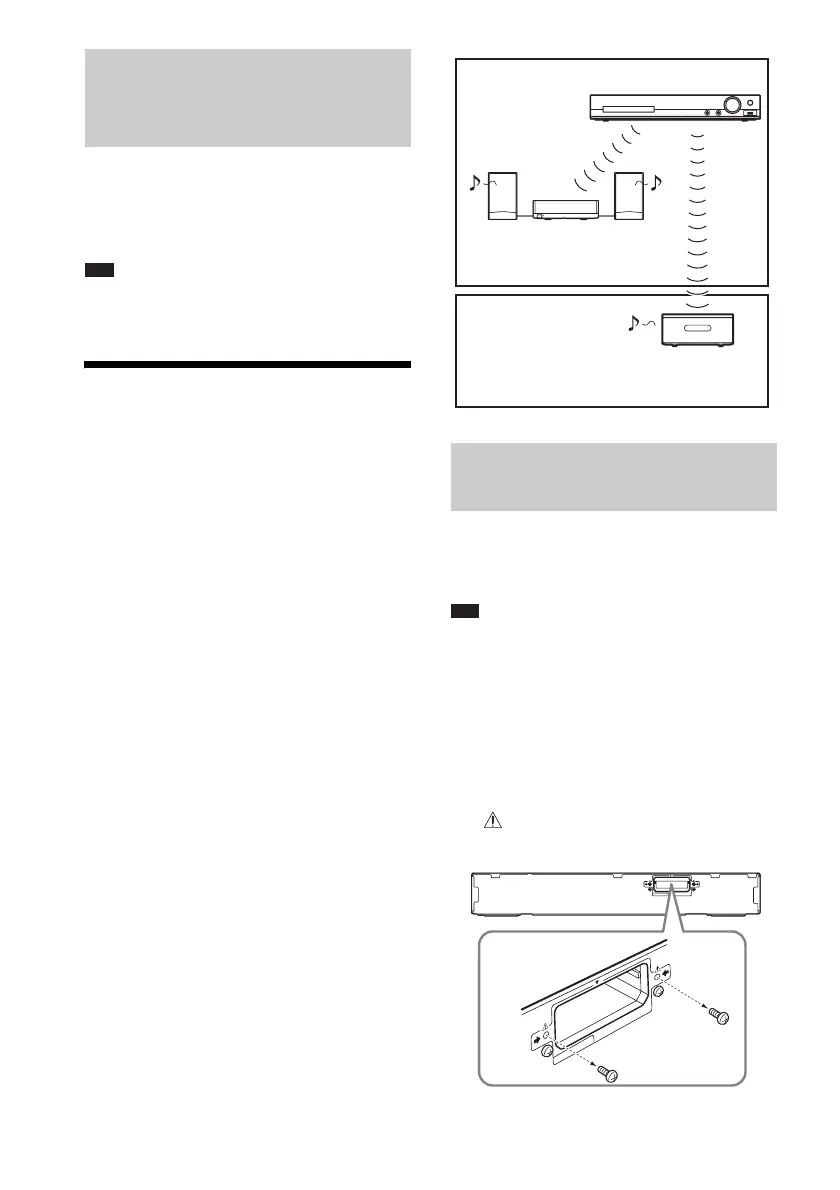
About S-AIR products
There are two types of S-AIR products.
• S-AIR main unit (this unit): This is for
transmitting sound. You can use up to three
S-AIR main units. (The number of usable
S-AIR main units depends on the use
environment.)
• S-AIR sub unit: This is for receiving sound.
– Surround amplifier (optional): You
can enjoy surround speaker sound
wirelessly.
– S-AIR receiver (optional): You can
enjoy system sound in another room.
To make use of the S-AIR function, you need to
insert the wireless transmitter into the unit and
the wireless transceiver into the S-AIR sub unit.
Note
• When you insert the wireless transmitter/transceiver,
make sure that the AC power cord (mains lead) is not
connected to a wall outlet (mains).
• Do not touch the terminals of the wireless transmitter/
transceiver.
To insert the wireless transmitter
into the unit
1 Remove the screws directly below the
mark.
Changing the language for the
system’s on-screen display in
sync with your TV
Inserting the wireless
transmitter/transceiver
S-AIR sub unit
(surround amplifier)
S-AIR main unit
S-AIR sub unit
(S-AIR receiver)
Room A
Room B
EZW-T100
EZW
-T100
Rear of the unit



 To Next Page