9
GB
Use the Control Menu to select a function that you’d like to use. The Control Menu display appears
when the DVD DISPLAY button is pressed. For details, refer to the page in parentheses.
List of Control Menu Items
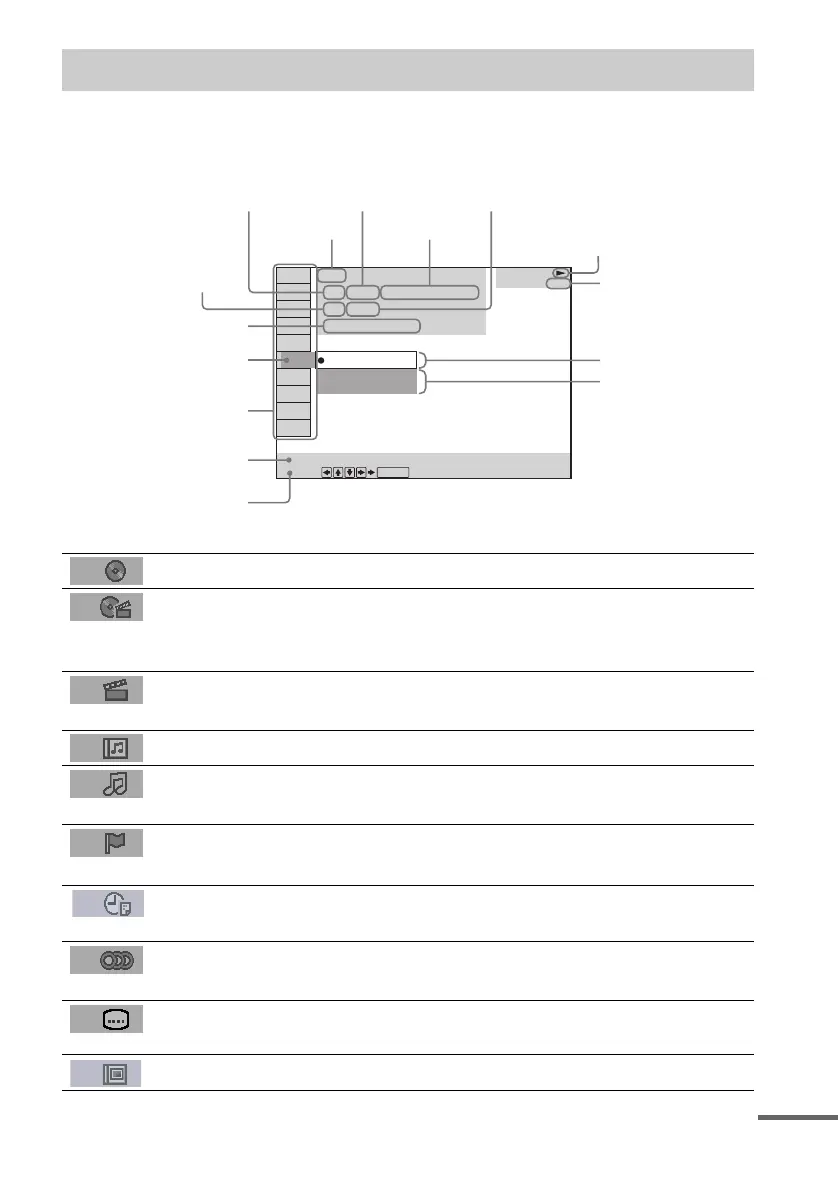
Guide to the Control Menu Display
DISC Displays the disc name or the disc type inserted into the system.
TITLE (DVD only) (page 32)/
SCENE (only VIDEO CD in PBC playback) /
TRACK (VIDEO CD only) (page 32)
Selects the title (DVD), or the track (VIDEO CD) to be
played.
Displays the scene (VIDEO CD in PBC playback).
CHAPTER (DVD only) (page 33)/
INDEX (VIDEO CD only) (page 33)
Selects the chapter (DVD) or the index (VIDEO CD) to be
played.
ALBUM (MP3 only) (page 25, 32) Selects the album (MP3) to be played.
TRACK (Super Audio CD/CD/
MP3 only) (page 25, 32)
Selects the track (Super Audio CD/CD/MP3) to be played.
INDEX (Super Audio CD/CD only)
(page 33)
Displays the index and selects the index (Super Audio CD) to
be played.
TIME (page 34) Checks the elapsed time and the remaining playback time.
Inputs the time code for picture and music searching.
AUDIO (DVD/VIDEO CD/Super
Audio CD/CD/MP3 only) (page 39)
Changes the audio setting.
SUBTITLE (DVD only) (page 46) Displays the subtitles.
Changes the subtitle language.
ALBUM (JPEG only) (page 26) Selects the album (JPEG) to be played.
2: FRENCH
3: SPANISH
1: ENGLISH
Select:
SUBTITLE
DVD
DVD
1 2
(
2 7
)
MAKING SCENE
1 8
(
3 4
)
T
1 : 3 2 : 5 5
ENTER
Currently playing title number (Video CD/
Super Audio CD/CD: track number)
Playing time
Currently playing chapter
number (Video CD/Super
Audio CD/CD: index number)
Icon of selected
Control Menu item
Control Menu items
Function name of selected
Control Menu item
Operation message
Disc name or disc
type
Total number of
titles or tracks
recorded
Currently playing
title name
Total number of chapters or indexes recorded
Playback status
(NPlayback, XPause, xStop, etc.)
Type of disc being
played back
Current setting
Options
continued



 To Next Page