Playing Discs
37
GB
You can play all the titles/tracks/files or a single
title/chapter/track on a disc.
In Shuffle or Program Play mode, the system
repeats tracks in shuffled or programmed order.
You cannot perform Repeat Play during PBC
playback of VIDEO CDs (page 29).
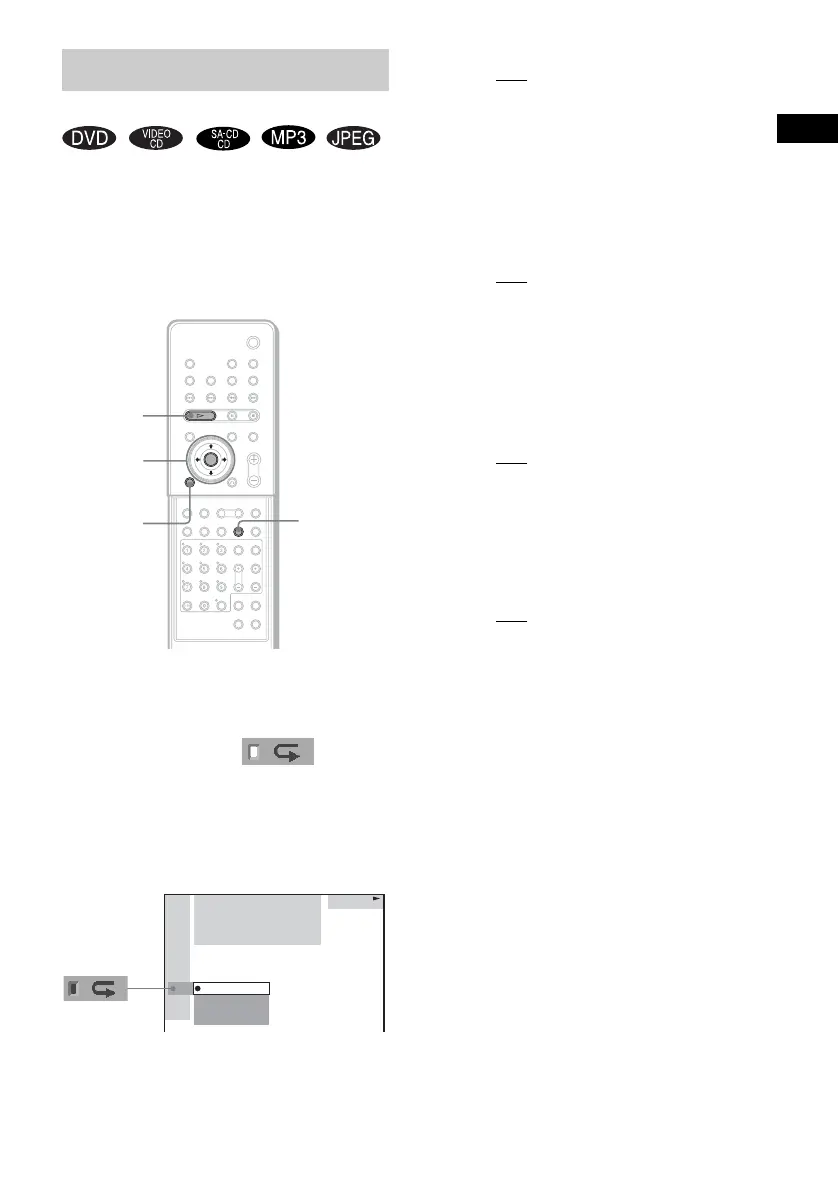
1 Press DVD DISPLAY.
The Control Menu appears.
2 Press X/x to select
(REPEAT), then press ENTER or c.
If you do not select [OFF], the [REPEAT]
indicator lights in green.
3 Select the Repeat Play setting, then
press ENTER.
x When playing a DVD
•OFF: does not play repeatedly.
• ALL: repeats all the titles.
• TITLE: repeats the current title on a
disc.
• CHAPTER: repeats the current
chapter.
x When playing a VIDEO CD/Super
Audio CD/CD/MP3, and when Program
Play is set to OFF
•OFF: does not play repeatedly.
• ALL: repeats all the tracks on the disc,
or repeats the current album (only
when CONTINUE (ALBUM) or
SHUFFLE (ALBUM) in the play
mode is selected).
• TRACK: repeats the current track.
x When playing a JPEG
•OFF: does not play repeatedly.
• ALL: repeats all the files on the disc
(when CONTINUE is selected in the
play mode), or repeats the current
album (when CONTINUE (ALBUM)
is selected in the play mode).
x When Program Play is set to ON
•OFF: does not play repeatedly.
• ALL: repeats Program Play.
Notes
• Depending on the DVD disc, Repeat Play does not
work.
• Repeat Play is cancelled when you eject the disc.
• If [ALL] is selected, Repeat Play is limited to 5 times.
Tips
• You can set Repeat Play during stop mode.
After selecting the [REPEAT] item, press H.
The system starts Repeat Play.
• You can quickly display the [REPEAT] status.
Press REPEAT on the remote.
• You can perform Repeat Play for DVD titles that
contain chapters.
Playing Repeatedly
(Repeat Play)
DVD
DISPLAY
REPEAT
H
C/X/x/c/
ENTER
With cover opened.
DVD
DVD
1 2
(
2 7
)
TITLE12
1 8
(
3 4
)
T
1 : 3 2 : 5 5
ALL
TITLE
CHAPTER
OFF



 To Next Page