Searching for a photo
- PHOTO SEARCHIPHOTO SCAN
You can search for a still image you have recorded on a tape (PHOTOSEARCH).It is
convenient to use the cassette with the cassette memo_T.
You can also search for still images one after another and display each picture for five
seconds automatically regardless of cassette memory (PHOTO SCAN). Use the R_mote
Commander for these operations.
Use this function to check or edit still images.
Before operation
• You can use this function only when playing back a cassette with cassette memory.
• Set CM SEARCH in _ to ON in the menu settings. (The default setting is ON.)
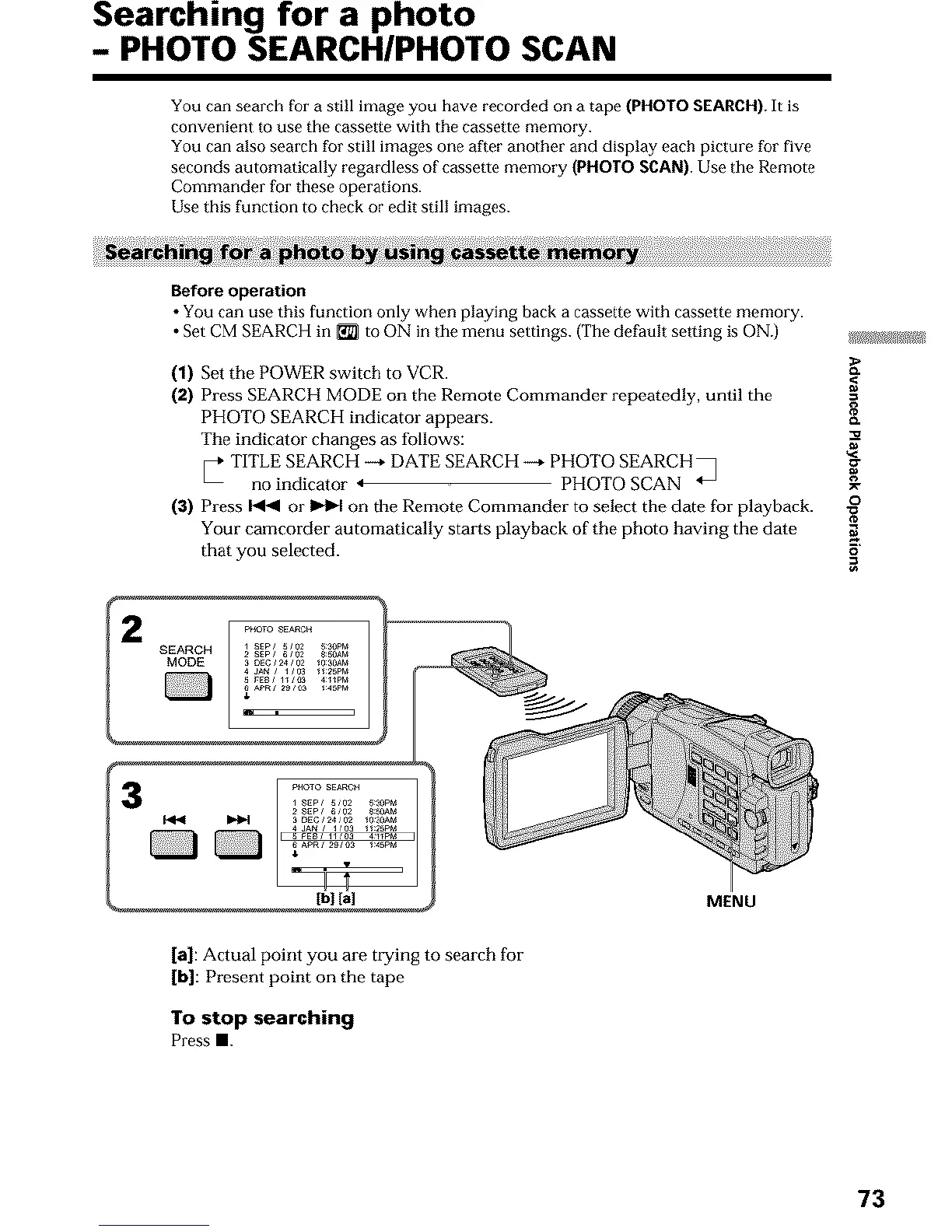
(1) Set the POWER switch to VCR. <
(2) Press SEARCH MODE on the Remote Commander repeatedly, until the
PHOTO SEARCH indicator appears. {_
The indicator changes as follows:
TITLE SEARCH --+ DATE SEARCH --+ PHOTO SEARCH • '_g
no indicator 4 PHOTO SCAN _ _-
o
(a) Press _ or _ on the Remote Commander to select the date for playback. -_
Your camcorder automatically starts playback of the photo having the date _,
that you selected, o
R
MENU
[a]: Actual point you are trying to search for
[b]: Present point on the tape
To stop searching
Press m.
73



 To Next Page