12
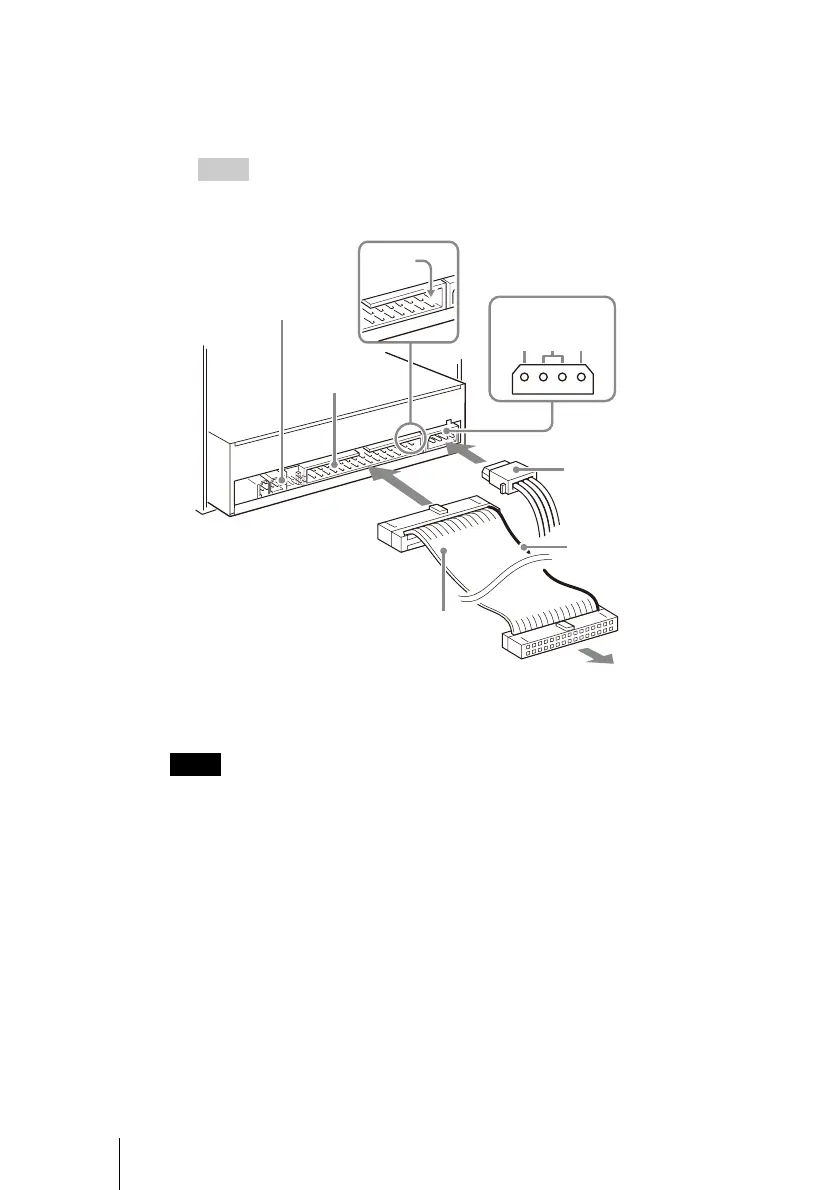
3 Connect the cables.
• Connect an unused power connector from the computer’s power supply to
the DC input (power input) connector of the drive.
• Connect the IDE flat cable to the IDE connector of the drive.
Hint
If your computer supports digital playback, you do not need to connect the audio cable
to the analog audio connector. Most computers support digital playback at this time.
Notes
• The side of the IDE flat cable with the red line indicates the pin 1 conductor. Verify that
the pin 1 side is connected to pin 1 on the motherboard.
• The power connector must be inserted with the inclined side upwards.
• If there is no spare power connector, you must use a “Y” adapter.
Analog audio
connector
IDE connector
IDE flat cable
Pin1
DC input connector
Power connector
Red (pin 1)
To computer
motherboard
5V GND12V
DC INPUT



 To Next Page