16
[ Macro (Shooting close-up)
Press b ( ) on the control button
repeatedly until the desired mode is
selected.
: Macro off
: Macro on (W side: Approx. 2 cm or farther
(13/16 inches or farther), T side: Approx. 90 cm or
farther (2 feet 11 1/2 inches or farther))
[ Using the self-timer
Press V ( ) on the control button
repeatedly until the desired mode is
selected.
: Not using the self-timer
: Setting the 10-second delay self-timer
: Setting the 2-second delay self-timer
When you press the shutter button, the self-
timer lamp flashes and a beep sounds until
the shutter operates.
[ DISP Changing the screen
display
Press v (DISP) on the control button.
Each time you press v (DISP), the display
and brightness changes as follows:
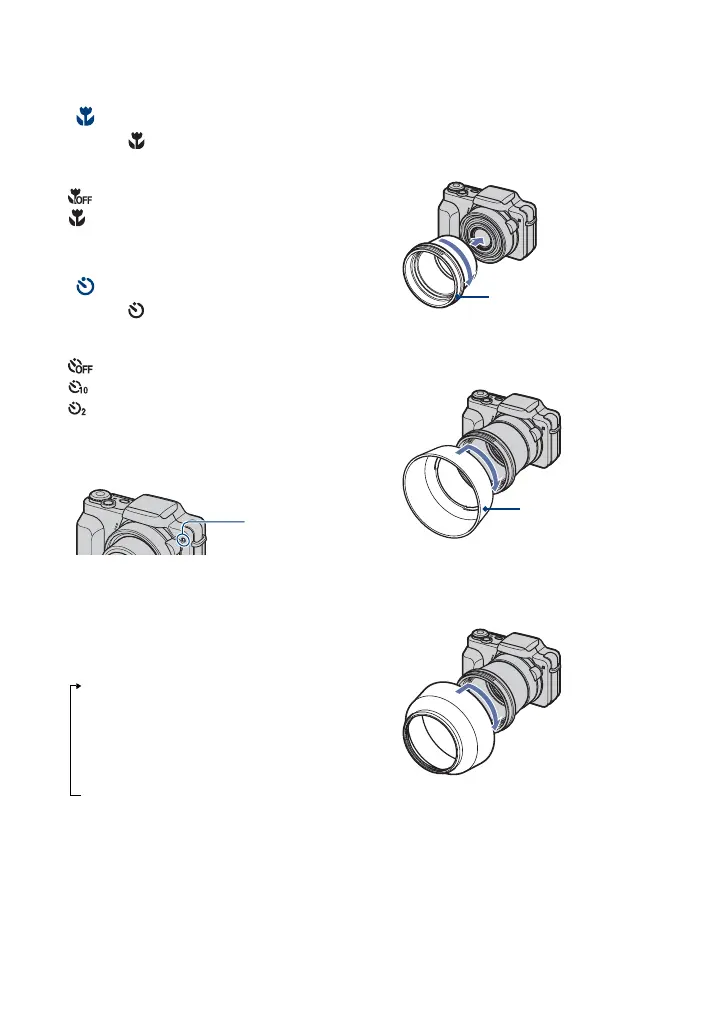
[ Attaching the lens hood
1 Attach the adaptor ring while the power
is off.
2 Position the lens hood as shown below
and turn the lens hood clockwise until it
clicks.
Storing the lens hood
Position the lens hood as shown below and
turn the lens hood clockwise until it clicks.
Indicators on
r
Indicators on*
r
Histogram on*
r
Indicators off*
* The brightness of the LCD Backlight up.
Self-timer
lamp
Adaptor ring
Lens hood



 To Next Page