12
• The values shown for alkaline battery are based on commercial norms, and do not apply to all alkaline
batteries in all conditions. The values may vary, depending on the battery manufacturer/type,
environmental conditions, product setting, etc.
• The alkaline battery (supplied) is for trial use only. You may need to purchase an additional battery for
regular camera use.
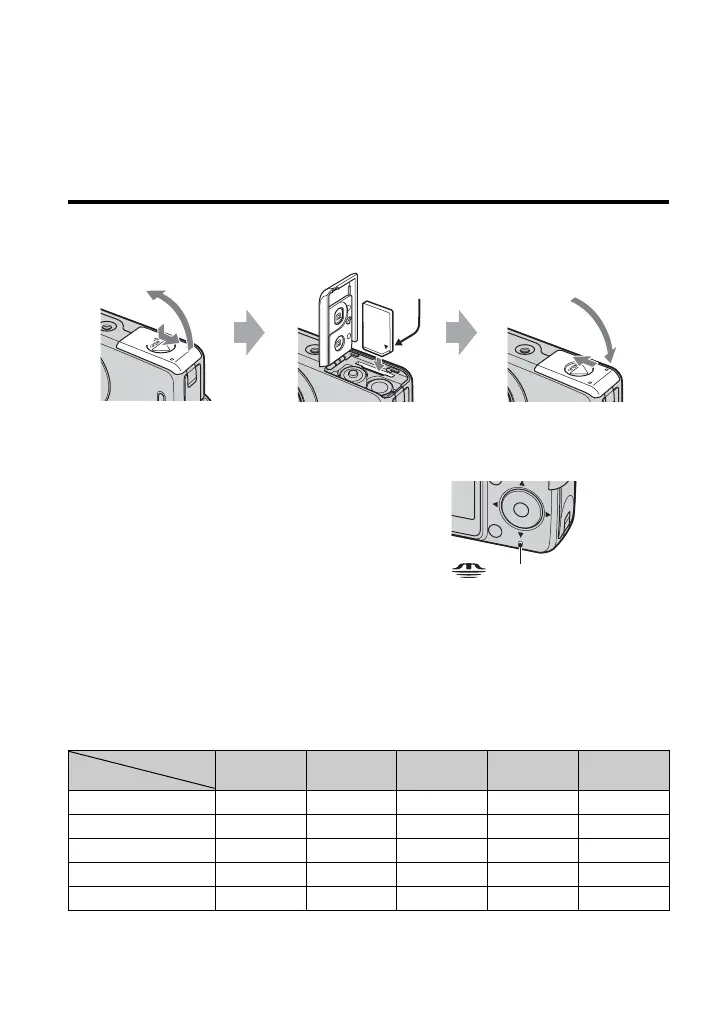
To remove a “Memory Stick Duo”
Open the battery/“Memory Stick Duo” cover, then push
the “Memory Stick Duo” in once.
When the access lamp is lit
Never open the battery/“Memory Stick Duo” cover or
turn off the power as data may be corrupted.
The camera has approx. 25 MB of internal memory. However, purchase of a “Memory Stick
Duo” is recommended. Only “Memory Stick Duo” can be used.
The table below shows the approximate total number of still images and approximate movie
recording time that can be recorded on the various capacities of “Memory Stick Duo,” for
reference before purchasing.
Total number of still images (Image quality is [Fine].)
(Units: Images)
Insert a “Memory Stick Duo” (not supplied)
Capacity
Size
Internal
memory
64MB 128MB 256MB 512MB
6M 7 21 42 77 157
3:2 7 21 42 77 157
3M 15 41 82 148 302
2M 25 66 133 238 484
VGA (E-Mail) 152 394 790 1428 2904
2
1
1
2
Terminal side
Insert the “Memory Stick Duo”
all the way in until it clicks.
Access lamp


 To Next Page
 Loading...