15
Shoot images easily (Auto adjustment mode)
Shoot images easily
(Auto adjustment mode)
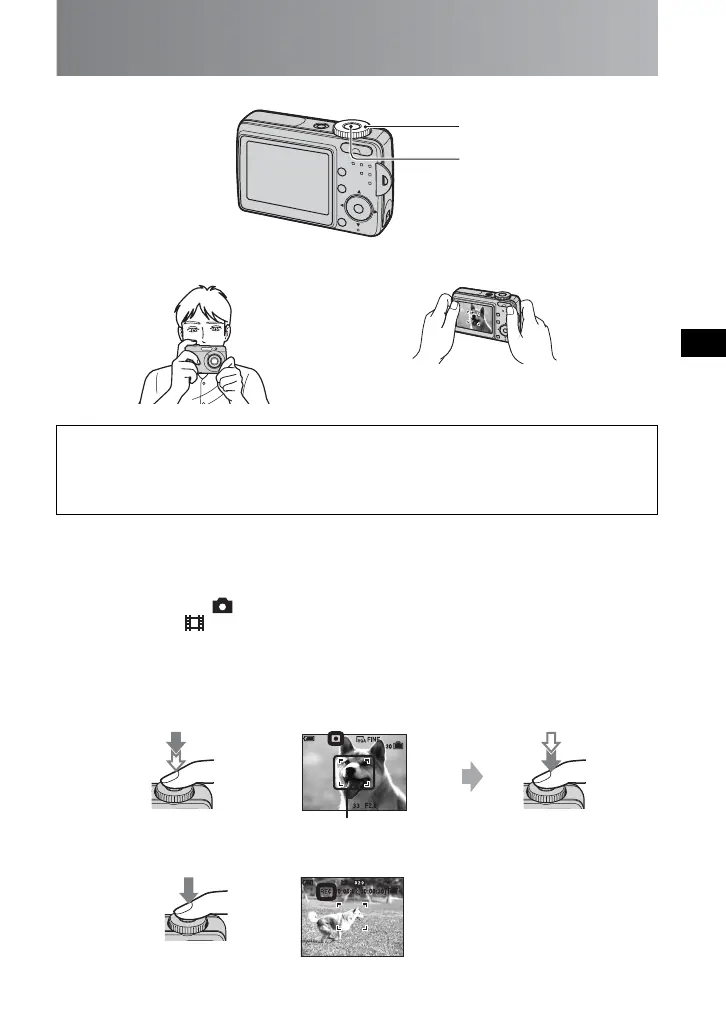
Hold the camera
Shoot an image
1 Select a mode (A).
2 Shoot with the shutter button (
B).
Hints for preventing blur
Hold the camera steadily, keeping your arms at your side. Also, you can stabilize the
camera by leaning against a tree or a building beside you. Using a tripod may be effective.
Also, using the flash in dark places is also recommended.
Still image: Select .
Movie: Select .
Still image:
Press and hold halfway
down to focus.
AE/AF lock indicator
Flashing t lit/beeps
Press fully down.
The shutter sounds.
Movie:
Press fully down.
• To stop recording, press the shutter button fully down again.
B
A
Position the subject in the center
of the focus frame
AF range finder frame



 To Next Page
 Loading...