18
View/delete images
To view images
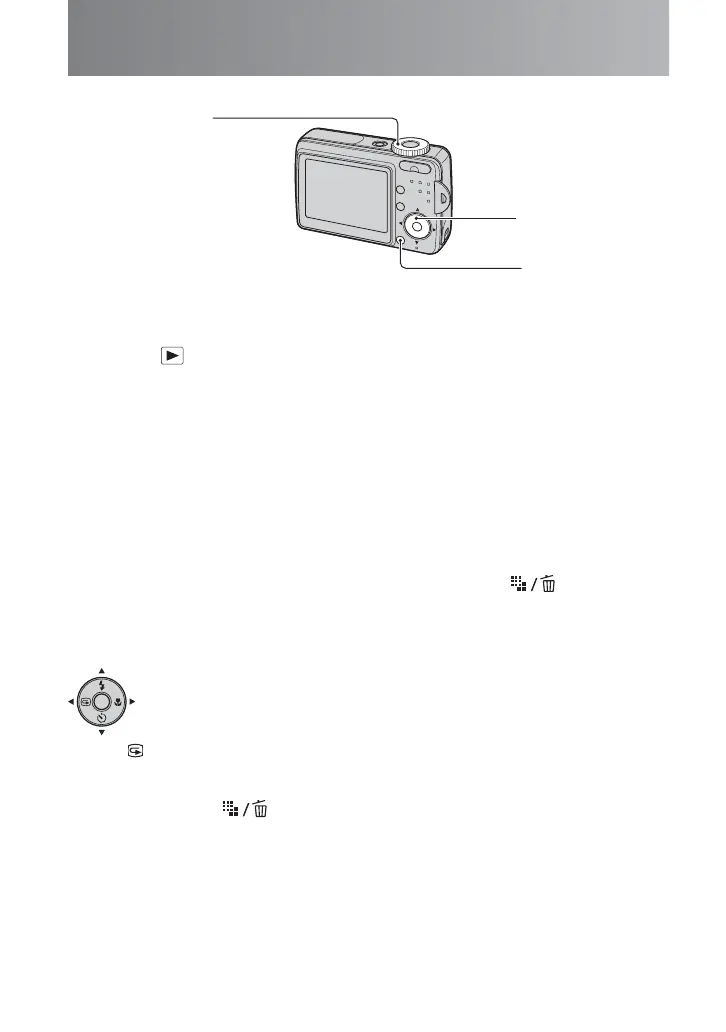
1 Select (A).
2 Select an image with b/B (
B).
3 Movie only : Press z (
B).
To delete images
1 Display the image you want to delete and press (Delete) (C).
2 Select [Delete] with v, then press z (B).
• To cancel the deletion, select [Exit], then press z in step 2.
Press b ( ) on the control button.
To cancel, press b again.
• The image may appear rough right after playback starts.
• To delete an image, press (Delete) and select [Delete] with v on the control button, then press z.
Rewind/Fast forward: b/B (Return to normal playback: z)
Stop playback: z
• Sound is not output during movie playback on this camera. Sound can be heard when viewing a
movie on a computer or TV.
To view an image using the control button (Quick Review)
You can check the last image you took.
A
C
B



 To Next Page
 Loading...