1-2
DSC-W150/W170_L2
ENGLISH JAPANESE
ENGLISH JAPANESE
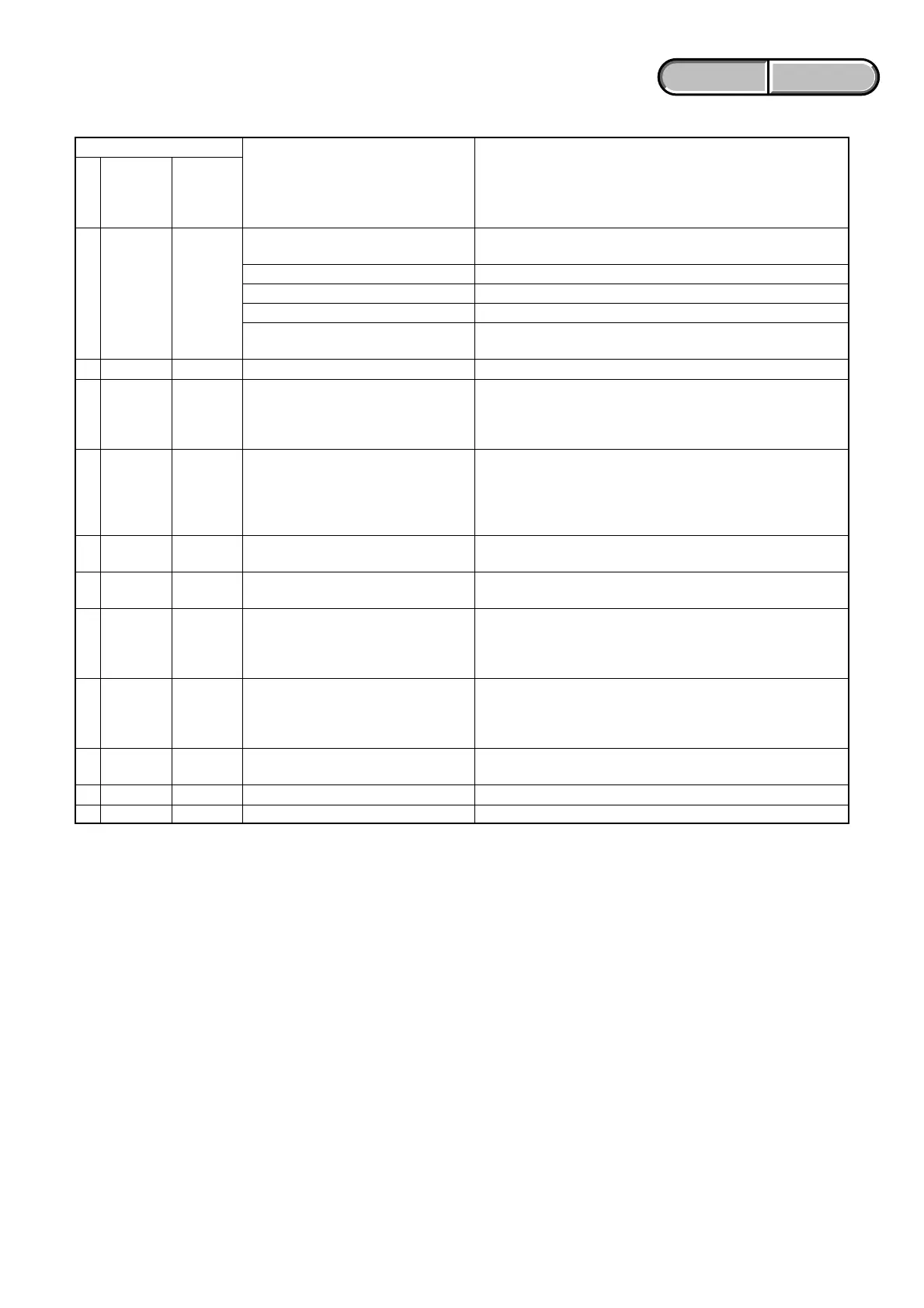
1-2-3. Self-diagnosis Code Table
C
C
E
E
E
E
E
E
E
E
E
Block
Function
13
32
61
61
62
62
62
62
62
91
92
Detailed
Code
01
01
00
10
02
10
11
12
20
01
00
Symptom/State
The internal memory has experienced a
format error.
“Memory Stick Duo” is unformatted.
“Memory Stick Duo” is broken.
“Memory Stick Duo” type error
The camera cannot read or write data
on the “Memory Stick Duo”.
Trouble with hardware
Difficult to adjust focus
(Cannot initialize focus)
Zoom operations fault
(Cannot initialize zoom lens.)
Abnormality of IC for steadyshot.
Lens initializing failure.
Lens overheating (PITCH).
Lens overheating (YAW).
Abnormality of thermistor.
Abnormality when flash is being charged.
Non-standard battery is used.
Self-diagnosis Code
Repaired by:
Correction
Format the internal memory.
Format the “Memory Stick Duo”.
Insert a new “Memory Stick Duo”.
Insert a supported “Memory Stick Duo”.
Turn the power off and on again, or taking out and inserting the
“Memory Stick Duo” several times.
Turn the power off and on again.
Retry turn the power on by the power switch. If it does not
recover, check the focus reset sensor of lens block (pin rj of
CN401 on the SY-194 board). If it is OK, check the focus motor
drive IC (IC401 on the SY-194 board).
Retry turn the power on by the power switch. Check the zoom
reset sensor of lens block (pin t; of CN401 on the SY-194
board) when zooming is performed when the zoom button is
operated. If it is OK, check the zoom motor drive IC (IC401 on
the SY-194 board).
Check or replacement of the IC for steadyshot (IC503 on the SY-
194 board).
Check or replacement of the IC for steadyshot (IC503 on the SY-
194 board).
Check the HALL element (PITCH) of optical image stabilizer
(pin qj, ql of CN401 on the SY-194 board). If it is OK, check
PITCH angular velocity sensor (SE502 on the SY-194 board)
peripheral circuits.
Check the HALL element (YAW) of optical image stabilizer (pin
q;, qs of CN401 on the SY-194 board). If it is OK, check YAW
angular velocity sensor (SE501 on the SY-194 board) peripheral
circuits.
Check the OIS temp sensor of optical image stabilizer (pin qg of
CN401 on the SY-194 board).
Checking of flash unit or replacement of flash unit. (Note)
Use the compatible battery only.
Note: After repair, be sure to perform “1-3. PROCESS AFTER FIXING FLASH ERROR”.







 To Next Page