GB
11
GB
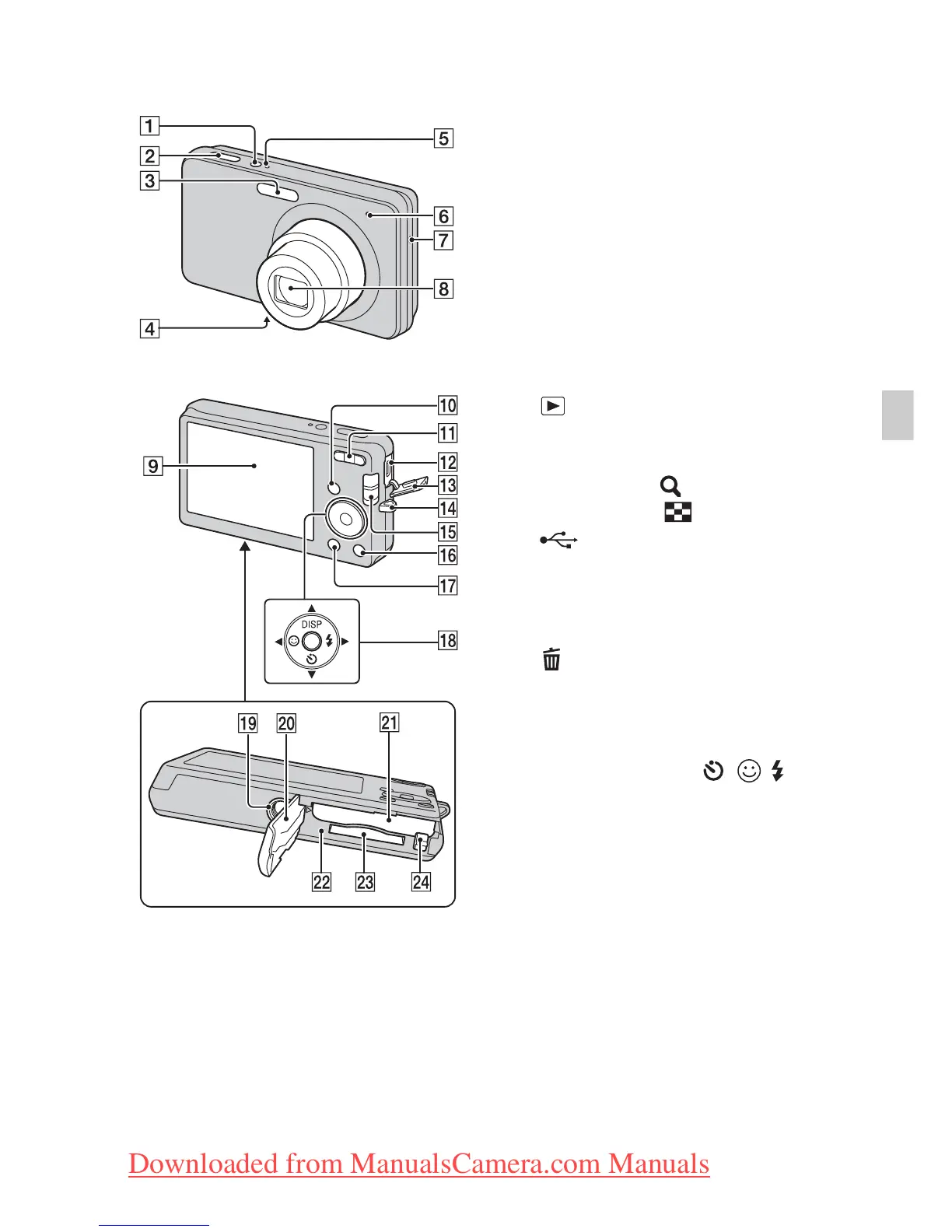
Identifying parts
A ON/OFF (Power) button
B Shutter button
C Flash
D Microphone
E ON/OFF (Power) lamp
F Self-timer lamp/Smile Shutter
lamp
G Speaker
H Lens
I LCD screen
J (Playback) button
K For shooting: W/T (zoom)
button
For viewing: (Playback
zoom) button/ (Index) button
L (USB)/A/V OUT jack
M Terminal cover
N Hook for wrist strap
O Mode switch
P (Delete) button
Q MENU button
R Control button
MENU on: v/V/b/B/z
MENU off: DISP/ / /
S Tripod receptacle
• Use a tripod with a screw less than
5.5 mm (7/32 inches) long.
Otherwise, you cannot firmly
secure the camera, and damage to
the camera may occur.
T Battery/Memory card cover
U Battery insertion slot
V Access lamp
W Memory card slot
X Battery eject lever
Bottom
Downloaded from ManualsCamera.com Manuals







 To Next Page