13GB
Precautions
Cool off the unit beforehand if your car has been
parked in direct sunlight.
Do not leave the front panel or audio devices
brought in inside the car, or it may cause
malfunction due to high temperature in direct
sunlight.
Power antenna (aerial) extends automatically.
To maintain high sound quality
Do not splash liquid onto the unit.
You can connect to the following iPod models.
Update your iPod devices to the latest software
before use.
Compatible iPhone/iPod models
“Made for iPod,” and “Made for iPhone,” mean
that an electronic accessory has been designed to
connect specifically to iPod or iPhone,
respectively, and has been certified by the
developer to meet Apple performance standards.
Apple is not responsible for the operation of this
device or its compliance with safety and
regulatory standards. Please note that the use of
this accessory with iPod or iPhone may affect
wireless performance.
If you have any questions or problems concerning
your unit that are not covered in this manual,
consult your nearest Sony dealer.
Additional Information
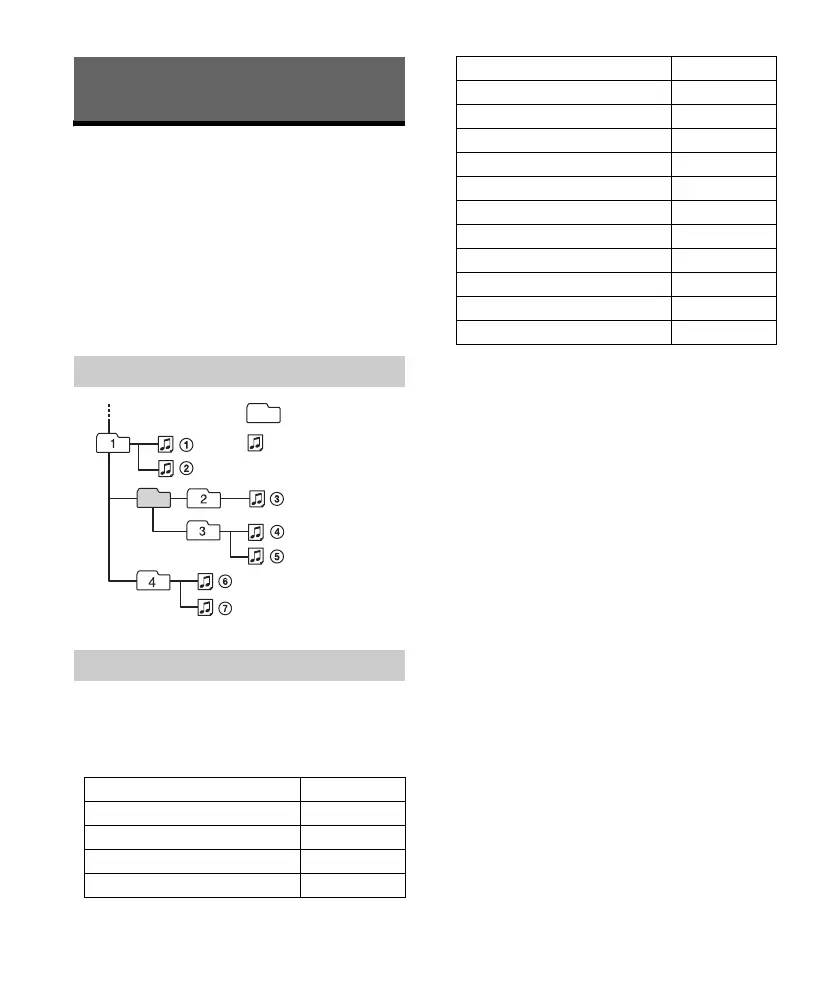
Playback order of audio files
About iPod
Compatible Model USB
iPhone 6 Plus
iPhone 6
iPhone 5s
iPhone 5c
Folder (album)
Audio file (track)
iPhone 5
iPhone 4s
iPhone 4
iPhone 3GS
iPod touch (5th generation)
iPod touch (4th generation)
iPod touch (3rd generation)
iPod classic
iPod nano (7th generation)
iPod nano (6th generation)
iPod nano (5th generation)
Compatible Model USB



 To Next Page