22GB
Installation
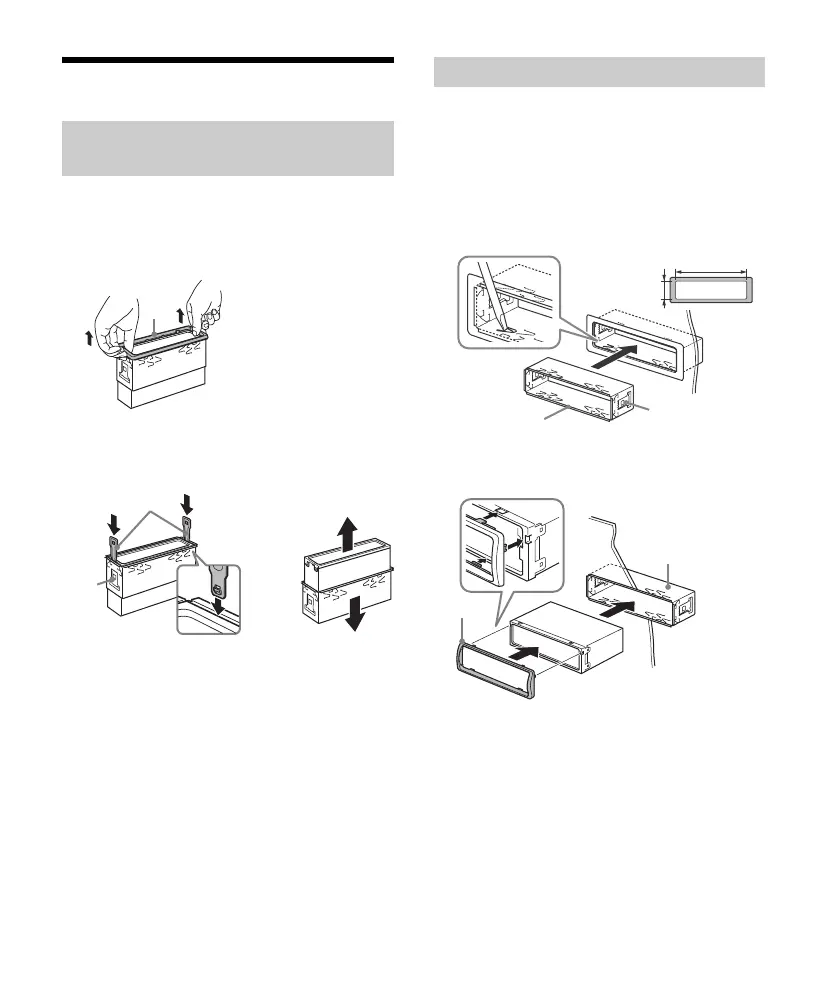
Before installing the unit, remove the protection
collar and the bracket from the unit.
1 Pinch both edges of the protection collar
, then pull it out.
2 Insert both release keys until they
click, and pull down the bracket , then
pull up the unit to separate.
Before installing, make sure the catches on both
sides of the bracket are bent inwards 2 mm (
3
/32
in). When mounting in a Japanese car, see
“Mounting the unit in a Japanese car” (page 23).
1 Position the bracket inside the
dashboard, then bend the claws outward
for a tight fit.
2 Mount the unit onto the bracket , then
attach the protection collar .
Notes
If the catches are straight or bent outwards, the unit
will not be installed securely and may spring out.
Make sure the 4 catches on the protection collar
are properly engaged in the slots of the unit.
Removing the protection collar and the
bracket
Face the hook inwards.
Mounting the unit in the dashboard
182 mm (7
1
/4 in)
53 mm (2
1
/8 in)
Catch



 To Next Page