13GB
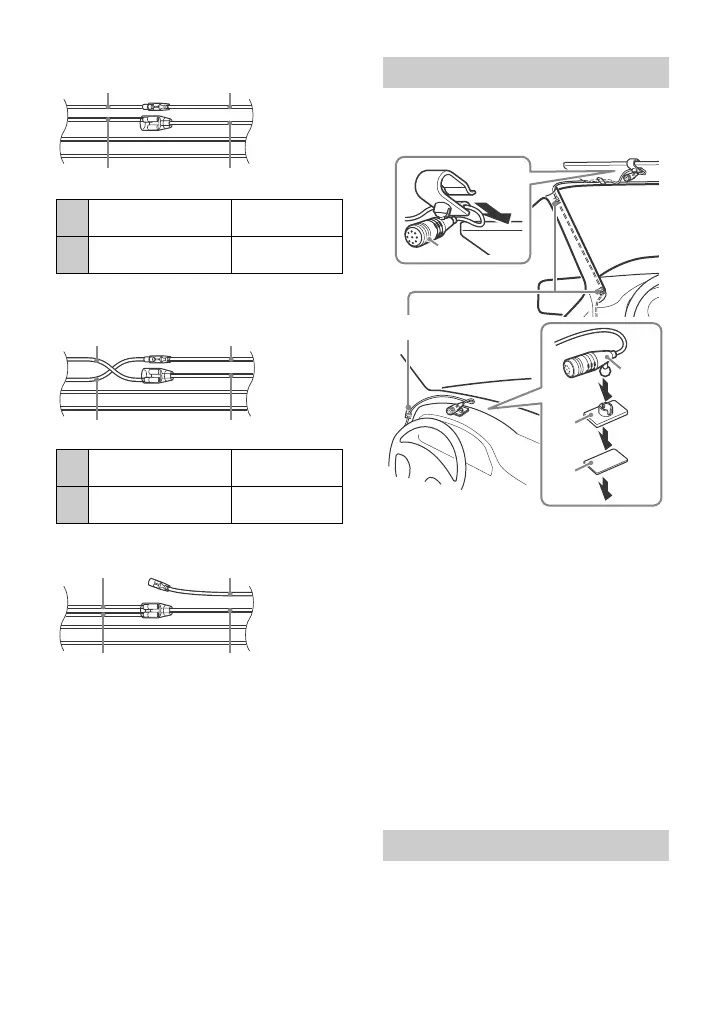
Common connection
When the positions of the red and
yellow leads are inverted
When the car without ACC position
After matching the connections and
switching power supply leads correctly,
connect the unit to the car’s power supply. If
you have any questions and problems
connecting your unit that are not covered in
this manual, consult the car dealer.
To capture your voice during handsfree
calling, you need to install the microphone
.
Cautions
•It is extremely dangerous if the cord
becomes wound around the steering
column or gearstick. Be sure to keep it and
other parts from interfering with your
driving operations.
•If airbags or any other shock-absorbing
equipment is in your car, contact the store
where you purchased this unit, or the car
dealer, before installation.
Notes
• When mounting on the dashboard, remove the
visor clip carefully from the microphone , then
attach the flat-mount base to the microphone
.
• Before attaching the double-sided tape clean
the surface of the dashboard with a dry cloth.
1 To enable the wired remote control,
set [STR CONTROL] in [SET STEERING]
to [PRESET].
12
continuous power
supply
Yel low
15
switched power
supply
Red
12
switched power
supply
Yel low
15
continuous power
supply
Red
Installing the microphone
Using the wired remote control



 To Next Page