EasyManua.ls Logo

Sony DTC-700 - Writing Skip IDs; Skip ID Writing Methods

Sony DTC-700
56 pages
Print Icon
To Next Page IconTo Next Page
To Previous Page IconTo Previous Page
Loading...
34
ah
dale
me)
Con
|
B)
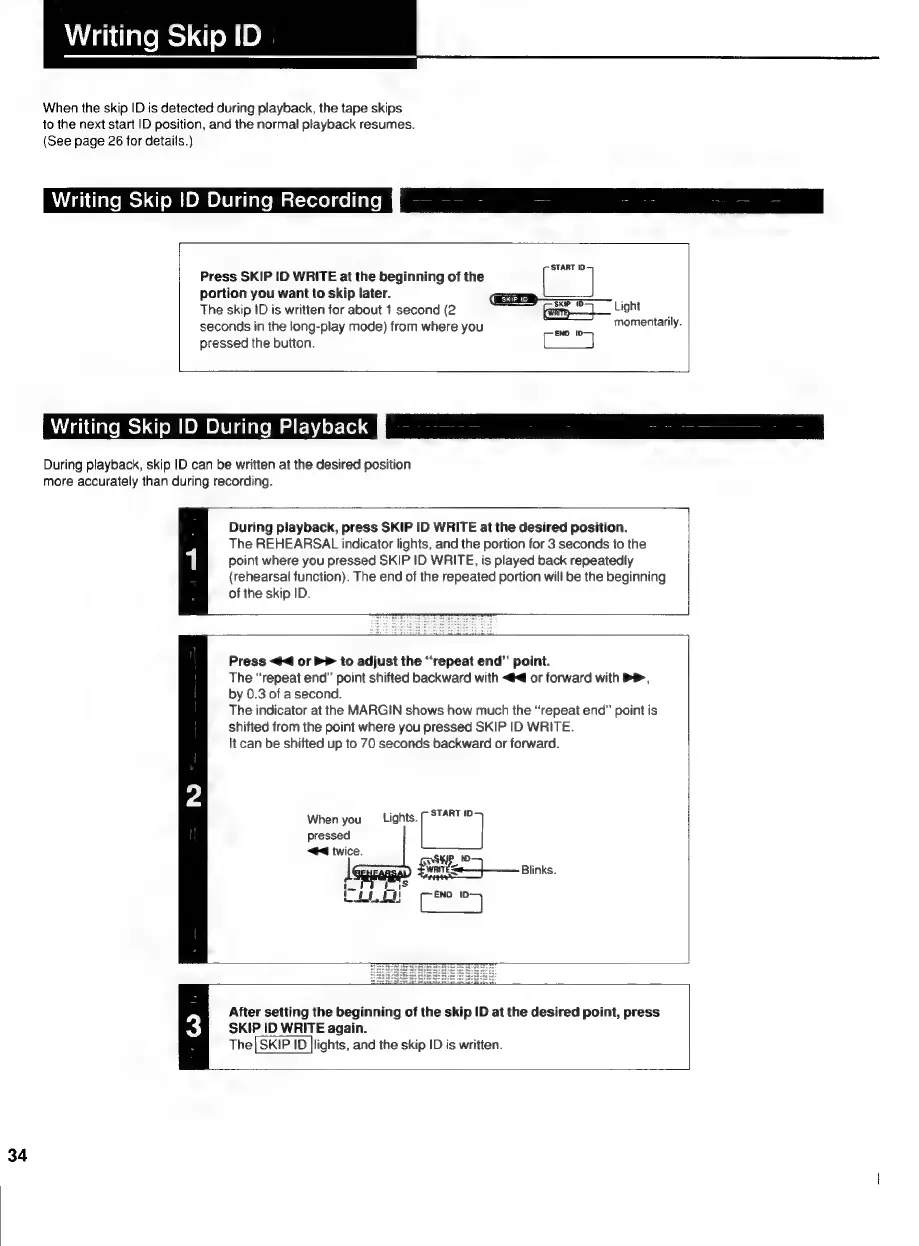
When
the
skip
ID
is
detected
during
playback,
the
tape
skips
to
the
next
start
ID
position,
and
the
normal
playback
resumes.
(See
page
26
for
details.)
Writing
Skip
ID
During
Recording
(START
ID
Press
SKIP
ID
WRITE
at
the
beginning
of
the
portion
you
want
to
skip
later.
==
The
skip
ID
is
written
for
about
1
second
(2
amp
Light
seconds
in
the
long-play
mode)
from
where
you
ape
momentarily.
pressed
the
button.
Writing
Skip
ID
During
Playback
During
playback,
skip
ID
can
be
written
at
the
desired
position
more
accurately
than
during
recording.
During
playback,
press
SKIP
ID
WRITE
at
the
desired
position.
The
REHEARSAL
indicator
lights,
and
the
portion
for
3
seconds
to
the
point
where
you
pressed
SKIP
ID
WRITE,
is
played
back
repeatedly
{rehearsal
function).
The
end
of
the
repeated
portion
will
be
the
beginning
of
the
skip
ID.
Press
<4
or
PP
to
adjust
the
“repeat
end”
point.
The
“repeat
end”
point
shifted
backward
with
<<
or
forward
with
PP,
by
0.3
of
a
second.
The
indicator
at
the
MARGIN
shows
how
much
the
“repeat
end”
point
is
shifted
from
the
point
where
you
pressed
SKIP
ID
WRITE.
lt
can
be
shifted
up
to
70
seconds
backward
or
forward.
When
you
Lights.
(START
pressed
44
twice.
After
setting
the
beginning
of
the
skip
ID
at
the
desired
point,
press
SKIP
ID
WRITE
again.
The|
SKIP
ID
|lights,
and
the
skip
ID
is
written.