7
DVP-CX985V
AV board
AV board
– Front side –
MB board
cables
(MB board to
driver board,
sensor board)
cables
(MB board to
driver board,
sensor board)
MB board
AV board
power block
locking wire
saddle
MB board
It takes care that the cables doesn’t hang down.
cable
(AV board to panel-L board)
cables
(MB board to
driver board,
sensor board)
cable
(MB board to
led board)
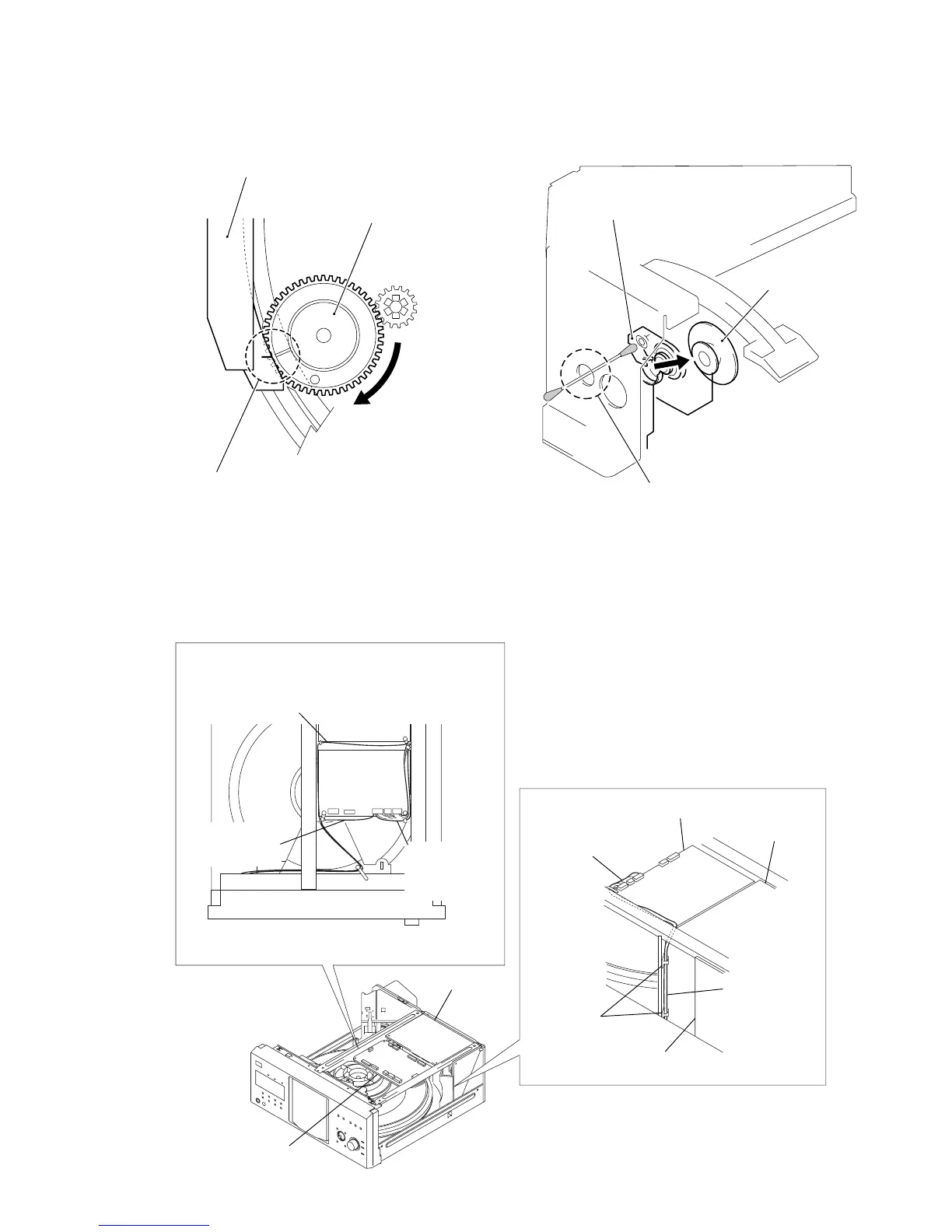
ALIGNMENT OF GEAR (CAM) PHASE WITH DOOR
ASS’Y
CLEANING OF OPTICAL PICK-UP
door assy
gear (cam)
Align a slit of door assy with a marking on
the bottom land of gear tooth when the gear
is rotated fully in arrow direction, as shown.
optical pick-up
pulley assy
Remove the pulley assy, and
clean the lens of optical pick-up
through this hole.
NOTE FOR INSTALLATION











 To Next Page