EasyManua.ls Logo

Sony DVP-S330 - Custom Settings (CUSTOM SETUP)

Sony DVP-S330
62 pages
Print Icon
To Next Page IconTo Next Page
To Previous Page IconTo Previous Page
Loading...
syuawgsnipy
pue
sbun3as
Custom
Settings
(CUSTOM
SETUP)
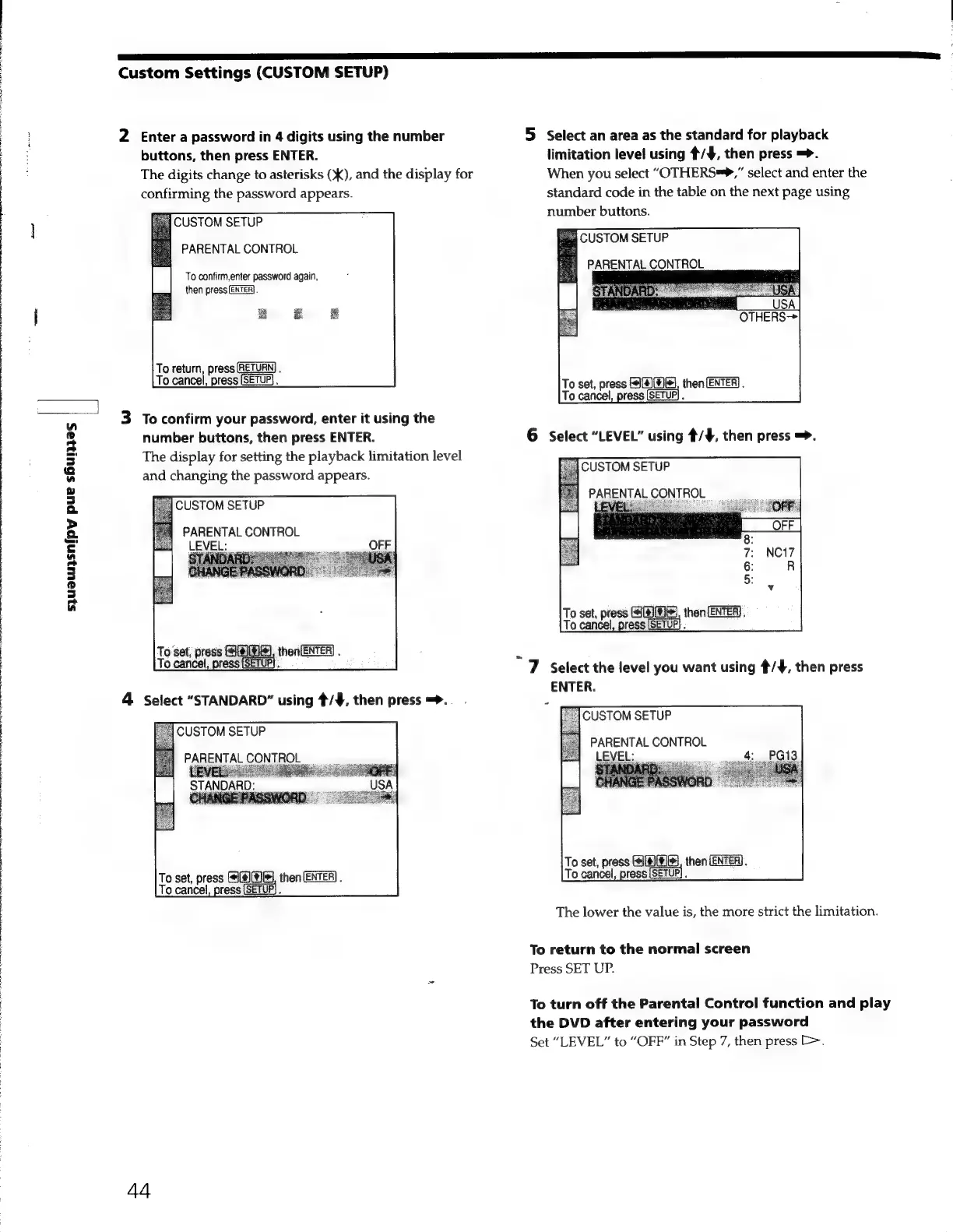
2
Entera
password
in
4
digits
using
the
number
buttons,
then
press
ENTER.
The
digits
change
to
asterisks
(X),
and
the
display
for
confirming
the
password
appears.
USTOM
SETUP
PARENTAL
CONTROL
To
confirm,enter
password
again,
then
press
[ENTER].
To
return,
press
RETURN]
.
To
cancel,
press
(SETUP).
3
To
confirm
your
password,
enter
it
using
the
number
buttons,
then
press
ENTER.
The
display
for
setting
the
playback
limitation
level
and
changing
the
password
appears.
USTOM
SETUP
PARENTAL
CONTROL
LEVEL:
To
set,
press
MEHS,
thenENTER)
.
Te
|,
press
(SETUP).
To
set,
press
MEH
then
(ENTER)
.
To
cancel,
press
N
44
5
Selectan
area
as
the
standard
for
playback
limitation
level
using
$/$,
then
press
=>.
When
you
select
“OTHERS?”
select
and
enter
the
standard
code
in
the
table
on
the
next
page
using
number
buttons.
a
CUSTOM
SETUP
PARENTAL
CONTROL
To
set,
press
AMAS,
then
ENTER).
|,
press
[SETUP]
.
6
Select
“LEVEL”
using
#/¥,
then
press
=>.
-Í
CUSTOM
SETUP
-
LEVE
To
set,
press
SHS,
then
:
To
cancel
“7
Select
the
level
you
want
using
#/¥,
then
press
ENTER.
CUSTOM
SETUP
PARENTAL
CONTROL
LE
To
set,
press
SAHA,
then
(ENTER).
To
cancel,
press
A
The
lower
the
value
is,
the
more
strict
the
limitation.
To
return
to
the
normal
screen
Press
SET
UP.
To
turn
off
the
Parental
Control
function
and
play
the
DVD
after
entering
your
password
Set
“LEVEL”
to
“OFF”
in
Step
7,
then
press
D>.