EasyManua.ls Logo

Sony DVP-S330 - Page 5

Sony DVP-S330
62 pages
Print Icon
To Next Page IconTo Next Page
To Previous Page IconTo Previous Page
Loading...
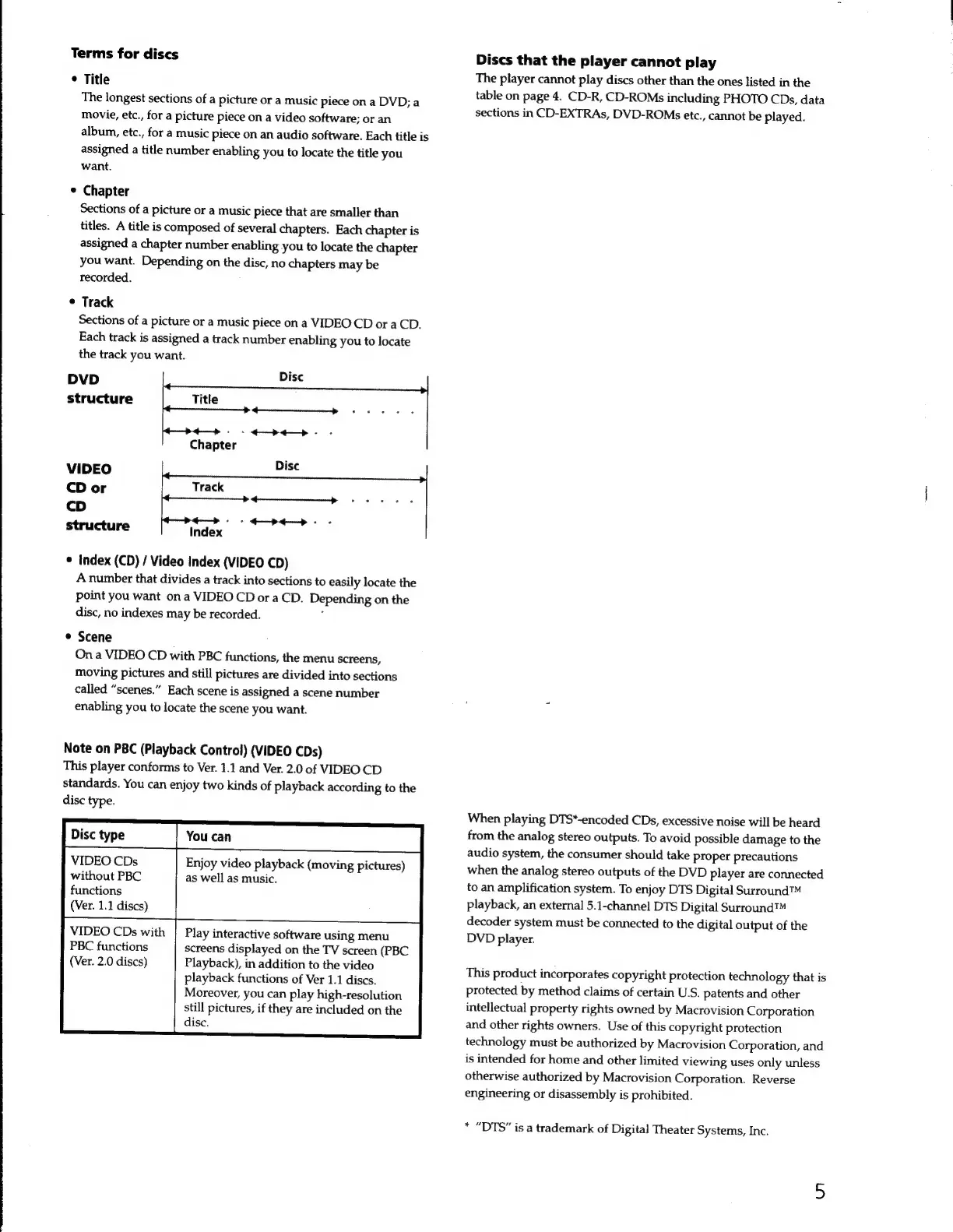
Terms
for
discs
*
Title
The
longest
sections
of
a
picture
or
a
music
piece
on
a
DVD;
a
movie,
etc.,
for
a
picture
piece
on
a
video
software;
or
an
album,
etc.,
for
a
music
Piece
on
an
audio
software.
Each
title
is
assigned
a
title
number
enabling
you
to
locate
the
title
you
want.
e
Chapter
Sections
of
a
picture
or
a
music
piece
that
are
smaller
than
titles.
A
title
is
composed
of
several
chapters.
Each
chapter
is
assigned
a
chapter
number
enabling
you
to
locate
the
chapter
you
want.
Depending
on
the
disc,
no
chapters
may
be
recorded.
*
Track
Sections
of
a
picture
or
a
music
piece
on
a
VIDEO
CD
or
a
CD.
Each
track
is
assigned
a
track
number
enabling
you
to
locate
the
track
you
want.
DVD
structure
VIDEO
CD
or
cD
structure
Index
e
Index
(CD)
/
Video
Index
(VIDEO
CD)
A
number
that
divides
a
track
into
sections
to
easily
locate
the
point
you
want
on
a
VIDEO
CD
or
a
CD.
Depending
on
the
disc,
no
indexes
may
be
recorded.
*
Scene
On
a
VIDEO
CD
with
PBC
functions,
the
menu
screens,
moving
pictures
and
still
pictures
are
divided
into
sections
called
“scenes.”
Each
scene
is
assigned
a
scene
number
enabling
you
to
locate
the
scene
you
want.
Note
on
PBC
(Playback
Control)
(VIDEO
CDs)
This
player
conforms
to
Ver.
1.1
and
Ver.
2.0
of
VIDEO
CD
standards.
You
can
enjoy
two
kinds
of
playback
according
to
the
disc
type.
eme
Tam
VIDEO
CDs
Enjoy
video
playback
(moving
pictures)
without
PBC
as
well
as
music.
functions
(Ver.
1.1
discs)
VIDEO
CDs
with
|
Play
interactive
software
using
menu
PBC
functions
screens
displayed
on
the
TV
screen
(PBC
(Ver.
2.0
discs)
Playback),
in
addition
to
the
video
playback
functions
of
Ver
1.1
discs.
Moreover,
you
can
play
high-resolution
still
pictures,
if
they
are
included
on
the
disc.
Discs
that
the
player
cannot
play
The
player
cannot
play
discs
other
than
the
ones
listed
in
the
table
on
page
4.
CD-R,
CD-ROMs
including
PHOTO
CDs,
data
sections
in
CD-EXTRAs,
DVD-ROMs
etc.,
cannot
be
played.
When
playing
DTS*-encoded
CDs,
excessive
noise
will
be
heard
from
the
analog
stereo
outputs.
To
avoid
possible
damage
to
the
audio
system,
the
consumer
should
take
proper
precautions
when
the
analog
stereo
outputs
of
the
DVD
player
are
connected
to
an
amplification
system.
To
enjoy
DTS
Digital
Surround™
playback,
an
external
5.1-channel
DTS
Digital
Surround™
decoder
system
must
be
connected
to
the
digital
output
of
the
DVD
player.
This
product
incorporates
copyright
protection
technology
that
is
protected
by
method
claims
of
certain
U.S.
patents
and
other
intellectual
property
rights
owned
by
Macrovision
Corporation
and
other
rights
owners.
Use
of
this
copyright
protection
technology
must
be
authorized
by
Macrovision
Corporation,
and
is
intended
for
home
and
other
limited
viewing
uses
only
unless
otherwise
authorized
by
Macrovision
Corporation.
Reverse
engineering
or
disassembly
is
prohibited.
*
“DTS”
is
a
trademark
of
Digital
Theater
Systems,
Inc.