80
Additional Information
Index to Parts and Controls
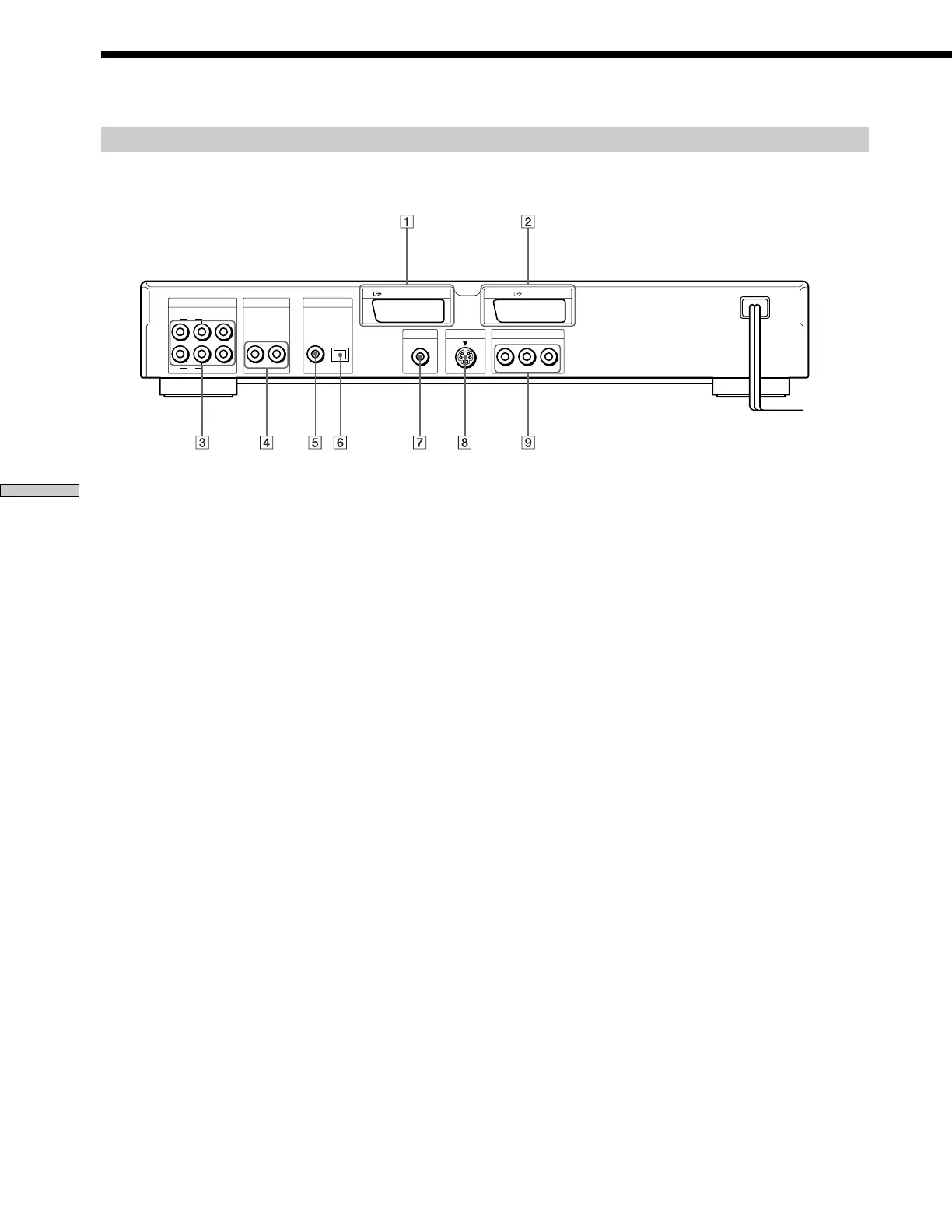
1 LINE-1 (RGB)-TV connector (8, 60)
Connect to your TV using a LINE-1 connector to
output the signal from the player. You can select the
video signals, the S VIDEO signals or the RGB signals
as the output signal format.
2 LINE-2 connector (8)
Connect your video equipment using a LINE-2
connector to input the signal from the equipment.
3 5.1CH OUTPUT connectors (15)
Connect to a receiver (amplifier) having 5.1 channel
input connectors.
4 AUDIO OUT R (right)/L (left) connectors (9, 12)
Connect to the audio input connector on your TV or
receiver (amplifier).
5 DIGITAL OUT COAXIAL connector (12)
Connect to an audio component using a coaxial digital
connecting cord.
6 DIGITAL OUT OPTICAL connector (12)
Connect to an audio component using an optical
digital connecting cord. Take off the cap.
7 VIDEO OUT connector (9)
Connect to the video input connector on your TV or
monitor.
8 S VIDEO OUT connector (9, 12)
Connect to the S video input connector on your TV or
monitor.
9 COMPONENT VIDEO OUT connectors (10)
Connect to a monitor or projector having component
video input connectors (Y, C
B/B-Y, CR/R-Y) that
conform to output signals from the player.
Rear Panel
LINE-1 (RGB) - TV
VIDEO OUT S VIDEO OUT
DIGITAL OUT
COMPONENT VIDEO OUT
COAXIAL OPTICAL
AUDIO OUT5.1CH OUTPUT
WOOFER
L
R
RL
PCM/DTS/MPEG/
DOLBY DIGITAL
LINE-2
FRONT REAR CENTER
YC
B
/B-Y C
R
/R-Y



 To Next Page