1-21
HDW-2000/M2000/M2000P/S2000/S2000P/M2100/M2100P, DVW-2000/2000P/M2000/M2000P
MSW-2000/A2000/A2000P/M2000/M2000P/M2000E/M2000EP/M2100/M2100P/M2100E/M2100EP
1-11-1. Operation Procedure of Destination
Selection Mode
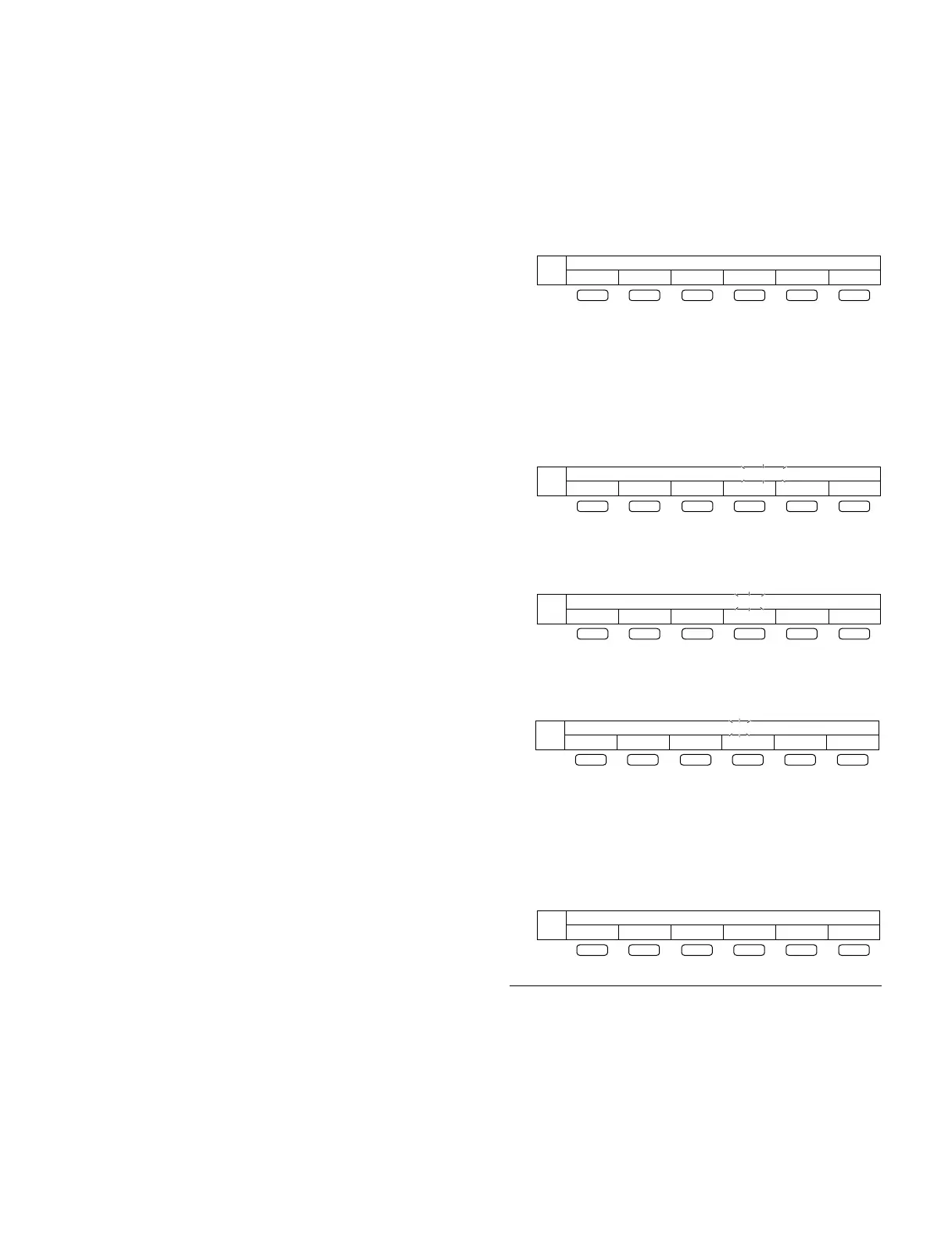
1. When no destination has not been selected, turning on
the POWER switch displays the following indication
in the menu display area of the control panel.
2. Press the F2 (SELECT) button.
. Pressing the F2 (SELECT) button blinks “NO-SET”.
. Pressing the F3 (_) or F4 (+) button selects the
destination SYL or J.
. Pressing the F1 (RETURN) button returns the
indication to the original indication shown in step 1.
When “SYL” is selected as a destination
(“SYL” blinks)
When “J” is selected as a destination
(“J” blinks)
3. Press the F5 (SET) button.
. Pressing the F5 (SET) button accepts the selected
destination.
. When the message “TURN OFF/ON POWER!!”
appears, turn off the POWER switch.
To return the destination to the “NO-SET” status:
Reset all the unit settings to the factory settings using
“M49: RESET ALL SETUP” of the maintenance mode.
For details about the maintenance mode, refer to Section 3
in the Maintenance Manual Volume-1.
n
All the settings, including the setup menu, are reset.
DESTINATION SEL - NO-SET
SELECT SE T
F1 F2 F3 F4 F5 F6
DESTINATION SEL - NO-SET
RETURN SET
F1 F2 F3 F4 F5 F6
+_
DESTINATION SEL - SYL
RETURN SET
F1 F2 F3 F4 F5 F6
+_
DESTINATION SEL - J
RETURN SET
F1 F2 F3 F4 F5 F6
+_
1-10-5. VN-13 Board (MSW-M2000E/
M2000EP/M2100E/M2100EP only)
For switch settings on the VN-13 board, refer to “1-1-5.
Switch Setting and Function of LEDs on VN-13 Board” in
the BKMW-E3000 Installation Manual.
1-11. Operation Mode Settings (For DVW-
2000/M2000 Only)
When turning on the POWER switch for the first time or
after executing “M49: RESET ALL SETUP” in the
maintenance mode, the mode for selecting a destination (J
or SYL) appears.
Select a destination following the operation procedure of
the destination selection mode.
Once a destination is selected, this mode does not appear
when the POWER switch is turned on and the unit operates
with the selected destination.
m
. Be sure to select a destination before use.
If no destination is selected, the unit will not perform the
playback and recording operations correctly even though
these operations are enabled.
. Destination: “J” is for the models for Japan, and “SYL”
is for the models for the countries other than Japan.
TURN OFF/ON POWER !!
SET
F1 F2 F3 F4 F5 F6
1-10. Switch Settings on Circuit Boards
1-11. Operation Mode Settings (For DVW-2000/M2000 Only)



 To Next Page