Calling
Making calls
You can make a call by manually dialling a phone number, by tapping a number
saved in your contacts list, or by tapping the phone number in your call log view. You
can also use the smart dial function to quickly find numbers from your contacts list
and call logs by entering part of a contact number or name and selecting from the
suggestions that appear. To make a video call, you can use the Hangouts™ instant
messaging and video chat application on your device. See
Instant messaging and
video chat
on page 73 .
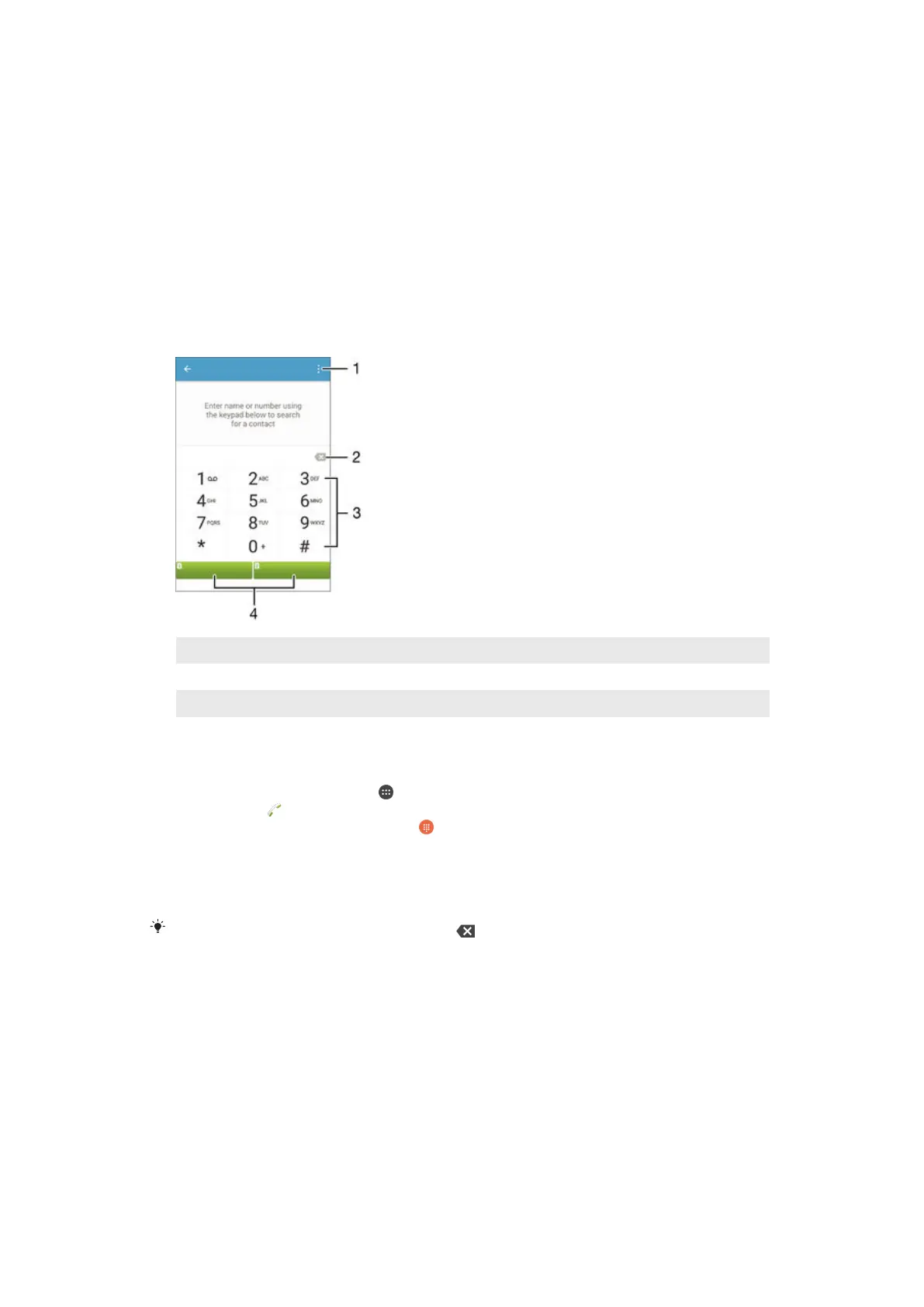
1 View more options
2 Delete number
3 Dialpad
4 Call button
To open the dialpad
1
From your Home screen, tap .
2
Find and tap .
3
If the dialpad does not appear, tap
.
To dial a phone number
1
Open the dialpad.
2
Enter the phone number, then select a SIM card.
To delete a number entered by mistake, tap
.
To make a call using the smart dial function
1
Open the dialpad.
2
Enter letters or numbers that correspond to the contact you want to call. As
you enter each letter or number, a list of possible matches appears.
3
Tap the contact that you want to call.
4
Select a SIM card.
To make an international call
1
Open the dialpad.
2
Touch and hold 0 until a “+” sign appears.
3
Enter the country code, area code (without the initial zeros) and phone number,
then select a SIM card.
56
This is an Internet version of this publication. © Print only for private use.







 To Next Page