To reject a second call with a text message
1
When you hear repeated beeps during a call, drag Reject with message
upwards.
2
Select a predefined message or tap and write a new message.
To edit the text message used to reject a call
1
From your Home screen, tap .
2
Find and tap Settings > Call > General > Reject call with message.
3
Tap the message that you want to edit, then make the necessary changes.
4
Tap OK.
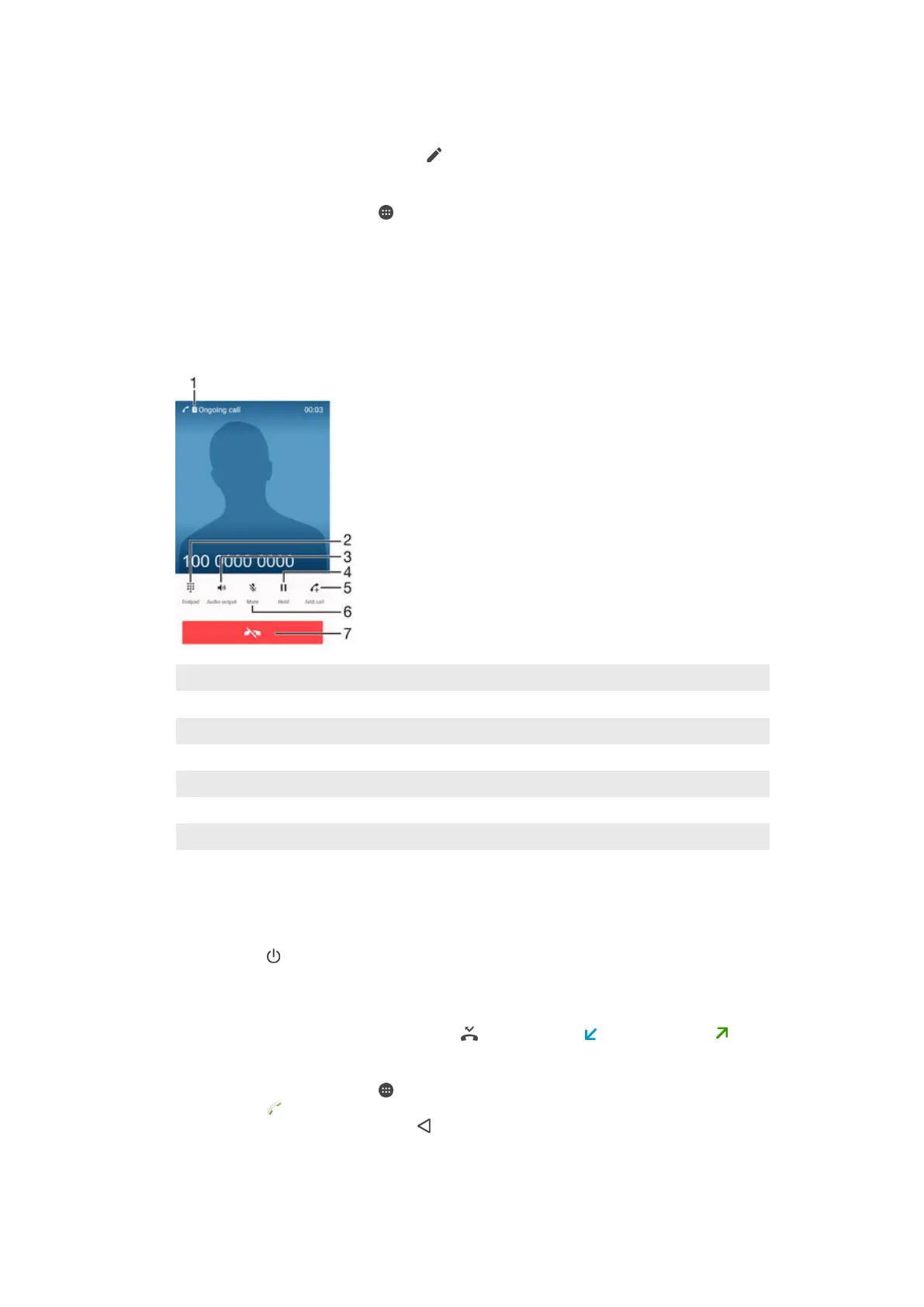
Ongoing calls
1 SIM card indicator – displays the SIM card in use for the ongoing call
2 Enter numbers during a call
3 Turn on the loudspeaker during a call
4 Put the current call on hold or retrieve a call on hold
5 Make a second call
6 Mute the microphone during a call
7 End a call
To change the ear speaker volume during a call
•
Press the volume key up or down.
To activate the screen during a call
•
Briefly press .
Using the call log
In the call log, you can view missed calls , received calls and dialled calls .
To open the call log
1
From your Home screen, tap .
2
Find and tap
.
3
If the call log does not appear, tap
.
59
This is an Internet version of this publication. © Print only for private use.







 To Next Page