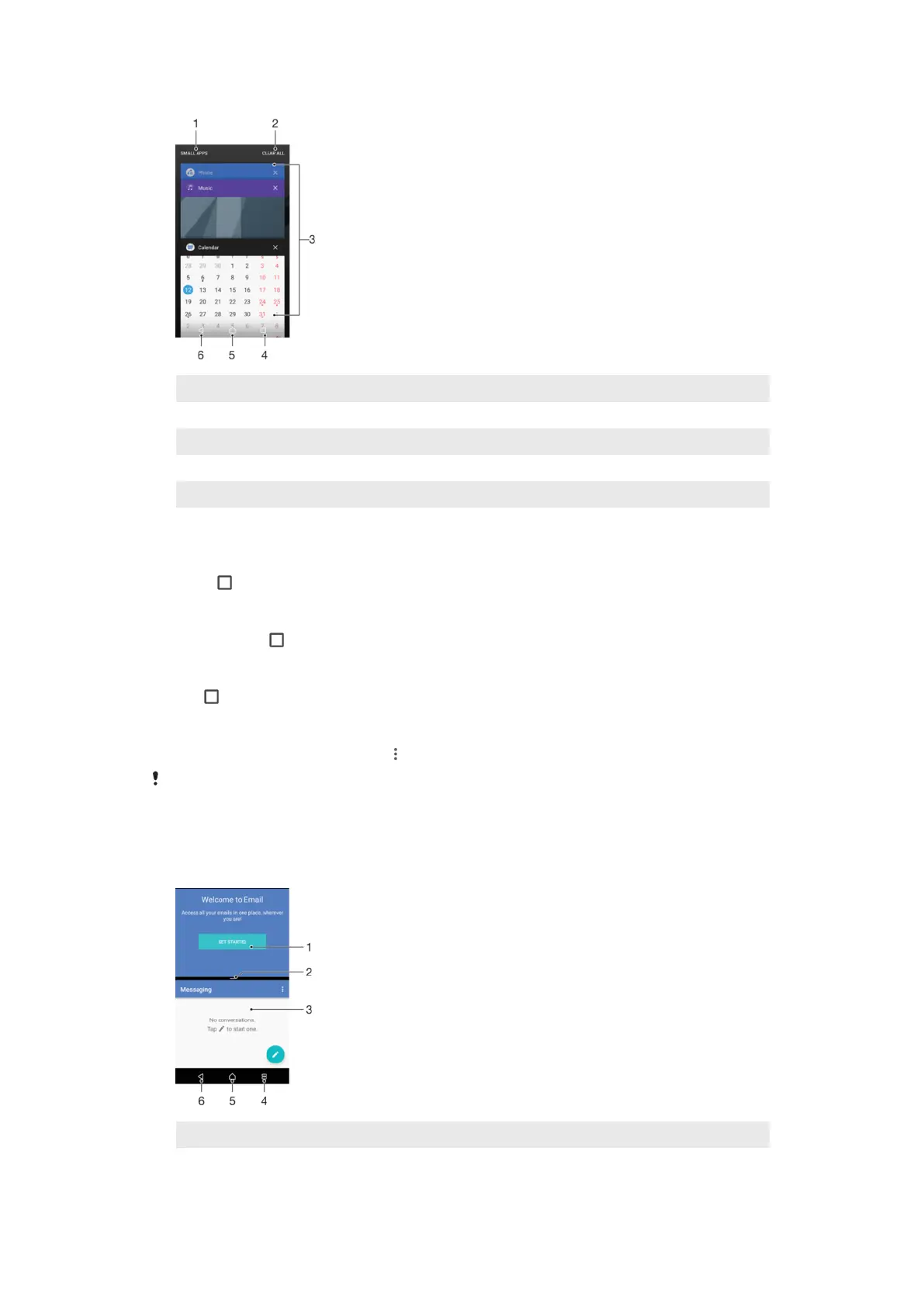
1 Small apps – Open small apps window
2 Clear all – Close all the recently used applications
3 Recently used applications window – Open a recently used application
4 Recent apps key – Open the recently used applications window
5 Home key – Exit an application and go back to the Homescreen
6 Back key - Go back to the previous screen within an application or close the application
To open the recently used applications window
•
Press .
To Quickly Switch Between Recently Used Applications
•
Quickly press twice.
To Close All the Recently Used Applications
•
Tap
and then tap CLEAR ALL.
To Open a Menu in an Application
•
While using the application, tap
.
Menus are not available in all applications.
Split Screen Mode
Split screen mode enables you to view two applications at once, for example, if you want
to view your email inbox and a web browser at the same time.
1 Application 1 in upper window
2 Split screen border – Drag to resize windows
25
This is an internet version of this publication. © Print only for private use.










 To Next Page