To Reject a Second Call with a Text Message
1
When you hear repeated beeps during a call, tap RESPONSE OPTIONS.
2
Select a predefined message or tap Write new message.
To edit the text message used to reject a call
1
From your Home screen, tap .
2
Find and tap Settings > Call, choose a SIM card, and then tap Reject call with
message.
3
Tap the message you want to edit, then make the necessary changes.
4
Tap OK.
Smart call handling
You can handle incoming calls without touching the screen by turning on the Smart call
handling function. Once activated, you can handle calls in the following way:
•
Answer: bring the device to your ear.
•
Reject: shake the device.
•
Ringer off: place the device face down.
To Turn On Smart Call Handling
1
From your Home screen, tap
.
2
Find and tap Settings > Call.
3
Select a SIM card.
4
Tap Smart call handling.
5
Tap the slider under
Smart call handling
.
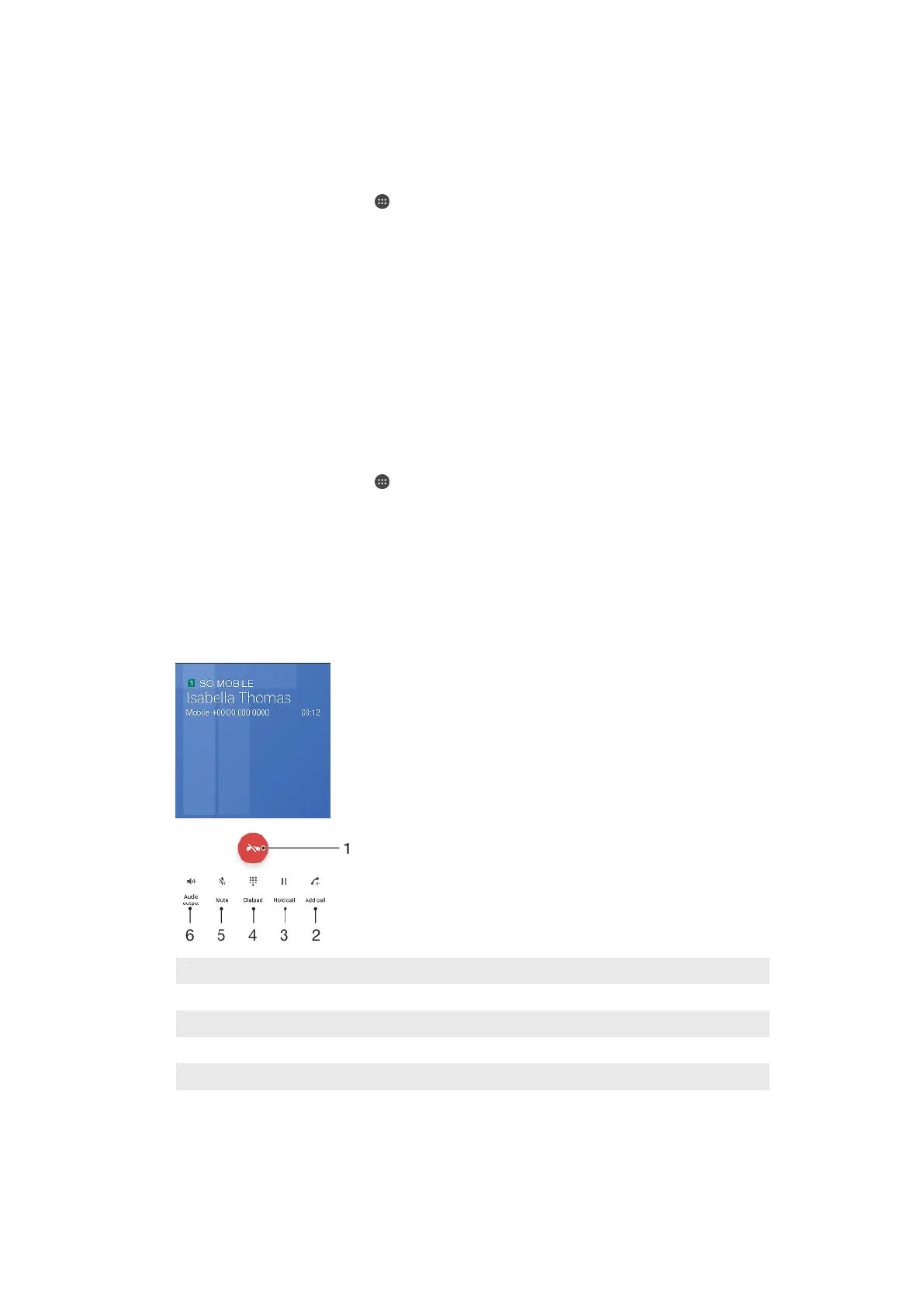
Ongoing calls
1 End a call
2 Make a second call
3 Put the current call on hold or retrieve a call on hold
4 Enter DTMF digits during a call
5 Mute the microphone during a call
6 Turn on the loudspeaker during a call
To change the ear speaker volume during a call
•
Press the volume key up or down.
76
This is an internet version of this publication. © Print only for private use.










 To Next Page