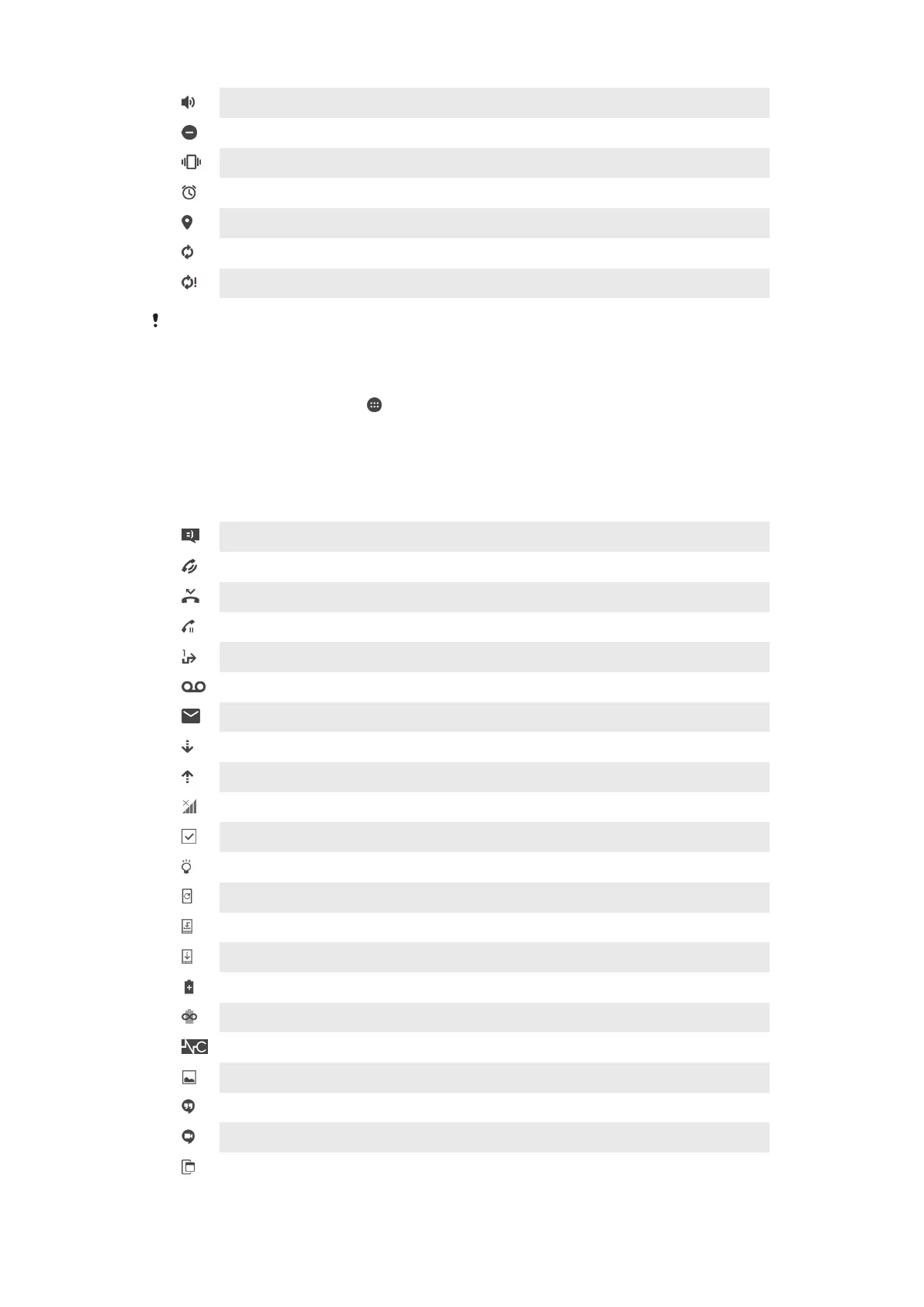
The speakerphone is on
Do Not Disturb mode is activated
Vibrate mode
An alarm is set
GPS is activated
Synchronization is ongoing
Problem with sign-in or synchronization
Depending on your service provider, network, or region, the functions or services represented
by some icons in this list may not be available.
To Manage Status Bar Icons
1
From your Homescreen, tap .
2
Find and tap Settings > Display > System icons.
3
Mark the checkboxes for the system icons that you want to appear in the status
bar.
Notification Icons
New text message or multimedia message
Ongoing call
Missed call
Call on hold
Call forwarding is turned on
New voicemail message
New email message
Downloading data
Uploading data
Cellular data is disabled
Perform a basic setup of your device
A software update is available
System updates are available
Downloading system updates
Tap to install the downloaded system updates
STAMINA mode is activated
Ultra STAMINA mode is activated
Noise canceling is on
Screenshot captured
New Hangouts™ chat message
Video chat with friends using the Hangouts™ application
A small app is running
34
This is an internet version of this publication. © Print only for private use.










 To Next Page