EasyManua.ls Logo

Sony EV-C3 - Various Playback Modes; Still Picture Playback; Picture Search Functions; Slow Motion Playback

Sony EV-C3
22 pages
Print Icon
To Next Page IconTo Next Page
To Previous Page IconTo Previous Page
Loading...
30
31
Editing
|
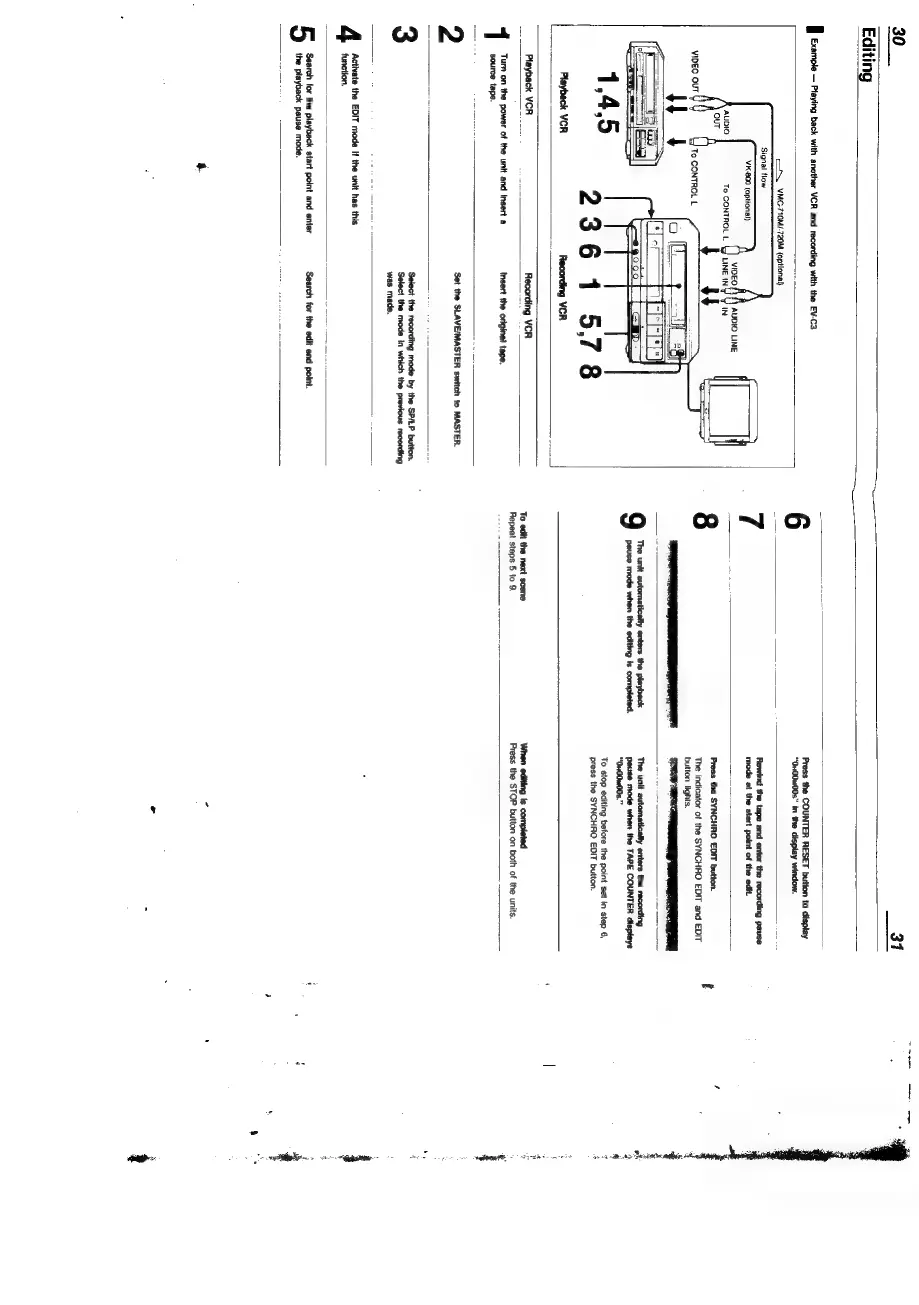
Example
Ptaying
back
with
another
VCR
and
recording
with
the
EV-C3
co.
YMC-710M/-720M
(optional)
Signal
flow
VK-800
(aptional)
To
CONTROL
L
2361
578
Playback
VCR
Recording
VCR
Press
the
COUNTER
RESET
button
to
display
“Qu00M00s”
in
the
display
window.
Rewind
the
tape
and
enter
the
recording
pause
mode
at
the
start
point
of
the
edit.
Press
the
SYNCHRO
EDIT
button.
The
indicator
of
the
SYNCHRO
EDIT
and
EDIT
button
lights.
a
|
The
unit
automatically
enters
the
playback
Pause
mode
when
the
editing
is
completed.
The
unit
automatically
enters
the
recording
pause
mode when
the
TAPE
COUNTER
displays
“O1H00m00s.”
To
stop
editing
before
the
point
set
in
step
6,
press
the
SYNCHRO
EDIT
button.
Playback
VCR
_
Recording
VCR
Turn
on
the
power
of
the
unit
and
insert
a
Insert
the
original
tape.
source
tape.
When
editing
Is
completed
2
Set the
SLAVE/MASTER
switch
to
MASTER.
3
Select
the
recording
mode
by
the
SP/LP
button.
Select
the
mode
in
which
the
previous
recording
was
made.
Activate
the
EDIT
mode
if
the
unit
has
this
function.
Search
for
the
playback
start
point
and
enter
Search
for
the
edit
end
point.
the
playback
pause
mode.
Press
the
STOP
button
on
both
of
the
units.
joa
tp
Lesh
saat
lanes
Rae
baagD
ee.

Related product manuals