EasyManua.ls Logo

Sony FD-42A - Horizontal Amplitude (H-SIZE) Adjustment; Vertical Amplitude (V-SIZE) Adjustment; Keystone Correction (KEYST) Adjustment; Horizontal Frequency (H-FREQ) Adjustment

Sony FD-42A
19 pages
Print Icon
To Next Page IconTo Next Page
To Previous Page IconTo Previous Page
Loading...
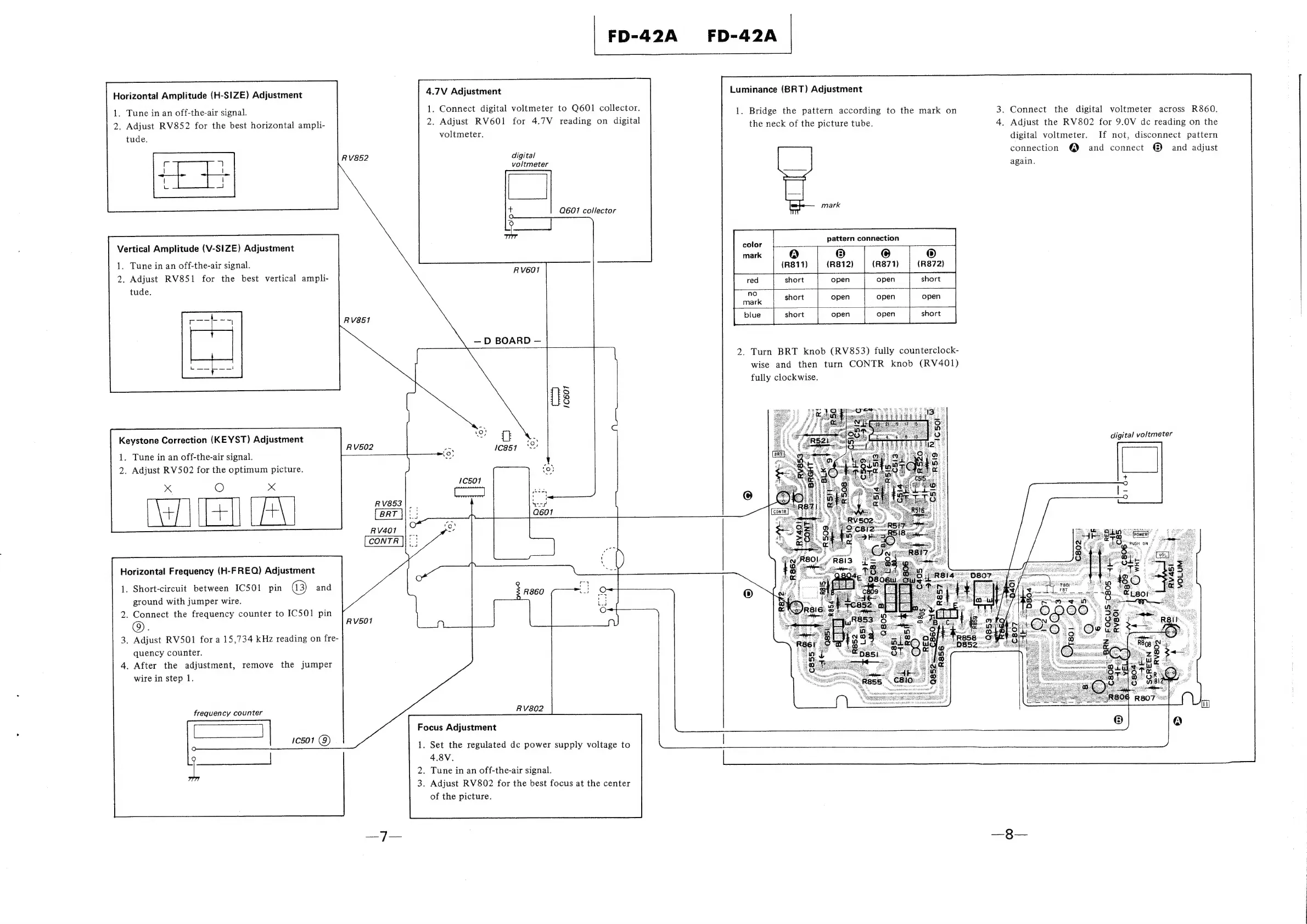
Horizontal
Amplitude
(H-SIZE)
Adjustment
1.
Tune
in
an
off-the-air
signal.
2.
Adjust
RV852
for
the
best
horizontal
ampli-
RV852
Vertical
Amplitude
(V-SIZE)
Adjustment
1.
Tune
in
an
off-the-air
signal.
2.
Adjust
RV851
for
the
best
vertical
ampli-
RvV851
Keystone
Correction
(KEYST)
Adjustment
FD-42A
4.7V
Adjustment
1.
Connect
digital
voltmeter
to
Q601
collector.
2.
Adjust
RV601
for
4.7V
reading
on
digital
voltmeter.
digital
voltmeter
iat
=a
Q601
collector
RV601
D
BOARD
RV502
1.
Tune
in
an
off-the-air
signal.
2.
Adjust
RV502
for
the
optimum
picture.
x
Oo
x
RV853
|
_
as
#
Rv4o1
|
~
Horizontal
Frequency
(H-F
REQ)
Adjustment
1.
Short-circuit
between
ICSO1
pin
a3)
and
ground
with
jumper
wire.
2.
Connect
the
frequency
counter
to
ICSO1
pin
6).
RV501
3.
Adjust
RV501
for
a
15,734
kHz
reading
on
fre-
quency
counter.
4.
After
the
adjustment,
remove
the
jumper
wire
in
step
1.
frequency
counter
ae
RV802
Focus
Adjustment
.
Set
the
regulated
dc
power
supply
voltage
to
4.8V.
.
Tune
in
an
off-the-air
signal.
.
Adjust
RV802
for
the
best
focus
at
the
center
of
the
picture.
FD-42A
Luminance
(BRT)
Adjustment
1.
Bridge
the
pattern
according
to
the
mark
on
the
neck
of
the
picture
tube.
mark
pattern
connection
(R871)
2.
Turn
BRT
knob
(RV853)
fully
counterclock-
wise
and
then
turn
CONTR
knob
(RV401)
fully
clockwise.
3.
Connect
the
digital
voltmeter
across
R860.
4.
Adjust
the
RV802
for
9.0V
dc
reading
on
the
digital
voltmeter.
If
not,
disconnect
pattern
connection
@
and
connect
®
and
adjust
again.
digital
voltmeter
%
ia
PUSH
ON
é

Related product manuals