ILME-FX30
5-045-568-41(1)
EN
6
\\Win-473\camera\CX96700(LAX)B_SG\Multi\04_Compose\5045568411_14lang\5045568411ILMEFX30CEC\01EN-ILMEFX30CEC\01EN.indd
DTP data saved: 2022/05/16 15:40
PDF file created: 2022/05/16 15:40
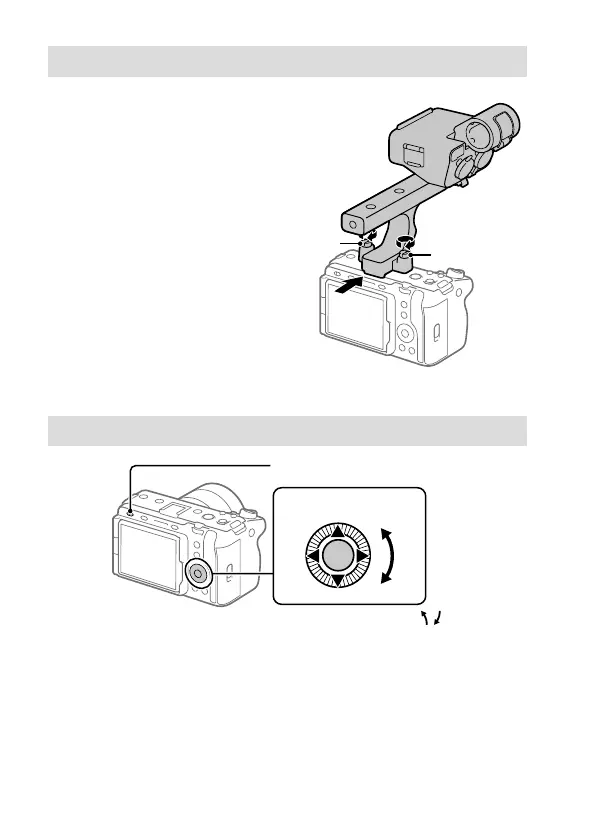
Attaching the XLR handle unit (supplied) (ILME-FX30 only)
By attaching the XLR handle
unit, up to four audio devices
can be connected to the camera
simultaneously.
1 Remove the shoe cap from the
camera and the handle shoe cap
from the XLR handle unit.
2 Slide the XLR handle unit into
the Multi Interface Shoe until
it reaches the back of the shoe.
Then, be sure to securely tighten
the screws on either side using a
coin, etc.
Screw
Screw
Turning the power on and setting the language and area
Power switch
Control wheel
Select items : ////
/
Confirm : Center button
1 Set the power switch to “” (On) to turn on the camera.
2 Press the top/bottom/left/right side of the control wheel to select the
desired language and the area where the camera will be used, and then
press the center of the control wheel.
3 Follow the instructions on the screen to apply the initial settings.



 To Next Page