To edit music information and download album art
1 While a song is playing in the Music application, tap the album art in the
music player screen and then tap Edit music info.
2 Edit the information as desired.
3 To set or download album art, tap , then select an option.
4 When you are finished, tap Save.
You can also set album art to download automatically in the Music menu, under Settings.
To Adjust the Audio Volume
• Press the volume key up or down.
To Minimize the Music Application
• When a song is playing, tap to go to the Home screen. The Music
application keeps running in the background.
To open the Music application when it is playing in the background
• While a song is playing in the background, drag the status bar downward
and tap the Music notification.
• Alternatively, find and tap
.
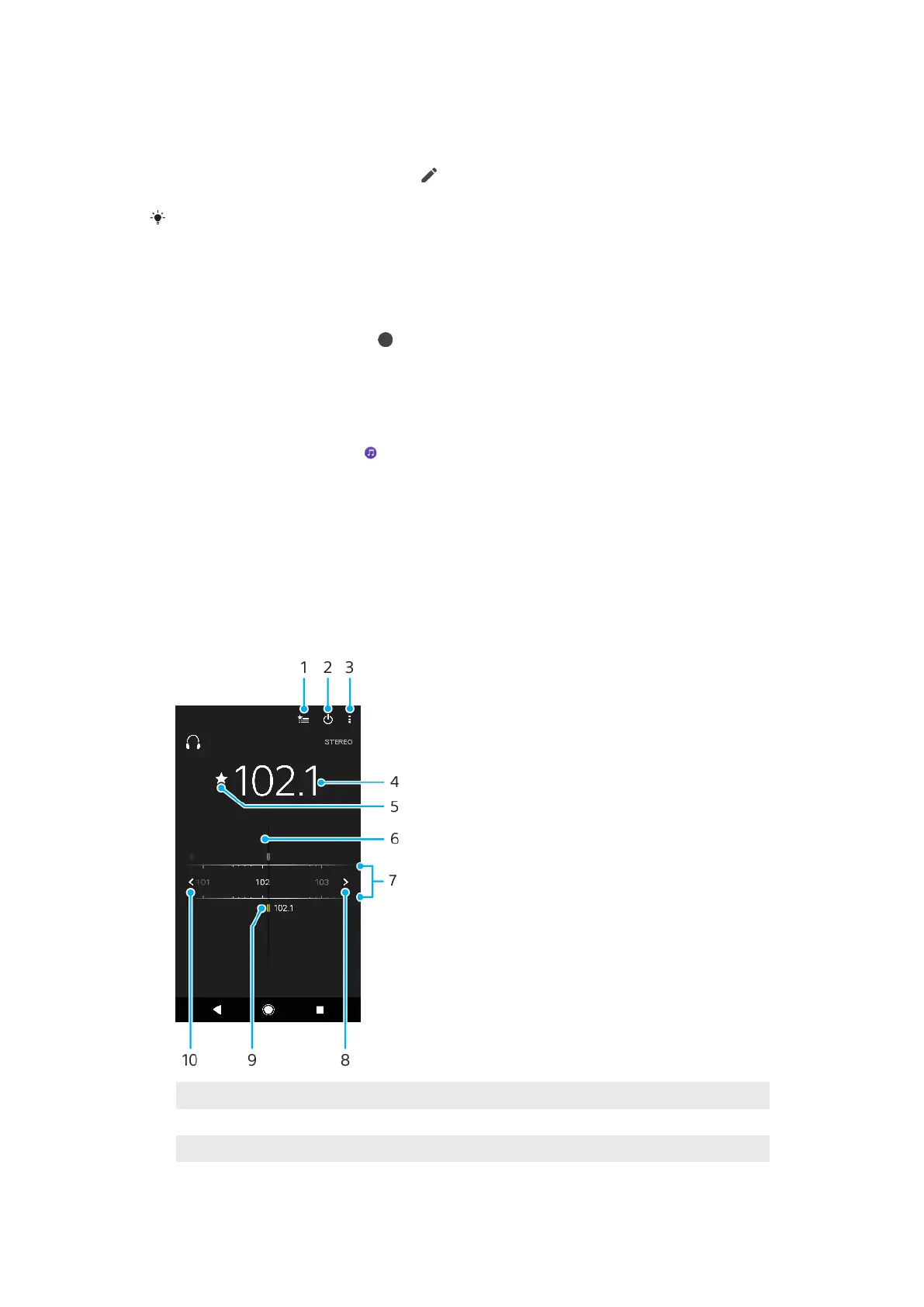
Listening to the radio
The FM radio in your device works like any FM radio. For example, you can browse
and listen to FM radio stations and save them as favorites. You must connect a
wired headset or headphones to your device before you can use the radio. This is
because the headset or headphones act as an antenna. After one of these devices
is connected, you can then switch the audio to the speaker, if desired.
FM radio overview
1
Favorites list
2 Radio on/o button
3 View menu options
4 Tuned frequency
80
This is an internet version of this publication. © Print only for private use.



 To Next Page