EasyManua.ls Logo

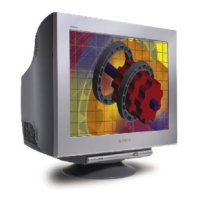
Sony GDM-F520 Trinitron - User Manual

Sony GDM-F520 Trinitron
116 pages
Print Icon
To Next Page IconTo Next Page
Loading...
Design and specications are subject to change without notice.
TRINITRON
®
COLOR MONITOR
SERVICE MANUAL
21CR1
CHASSIS
AEP Model
US Model
Canada Model
Chassis No: SCC-L33D-A
GDM-F520
9-878-802-01
ORIGINAL MANUAL ISSUE DATE: 1/2003
ALL REVISIONS AND UPDATES TO THE ORIGINAL MANUAL ARE APPENDED TO THE END OF THE PDF FILE.
REVISION DATE REVISION TYPE SUBJECT
1/2003 No revisions or updates are applicable at this time.
HISTORY INFORMATION FOR THE FOLLOWING MANUAL:

Table of Contents

Questions and Answers

  • A
    Anthony WilsonAug 20, 2025
    What to do if my Sony GDM-F520 Trinitron Monitor has no picture?
    • R
      Richard DavenportAug 20, 2025
      If the power indicator is not lit, ensure the power cord is properly connected and the power switch is in the “on” position. If the power indicator is orange, verify the video signal cable is properly connected, all plugs are firmly seated, the INPUT switch setting is correct, the HD15 video input connector’s pins are not bent, and the computer’s power is on. Also, if the power indicator is orange, the computer may be in power saving mode, so try pressing a key or moving the mouse. Ensure the graphic board is completely seated in the proper bus slot. If the power indicator is green or flashing orange, use the Self-diagnosis function.
  • L
    lewiskevinAug 22, 2025
    How to fix a Sony Monitor when the picture flickers?
    • B
      Bobby ThomasAug 22, 2025
      To resolve picture flickering, bouncing, oscillation, or scrambling on your Sony monitor: * Isolate and eliminate potential sources of electric or magnetic fields such as other monitors, laser printers, electric fans, fluorescent lighting, or televisions. * Move the monitor away from power lines or place a magnetic shield near it. * Try a different AC outlet, preferably on a different circuit. * Try turning the monitor 90° to the left or right. * Check your graphics board manual for the proper monitor setting. * Confirm that the graphics mode and the frequency of the input signal are supported by this monitor. * Adjust the computer’s refresh rate (vertical frequency) to obtain the best possible picture.
  • O
    olsonrachelAug 25, 2025
    Why are my USB peripherals not working with my Sony GDM-F520 Trinitron Monitor?
    • S
      Shane KnightAug 25, 2025
      First, check that the appropriate USB connectors are securely connected. Then, try turning the Sony monitor off and then on again, and reconnect the USB cable. If you connected a keyboard or mouse to the USB connectors and then booted your computer for the first time, first connect the keyboard and mouse directly to the computer and set up the USB compliant devices, then connect them to this monitor. Also, install the latest version of the device driver on your computer.
  • M
    Michelle RobinsonAug 26, 2025
    How to resolve a fuzzy picture on a Sony GDM-F520 Trinitron Monitor?
    • D
      David NicholsAug 27, 2025
      To fix a fuzzy picture on your Sony monitor, adjust the contrast, brightness, and PICTURE EFFECT. You can also degauss the monitor. Additionally, adjust the degree of moire cancellation until the moire is minimal, or set CANCEL MOIRE to OFF.
  • W
    Wanda FordAug 28, 2025
    Why is the color not uniform on my Sony GDM-F520 Trinitron Monitor?
    • G
      Glenn SmithAug 28, 2025
      If the color on your Sony monitor is not uniform, and you have equipment that generates a magnetic field (like a speaker) near the monitor, or you changed the monitor's direction, degauss the monitor. You can also adjust the landing.
  • F
    Frances PriceAug 29, 2025
    How to center the picture on my Sony Monitor?
    • K
      Kimberly HornAug 30, 2025
      To correct the picture size or centering on your Sony monitor, perform the Auto Size Center function or manually adjust the size or centering. Note that just after turning on the power switch, the size/center may take a while to adjust properly.
  • Q
    qsnyderAug 31, 2025
    Why does white not look white on my Sony Monitor?
    • S
      steeledustinSep 1, 2025
      If white does not look white on your Sony monitor, adjust the color temperature. Also, check that the 5 BNC connectors are connected in the correct order.
  • M
    Maureen WeaverSep 2, 2025
    How to fix moire patterns on Sony Monitor?
    • G
      gary65Sep 2, 2025
      If you see a wavy or elliptical pattern (moire) on your Sony monitor, adjust the degree of moire cancellation until the moire is minimal. Alternatively, change your desktop pattern.
  • M
    michaelgrantSep 4, 2025
    What causes picture ghosting on a Sony GDM-F520 Trinitron?
    • K
      Kimberly HansenSep 4, 2025
      To eliminate ghosting on your Sony monitor's picture, avoid using video cable extensions and/or video switch boxes. Also, check that all plugs are firmly seated in their sockets.
  • K
    Kevin GarciaSep 6, 2025
    What does 'CHECK SIGNAL CABLE' mean on my Sony GDM-F520 Trinitron?
    • D
      dsmithSep 6, 2025
      If the on-screen message 'CHECK SIGNAL CABLE' appears on your Sony monitor, check that the monitor is correctly connected to the computer.

Sony GDM-F520 Trinitron Specifications

General IconGeneral
BrandSony
ModelGDM-F520 Trinitron
CategoryMonitor
LanguageEnglish

Related product manuals