5
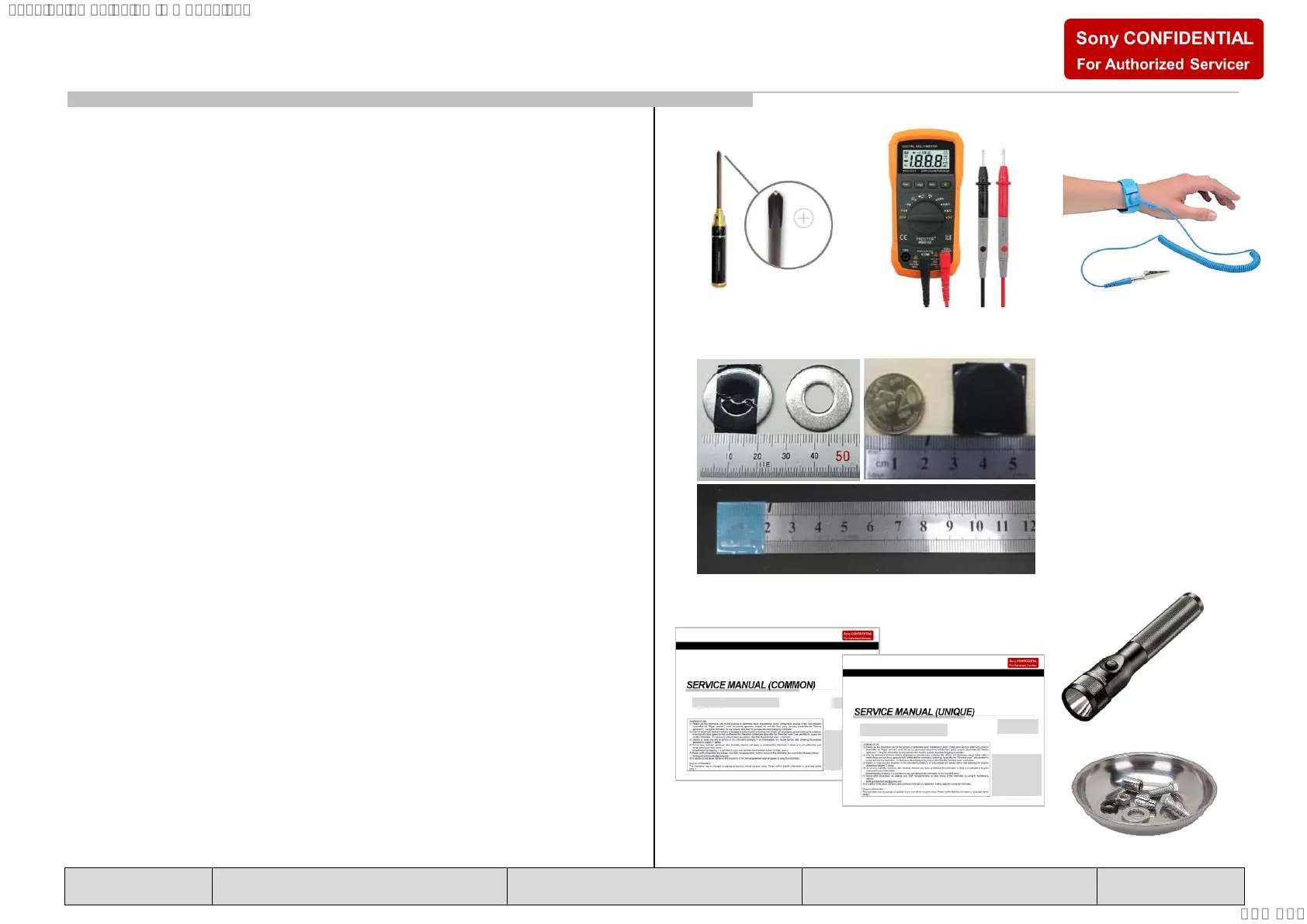
1 LIST OF ITEMS TO BRING
1. Screwdriver (e.g. #2 Phillips Screwdriver)
2. Multimeter
3. ESD Wrist Straps
4. Metal Washer (Flat) or Coin (for remove Rear Cover)
5. Ruler (for remove Rear Cover)
6. Service Manual (Unique) (for remove & replace details)
2 OPTIONAL EQUIPMENT
1. Screwdriver (e.g. #0 Phillips Screwdriver)
2. Parts Tray for loose screws and small items
2. Flashlight
3. Service Manual (Common) (for t/shooting information)
3 PREPARATION BEFORE REPAIRS
Before you begin, unplug the TV from the wall outlet and
stand it up on a level work surface to begin removing the
Rear Cover. If you are working on a TV that was wall-
mounted, and does not have a stand, simply place the TV
faced-down on top of a thick blanket, on a large/flat surface,
or you may be able to lean it up against a wall near a wall
outlet.
Thickness: approx. 1.5mm
Diameter: 20~25mm
(wrap in tape (L=50mm))
Plastic or Metal Ruler
(In case of Metal ruler, wrap
in tape (L=50mm) for prevent
scratches)
TOOLS & EQUIPMENT








 To Next Page