24
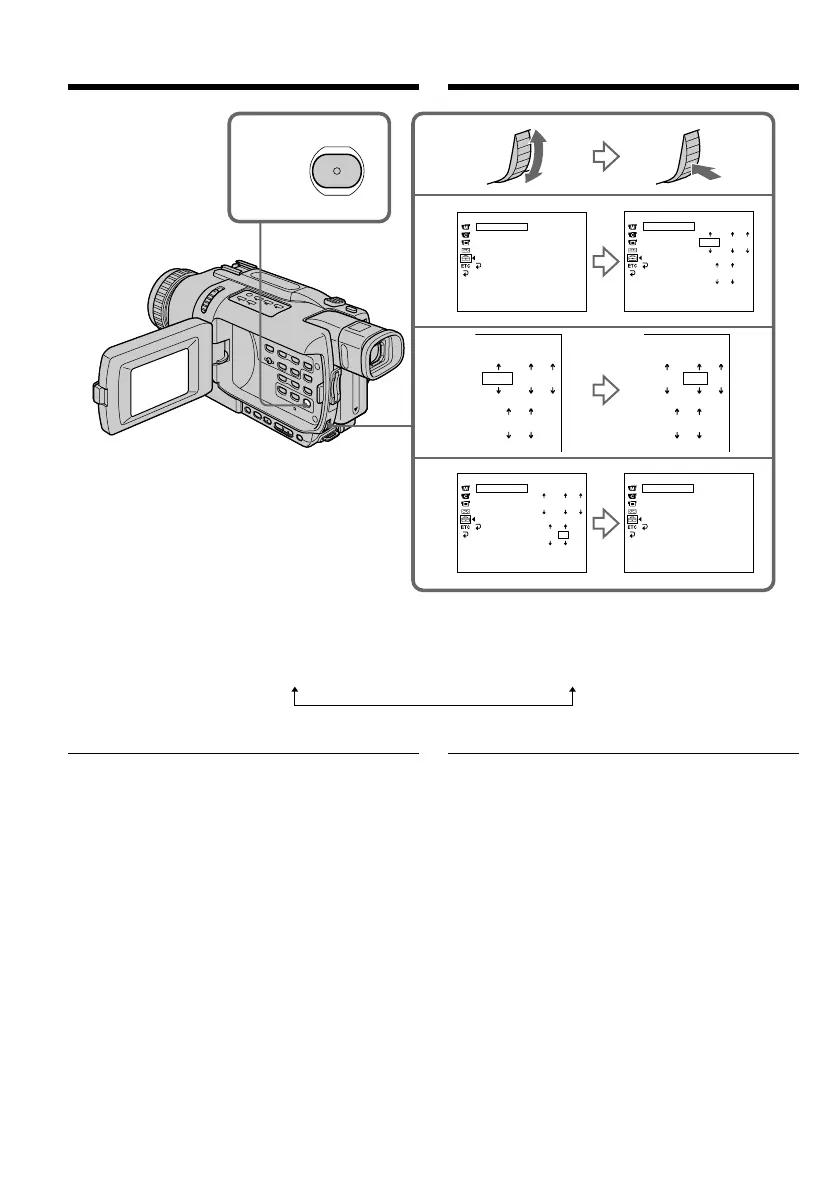
Step 2 Setting the date and time
The year changes as follows:
If you do not set the date and time
“-- -- ----” “--:--:--” are recorded on the tape and
the “Memory Stick”. (DCR-TRV340E only)
Note on the time indicator
The internal clock of your camcorder operates on
a 24-hour cycle.
1,6
MENU
2
3
5
SETUP MENU
CLOCK SET
USB STREAM
LTR SIZE
LANGUAGE
DEMO MODE
RETURN
– –
:
– –
:
– –
[
MENU
]
:
END
SETUP MENU
CLOCK SET
USB STREAM
LTR SIZE
LANGUAGE
DEMO MODE
RETURN
2002 1 1
0 00
[
MENU
]
:
END
2002 1 1
0 00
SETUP MENU
CLOCK SET
USB STREAM
LTR SIZE
LANGUAGE
DEMO MODE
RETURN
2002 7 4
17 30
[
MENU
]
:
END
SETUP MENU
CLOCK SET
USB STREAM
LTR SIZE
LANGUAGE
DEMO MODE
RETURN
4 7 2002
17
:
30
:
00
[
MENU
]
:
END
2002 1 1
0 00
Пункт 2 Установка даты и
времени
Год изменяется следующим образом:
Если вы не установите дату и время
На ленте и на “Memory Stick” (только модель
DCR-TRV340E) будет записана индикация “--
-- ----” “--:--:--”.
Примечание по индикатору времени
Встроенные часы Вашей видеокамеры
работают в 24-часовом режиме.
1995 T · · · · t 2002 T · · · · t 2079









 To Next Page