32
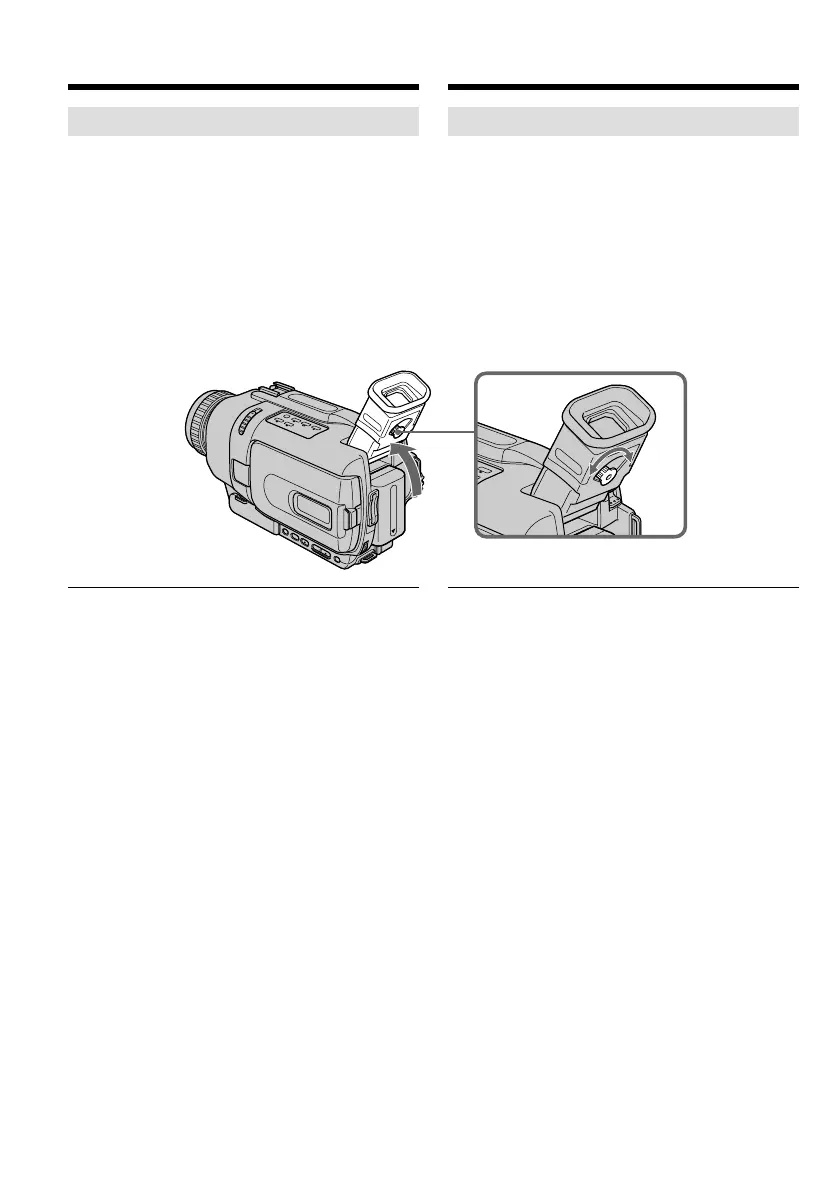
Adjusting the viewfinder
If you record pictures with the LCD panel closed,
check the picture with the viewfinder. Adjust the
viewfinder lens to your eyesight so that the
indicators in the viewfinder come into sharp
focus.
Lift up the viewfinder and move the viewfinder
lens adjustment lever.
Viewfinder backlight
You can change the brightness of the backlight.
Select VF B.L. in the menu settings (p. 127). Even
if you adjust the VF B.L., the recorded picture
will not be affected.
Recording a picture Запись изображения
Регулировка видоискателя
Если Вы записываете изображение с
закрытой панелью ЖКД, проверьте
изображение с помощью видоискателя.
Отрегулируйте окуляр видоискателя в
соответствии с Вашим зрением так, чтобы
индикаторы в видоискателе были четко
сфокусированы.
Поднимите видоискатель и передвиньте
рычаг регулировки окуляра видоискателя.
Задняя подсветка видоискателя
Вы можете отрегулировать яркость задней
подсветки. Выберите опцию VF B.L. в
установках меню (стр. 127). Даже если Вы
будете регулировать опцию VF B.L., на
записанное изображение это не повлияет.









 To Next Page