HBD-E190/E290/E490/E690
25
12. Factory Initialize (Factory Settings)
There is a possibility that this mode cannot be correctly execut-
ed. Never use this mode.
13. Network (Network Test Diagnosis Screen: Ifconfi g)
Network menu for the wired ethernet.
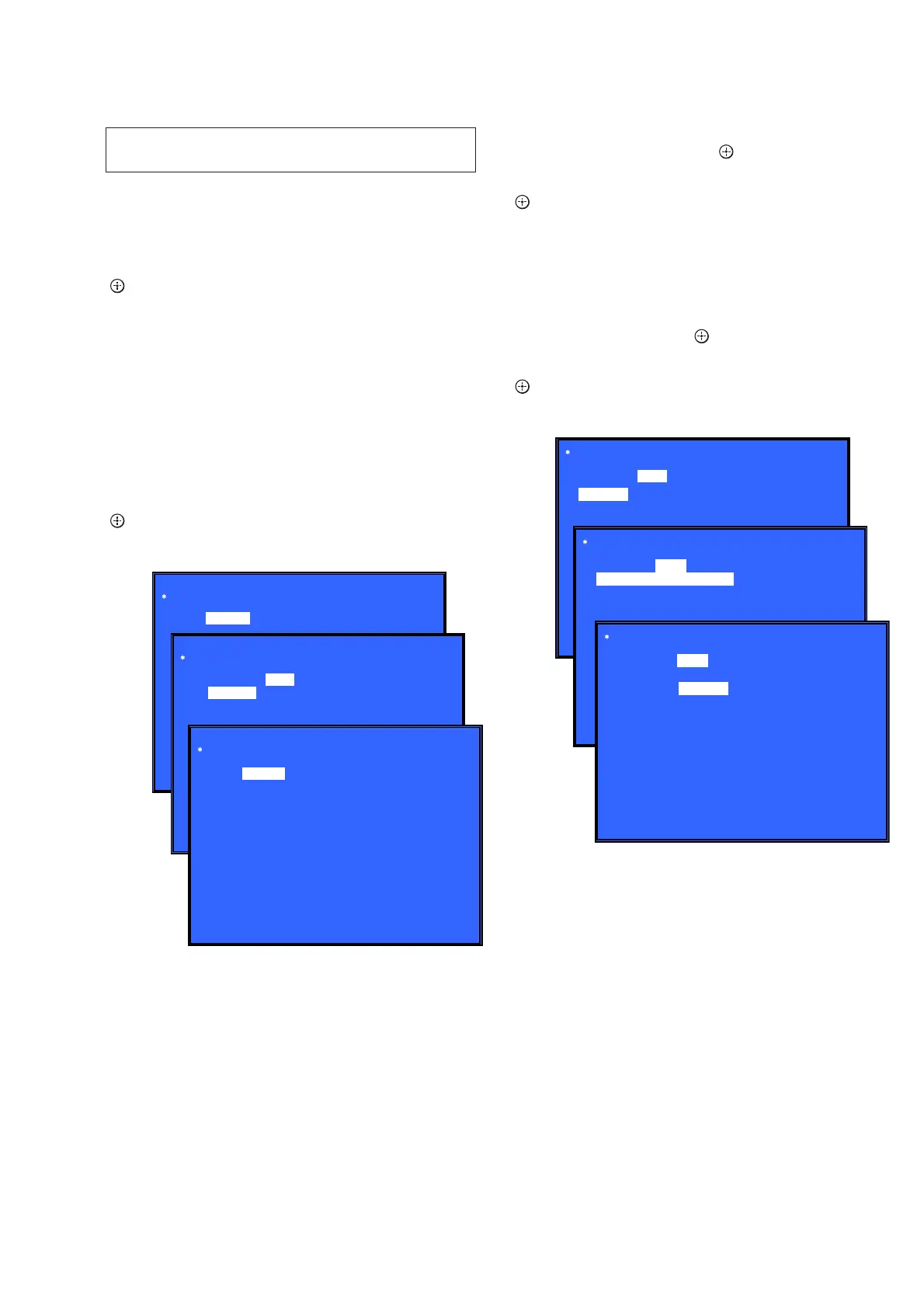
Screen 1: Ifconfi g Test
Operation:
[
] Activate Ifconfi g (Display network setting)
[,] Select ping test
[RETURN] Returns to the top menu of the service mode
Screen 2: Ping Test
Operation:
[
<
] Select Ifconfi g test
[RETURN] Returns to the top menu of the service mode
(The details of a Ping test are “14. Network (Network Test Diagno-
sis Screen: Ping)”)
Screen 3: Ifconfi g Test Active
Display Ifconfi g command results.
Operation:
[ ] Ifconfi g retry
[,] Select Ping Test
[RETURN] Returns to the top menu of the service mode
14. Network (Network Test Diagnosis Screen: Ping)
Ping test for the wired ethernet.
Screen 1: Ping Test
Operation:
[
<
] Select Ifconfi g test
[
m
] Ping execution preparation
[RETURN] Returns to the top menu of the service mode
Screen 2: The IP address of the Ping point is set up
(IP address input mode)
When “Ping to :>” is reversed, the [
] button is pressed and IP
is inputted.
Operation:
[ ] Finish to input
[RETURN] Finish to input
[
<
] Finish to input and Select Ifconfi g Test
[0] to [9] Input Character sting ‘0-9’
[TIME] Input Character sting ‘.’
[CLEAR] Backspace
Screen 3: Ping Test Active
When [START] is reversed, the [
] button is pressed and execute
ping.
Operation:
[
] Activate ping test
[
M
] The IP address of the ping point is set up
[RETURN] Returns to the top menu of the service mode
15. System Information (System Information Display)
This screen displays system information.
Screen 1: Basic Information
Operation:
[
,
] Drive information (delta IOP of a drive is measured)
and wireless device information (not used) displayed
(go to Screen 2)
[RETURN] Returns to the top menu of the service mode
Screen 2: Drive and Wireless Information Menu
Operation:
[
<
] Basic Information displayed (go to Screen 1)
[RETURN] Returns to the top menu of the service mode
When delta IOP is measured, it becomes impossible to use the Ver-
sion Up function.
Network
Test: Ifconfig Ping
HELP : [DOWN][ENT][(NUM)]
(Screen 1)
Network
HELP : [DOWN][ENT][(NUM)]
Network
(Screen 2)
(Screen 3)
Test: Ifconfig Ping
[START]
Ping To:
Test: Ifconfig Ping
IP 192. 168. 11. 2 MAC 00-16-01-85-21-A3
HELP : [ENT]: Re/Exe [RIGHT]
(Screen 1)
Test:
(Screen 2)
Ping
Network
Test: Ifconfig
Ping to :> 192. 168. 200. 13
[ENT] : Release
[RET] : Release
(Screen 3)
Network
Ping to : 192. 168. 200. 13
[START]
HELP: [ENT] : Start [UP] [LEFT]
Ping
Ifconfig
Ping To :
[START]
Network
Test: Ifconfig
PING 192. 168. 200. 13 OK!
Ping



 To Next Page